
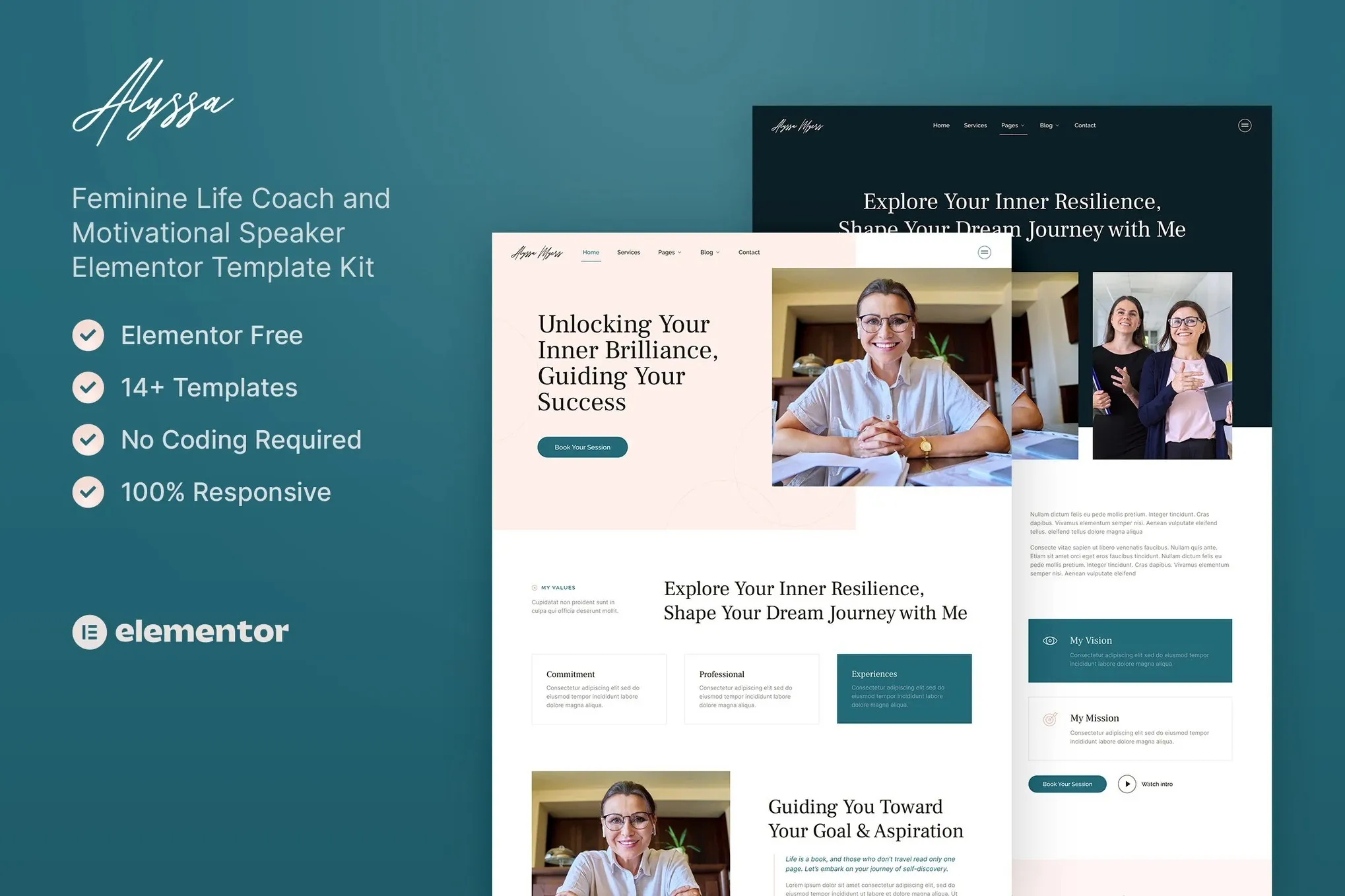
Alyssa – Feminine Life Coach & Motivational Speaker Elementor Template Kit
- Updated on May 4, 2026
- 100% Original Product & Well Documented
- Unlimited Domain Usage
*Important Note:
The image should not be Part of the template kit. You need to use your own reliable Source.


Original price was: ₹999.00.₹299.00Current price is: ₹299.00.
A beautiful feminine website template designed specifically for life coaches and motivational speakers. Build your online presence in minutes with 15+ pre-designed pages — no coding required. Get instant access and start attracting your ideal clients today.
- Secured & Scanned by Virus total & McAfee.
- Access to Free updates for Lifetime
- All products are Under GPL License (Unlimited Domain Usage)
- We Not Provide any Support For this Product

Lifetime Membership
Access 6700+ Premium WordPress Themes & Plugins, Elementor Templates, Mobile Apps, PHP scripts with Lifetime Updates.
Join Premium MembershipRecently Viewed
Feminine Life Coach Website Template for Elementor
Transform your coaching business with a website that truly represents your feminine energy and professional expertise. Alyssa is a thoughtfully designed Elementor Template Kit that helps life coaches, motivational speakers, and wellness professionals create stunning websites without touching a single line of code. This premium template package gives you everything you need to launch a compelling online presence that converts visitors into paying clients.
What Alyssa Offers
This template kit combines soft aesthetics with powerful functionality. Every section, page, and element has been professionally crafted to showcase your services in the best possible light. The feminine design language uses gentle curves, elegant typography, and a soothing color palette that appeals to your target audience — women seeking personal growth and guidance. You get complete page templates including home, about, services, testimonials, pricing, blog, and contact pages. Each template works seamlessly with Elementor’s drag-and-drop builder, so you can customize every detail without technical knowledge.
- 15+ pre-designed pages and sections ready for customization
- Clean, feminine aesthetic with modern typography
- Fully responsive design that looks perfect on all devices
- Compatible with free Elementor and Elementor Pro
- One-click installation with the Envato Elements Importer
Who It’s Built For
Alyssa works perfectly for anyone in the coaching and speaking space. Life coaches use it to display their certifications, coaching packages, and client success stories. Motivational speakers attract booking agents and event organizers with a polished speaker portfolio. Workshop facilitators showcase their upcoming events and retreat schedules. Business coaches highlight their expertise and testimonials from corporate clients. Career consultants present their assessment tools and coaching methodologies. Personal development experts build email lists and sell digital courses through integrated landing pages. If you help people grow and transform, this template kit speaks to your audience.
How To Use This Template Kit
Getting started takes less than 30 minutes. Install the free Elementor plugin on your WordPress site, then upload the Alyssa template kit file. Browse the library of pre-made pages and import the ones that fit your business model. Swap out the placeholder text with your own content, upload your photos, and publish. The templates use global colors and fonts, so changing your brand identity is as simple as updating a few settings. You can add or remove sections, rearrange layouts, and customize every element to match your unique coaching style.
- Replace placeholder content with your biography, services, and pricing
- Connect your booking or scheduling tool to the contact forms
- Add your logo and brand colors in minutes
- Publish your complete website in a single afternoon
Why Choose Alyssa Over Free Templates
Free templates often look generic and require extensive coding knowledge to customize properly. Alyssa gives you a professionally designed, cohesive website from day one. The feminine design has been refined to appeal specifically to coaching clients — soft backgrounds, elegant spacing, and typography that builds trust. Every element has been tested for mobile responsiveness, page speed, and conversion optimization. You also get lifetime updates and direct support if you run into any questions during setup. One payment covers everything — no subscriptions, no hidden fees, no ongoing costs.
Ready to Get Started?
Your ideal clients are searching for a life coach or speaker right now. Make sure they find you with a website that looks as professional as the guidance you provide. Buy Alyssa today and download your template kit instantly. You’ll have your new website live before the weekend, ready to attract clients and grow your coaching practice.
Only logged in customers who have purchased this product may leave a review.
How to use Kit:
Install and activate the “Template Kit – Import” plugin from Plugins > Add New in WordPress.
Do not unzip.
Go to Template Kit – Import > Upload Template Kit Zip File button.
Before importing a template, ensure the Install Requirements button is clicked to activate required plugins.
For best results, do not import more than one template at a time.
RELATED PRODUCTS

DIVI – Original License | One Time Payment – Exclusive Deal

Elementor Pro 4.2.1 + Elementorism Landing Pages WordPress Plugin

907 5.3.6 – Responsive Multi-Purpose WordPress Theme

Element Pack Pro 9.1.0 – Addon For Elementor






 Mobile Apps
 php script
 How to
Reviews
There are no reviews yet