
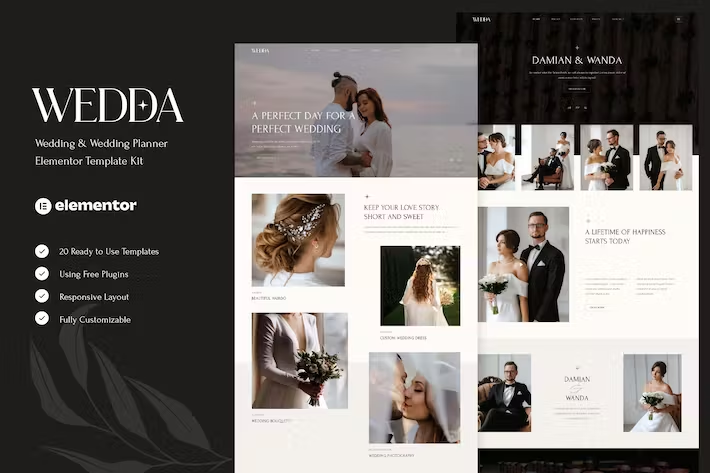
Wedda – Wedding & Wedding Planner Elementor Template Kit
- Updated on May 4, 2026
- 100% Original Product & Well Documented
- Unlimited Domain Usage
*Important Note:
The image should not be Part of the template kit. You need to use your own reliable Source.


- Coupon "b2g1" has expired.
- Coupon "b2g1" has expired.
- Coupon "b2g1" has expired.
- Coupon "b2g1" has expired.
- Coupon "b2g1" has expired.
- Coupon "b2g1" has expired.
- Coupon "b2g1" has expired.
- Coupon "b2g1" has expired.
- Coupon "b2g1" has expired.
- Coupon "b2g1" has expired.
- Coupon "b2g1" has expired.
- Coupon "b2g1" has expired.
- Coupon "b2g1" has expired.
- Coupon "b2g1" has expired.
- Coupon "b2g1" has expired.
- Coupon "b2g1" has expired.
- Coupon "b2g1" has expired.
- Coupon "b2g1" has expired.
- Coupon "b2g1" has expired.
- Coupon "b2g1" has expired.
- Coupon "b2g1" has expired.
- Coupon "b2g1" has expired.
- Coupon "b2g1" has expired.
- Coupon "b2g1" has expired.
- Coupon "b2g1" has expired.
- Coupon "b2g1" has expired.
- Coupon "b2g1" has expired.
- Coupon "b2g1" has expired.
- Coupon "b2g1" has expired.
- Coupon "b2g1" has expired.
- Coupon "b2g1" has expired.
- Coupon "b2g1" has expired.
- Coupon "b2g1" has expired.
- Coupon "b2g1" has expired.
- Coupon "b2g1" has expired.
- Coupon "b2g1" has expired.
- Coupon "b2g1" has expired.
- Coupon "b2g1" has expired.
Original price was: ₹999.00.₹299.00Current price is: ₹299.00.
Build a beautiful wedding planning website without touching code. This complete Elementor template kit gives you 15+ professionally designed pages, a commercial license for client work, and lifetime updates — all for a one-time price. Get instant access today.
- Secured & Scanned by Virus total & McAfee.
- Access to Free updates for Lifetime
- All products are Under GPL License (Unlimited Domain Usage)
- We Not Provide any Support For this Product

Lifetime Membership
Access 6700+ Premium WordPress Themes & Plugins, Elementor Templates, Mobile Apps, PHP scripts with Lifetime Updates.
Join Premium MembershipRecently Viewed
Wedding Elementor Template Kit — Build Your Dream Wedding Website Fast
Building a wedding planning website from scratch eats up hours you don’t have. Custom development costs add up fast, and generic templates make your business look just like everyone else. Wedda changes that. This complete Elementor Template Kit gives you a professional, polished foundation specifically designed for wedding planners, photographers, venues, and event professionals — ready to customize and launch in an afternoon.
No coding. No monthly subscriptions. No complicated setup. Just beautiful, functional pages you can edit right inside Elementor.
What You Get With Wedda
This wedding template kit comes packed with everything you need to launch a complete website:
- 15+ professionally designed pages: Home, About, Services, Portfolio/Gallery, Pricing, Blog, Contact, and more
- Fully responsive layouts that look stunning on mobile, tablet, and desktop
- Elegant typography and soft, romantic color palettes perfect for the wedding industry
- Drag-and-drop editing — no code required, works with the free Elementor plugin
- Commercial license included — use it for your clients without paying extra
Who Is This Template Kit For?
Wedda works beautifully for:
- Wedding planners launching their business online
- Wedding photographers building portfolio sites
- Event venues showcasing their spaces
- Freelancers building client websites with a fast turnaround
- Small agencies needing a quick, professional wedding niche solution
Whether you’re starting fresh or refreshing an existing site, this kit gives you a cohesive, high-end look that attracts premium clients.
How to Use It
Getting started takes less than 30 minutes. Install the free Elementor plugin on your WordPress site, upload the kit, and start editing. Swap in your own images, colors, and text. Every section is designed to be modular — pick the pages you need, arrange them how you like, and publish. The kit includes step-by-step documentation to help beginners navigate the setup process without confusion.
Why Buy This Wedding Template Kit
Here’s what sets Wedda apart from free or cheaper alternatives:
- Instant download — Get access immediately after purchase, no waiting
- One-time payment — No recurring fees, no hidden costs, own it forever
- Lifetime free updates — New pages and features added later come at no extra charge
- Lifetime support — Get help when you need it, not just for 6 months
- Commercial license — Build client sites without upgrading or paying royalties
Most template kits charge ongoing fees or limit how you can use them. With Wedda, you buy once and use it for unlimited personal and client projects.
Ready to Get Started?
Stop spending weeks on website design when you don’t have to. Buy the Wedda Elementor Template Kit today and have a stunning wedding website live tomorrow. Instant download, lifetime updates, and dedicated support — all included with your one-time purchase. This is the fastest path from “I need a wedding website” to “My website is live and booking clients.”
Only logged in customers who have purchased this product may leave a review.
How to use Kit:
Install and activate the “Template Kit – Import” plugin from Plugins > Add New in WordPress.
Do not unzip.
Go to Template Kit – Import > Upload Template Kit Zip File button.
Before importing a template, ensure the Install Requirements button is clicked to activate required plugins.
For best results, do not import more than one template at a time.
RELATED PRODUCTS

DIVI – Original License | One Time Payment – Exclusive Deal

Elementor Pro 4.2.1 + Elementorism Landing Pages WordPress Plugin

907 5.3.6 – Responsive Multi-Purpose WordPress Theme

Element Pack Pro 9.1.0 – Addon For Elementor






 Mobile Apps
 php script
 How to
Reviews
There are no reviews yet