
Aquila – Luxury Hotel & Resort Elementor Template
- Updated on May 3, 2026
- 100% Original Product & Well Documented
- Unlimited Domain Usage
*Important Note:
The image should not be Part of the template kit. You need to use your own reliable Source.


Original price was: ₹999.00.₹299.00Current price is: ₹299.00.
Turn browsers into booked guests. Aquila gives you 10+ pages — room showcases, booking sections, galleries, and more — all customizable in minutes without touching code. Launch a hotel website that actually looks expensive.
- Secured & Scanned by Virus total & McAfee.
- Access to Free updates for Lifetime
- All products are Under GPL License (Unlimited Domain Usage)
- We Not Provide any Support For this Product

Lifetime Membership
Access 6700+ Premium WordPress Themes & Plugins, Elementor Templates, Mobile Apps, PHP scripts with Lifetime Updates.
Join Premium MembershipRecently Viewed
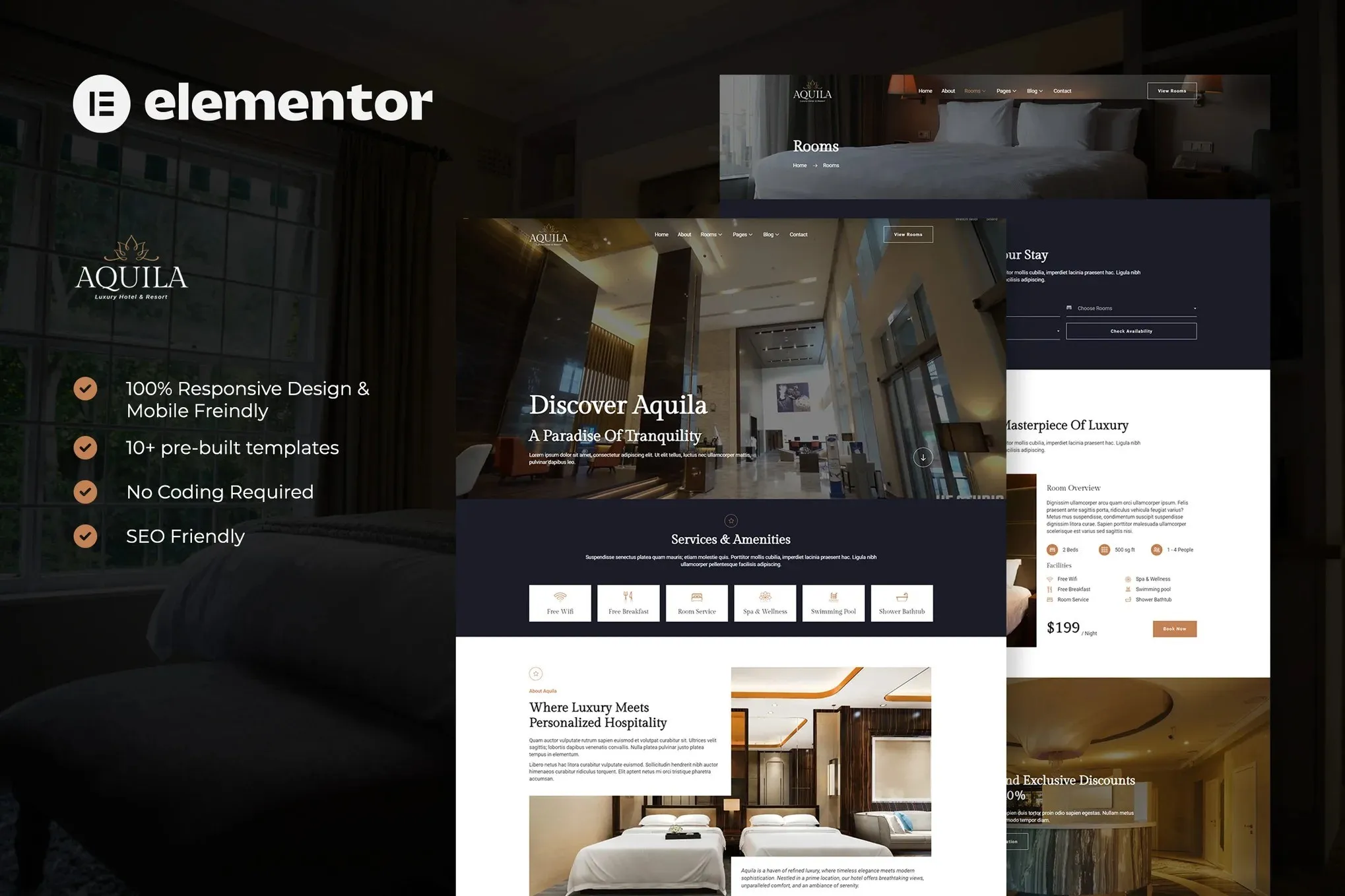
Aquila – Premium Elementor Template for Luxury Hotels & Resorts
Your hotel’s service is five-star. Your website should be, too. Aquila is an Elementor Template Kit built specifically for luxury accommodations, boutique resorts, and anyone who takes hospitality seriously. No coding. No design agency bills. Just a site that looks like you paid someone big bucks to build it.
Room showcases, amenity highlights, photo galleries, booking sections — it’s all here. Beachfront resort, mountain lodge, or urban boutique hotel, Aquila handles your brand’s aesthetic without breaking a sweat.
What’s Included in the Aquila Template Kit
Ten pages. Seventy+ sections. Everything a hotel website needs:
- Homepage with hero slider, featured rooms, and guest testimonials
- Room listing pages — pricing, amenities, booking buttons
- About section to tell your story and introduce your team
- Services page — spa, dining, concierge, activities
- Gallery template with masonry layouts and lightbox
- Contact page with map and inquiry form
- Blog layout for travel tips and hotel news
Clean code. Fast load times. Luxury isn’t just about looks — it’s about performance too.
Who Is Aquila For?
If any of these sound like you, this template kit was made for you:
- Hotel owners who want a professional site without six months of back-and-forth with a web agency
- Resort properties chasing more direct bookings through a stronger visual presence
- Boutique innkeepers and B&B operators tired of looking like every chain hotel
- Travel agencies putting together portfolio sites for client recommendations
- WordPress designers working with hospitality clients on a tight timeline
Your brand is about elegance, comfort, and premium experiences. Aquila matches that energy.
Getting Started: 15 Minutes to a Live Site
No lengthy setup process here.
Install the free Hello Elementor theme. Import Aquila through your WordPress dashboard. Pick your pre-built pages. Tweak colors, fonts, and images in Elementor. Publish.
Each section works together, but you can also mix and match individual blocks across pages. Fully responsive — mobile, tablet, and desktop all look sharp.
Why Aquila Over Other Hotel Templates?
Quality. Speed. Value. Here’s the honest breakdown:
Design: This isn’t a generic template with cheesy stock photos. The color palette — deep navy, warm gold, plenty of breathing room — says luxury without screaming it.
License: Commercial use included. Client projects, your own sites, whatever. No hidden fees, no upsells.
Delivery: Instant download. Start building the same minute you pay.
Ease: Point, click, customize. No CSS knowledge needed. No developer required.
Give Your Hotel the Website It Deserves
Travelers are searching for properties like yours right now. When they find you, what they see matters. Aquila gives them a polished, professional online experience that builds trust and pushes them toward booking.
Download Aquila today. One-time payment. Lifetime access. Have a stunning site live in under an hour.
Only logged in customers who have purchased this product may leave a review.
How to use Kit:
Install and activate the “Template Kit – Import” plugin from Plugins > Add New in WordPress.
Do not unzip.
Go to Template Kit – Import > Upload Template Kit Zip File button.
Before importing a template, ensure the Install Requirements button is clicked to activate required plugins.
For best results, do not import more than one template at a time.
RELATED PRODUCTS

DIVI – Original License | One Time Payment – Exclusive Deal

Elementor Pro 4.1.3 + Elementorism Landing Pages WordPress Plugin

907 5.3.6 – Responsive Multi-Purpose WordPress Theme

Element Pack Pro 9.1.0 – Addon For Elementor

Lifetime Mini Membership





 Mobile Apps
 php script
 How to
Reviews
There are no reviews yet