
Bonfest – Event & Conference Elementor Template Kit
- Updated on May 3, 2026
- 100% Original Product & Well Documented
- Unlimited Domain Usage
*Important Note:
The image should not be Part of the template kit. You need to use your own reliable Source.


Original price was: ₹999.00.₹299.00Current price is: ₹299.00.
Eight pages, zero coding, done this weekend. Bonfest gives you speaker profiles, schedule layouts, ticket pricing sections, and everything else an event site needs. Commercial license included, instant download.
- Secured & Scanned by Virus total & McAfee.
- Access to Free updates for Lifetime
- All products are Under GPL License (Unlimited Domain Usage)
- We Not Provide any Support For this Product

Lifetime Membership
Access 6700+ Premium WordPress Themes & Plugins, Elementor Templates, Mobile Apps, PHP scripts with Lifetime Updates.
Join Premium MembershipRecently Viewed
Bonfest Event & Conference Elementor Template Kit
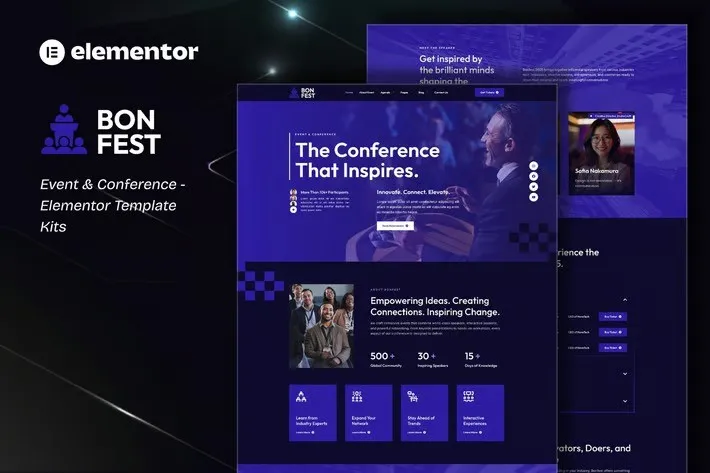
Still using a clunky event page that looks like it survived from 2015? Bonfest flips that. It’s a ready-made Elementor Template Kit built for conferences, festivals, summits, and professional gatherings — a site that actually looks like you hired a designer.
No code. No weeks of back-and-forth with developers. Just install the free Elementor plugin, upload the kit, and start swapping in your details. Tech conference? Music festival? Wellness retreat? Bonfest adjusts to whatever you’re running.
What’s Inside
Eight pages, each one ready to drop into WordPress. Here’s the breakdown:
- Homepage — hero section, speaker spotlights, schedule teaser, sponsor logos
- About — event backstory, your organizing crew
- Schedule — timeline view for keynotes and breakout sessions
- Speakers — grid layout with individual profile cards
- Tickets — pricing table with side-by-side comparison
- FAQ — address the same questions attendees always ask
- Contact — form styling, map placeholder, location info
- Blog — event updates, speaker announcements, sponsor news
Every page scales to any screen. Desktop, tablet, phone — looks sharp everywhere without extra work.
Who Uses Bonfest
Perfect for people who need a real website without the agency invoice.
- Conference planners handling annual events or one-off gatherings
- Small businesses running workshops, product launches, or training days
- Freelancers building client sites on tight deadlines
- WordPress devs who want a jumpstart on event projects
- Community groups, nonprofits, anyone organizing meetups
If you can use Word, you can edit this kit.
Getting Started
Three steps. That’s it. Install Elementor on your WordPress site. Upload the kit from your dashboard. Pick the pages you want and start tweaking.
No child themes. No custom code. Works with Hello Elementor, Astra, or most standard themes. Swap in your logo, add your schedule, set your ticket prices. Publish.
First time with WordPress? The included docs walk you through setup in about 15 minutes.
Why This Kit Instead of Free Templates
Free templates look like free templates. Bonfest doesn’t. The layouts guide visitors toward one thing: registration. Typography is readable. Colors work together. Spacing creates hierarchy instead of chaos.
And here’s what you get: instant download, commercial license (use it for client work without extra fees), and lifetime updates as WordPress and Elementor evolve.
One payment. No subscriptions. Build once, launch fast.
Ready to Launch?
Download Bonfest today and have a conference-ready site running before your next planning meeting. Eight pages, fully responsive, designed to impress attendees the moment they land on your page.
Only logged in customers who have purchased this product may leave a review.
How to use Kit:
Install and activate the “Template Kit – Import” plugin from Plugins > Add New in WordPress.
Do not unzip.
Go to Template Kit – Import > Upload Template Kit Zip File button.
Before importing a template, ensure the Install Requirements button is clicked to activate required plugins.
For best results, do not import more than one template at a time.
RELATED PRODUCTS

DIVI – Original License | One Time Payment – Exclusive Deal

Elementor Pro 4.1.3 + Elementorism Landing Pages WordPress Plugin

907 5.3.6 – Responsive Multi-Purpose WordPress Theme

Element Pack Pro 9.1.0 – Addon For Elementor

Lifetime Mini Membership





 Mobile Apps
 php script
 How to
Reviews
There are no reviews yet