
Baberage – Barber & Hairdresser Shop Elementor Template Kit
- Updated on May 2, 2026
- 100% Original Product & Well Documented
- Unlimited Domain Usage
*Important Note:
The image should not be Part of the template kit. You need to use your own reliable Source.


Original price was: ₹999.00.₹299.00Current price is: ₹299.00.
Launch a barbershop website in an afternoon. Baberage gives you ready pages, booking layouts, and a commercial license — no subscriptions, no monthly fees, no code required.
- Secured & Scanned by Virus total & McAfee.
- Access to Free updates for Lifetime
- All products are Under GPL License (Unlimited Domain Usage)
- We Not Provide any Support For this Product

Lifetime Membership
Access 6700+ Premium WordPress Themes & Plugins, Elementor Templates, Mobile Apps, PHP scripts with Lifetime Updates.
Join Premium MembershipRecently Viewed
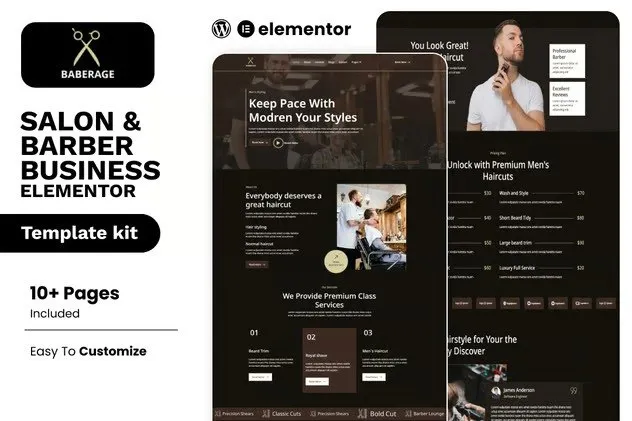
Baberage – Professional Barber Website Template for Elementor
Most barbers spend more time choosing what to stream than building their online presence. Baberage changes that. It’s a complete website template built specifically for barbershops and salons — no generic designs, no starting from scratch, no designer fees.
You get multiple pre-built pages that look custom-made. Swap in your photos, update your prices, and publish. The whole thing works inside Elementor, which means drag, drop, done. Solo barbers use it. Multi-chair shops use it. Either way, you’re looking at a finished site by dinner time.
What’s Included
Seven pages, ready to go:
- Homepage with hero image, service showcase, team bios, and a prominent booking button
- Services page with pricing tables for cuts, shaves, beard work, and treatments
- About page — tell people who you are and why they should sit in your chair
- Contact page with map embed, business hours, and a form clients can fill out
- Gallery, testimonials, and a promotions page for seasonal offers
Built for Bookings, Not Just Looks
Pretty websites don’t pay bills. This template is designed to move visitors toward one action: booking an appointment. Every page has strategic spots for contact forms and call-to-action buttons. The layout works on phones — because that’s where your clients are searching from.
- Mobile-first: Your site needs to look sharp on a 6-inch screen, not just a desktop
- Booking-ready: Contact forms and CTA buttons placed where they actually get clicked
- Team profiles: Give each barber their own page — clients book with people, not businesses
- Service displays: Dedicated areas for cuts, shaves, color, and whatever else you offer
- Gallery sections: Show before-and-afters without rebuilding your portfolio
- Social links: Connect your Instagram and Facebook without hunting for widgets
Does This Fit You?
If you’ve ever thought any of these, Baberage was made for you:
- “I need a real website but I don’t have time to learn web design”
- “I’m tired of paying $50+ monthly for a website builder that watermarks my images”
- “My current site looks nothing like my actual work — it’s embarrassing”
- “I want to launch something before [insert deadline here]”
- “A developer quoted me $2,000 and I know I can do this myself”
Real barbers and stylists have launched sites with this kit in a single afternoon. You need two things: a free WordPress site and Elementor installed. Everything else is in the download.
How It Works
Three steps, seriously:
1. Install Elementor — it’s a free WordPress plugin. Takes about 5 minutes if you already have hosting.
2. Import the kit — one click and all pages, sections, and styles transfer into your site.
3. Swap the content — replace the placeholder text with your business name, your services, your photos. Hit publish.
First-timers finish in 2-4 hours. If you’ve touched Elementor before, you’re looking at 45 minutes. You own the site. No monthly fees. No per-page limits. No “powered by” badges.
Why Pay for a Template?
Free templates exist. You know what they come with? Broken layouts. Mismatched fonts. Hours of troubleshooting. Half of them haven’t been updated in two years and break when WordPress releases a new version.
Baberage costs less than one haircut per week for a month. You get a commercial license — use it for your own shop or client work. Pay once, download once, keep forever. No subscriptions. No surprises when you check your bank statement.
Your competitors already have websites. Your potential clients are searching for barbers right now, on their phones, three miles away. The question isn’t whether you need a website. It’s whether you’re ready to stop waiting and actually build one.
Download Baberage
Instant delivery. Check your inbox after purchase — the kit is ready to import the moment you log into WordPress.
Only logged in customers who have purchased this product may leave a review.
How to use Kit:
Install and activate the “Template Kit – Import” plugin from Plugins > Add New in WordPress.
Do not unzip.
Go to Template Kit – Import > Upload Template Kit Zip File button.
Before importing a template, ensure the Install Requirements button is clicked to activate required plugins.
For best results, do not import more than one template at a time.
RELATED PRODUCTS

DIVI – Original License | One Time Payment – Exclusive Deal

Elementor Pro 4.1.3 + Elementorism Landing Pages WordPress Plugin

907 5.3.6 – Responsive Multi-Purpose WordPress Theme

Element Pack Pro 9.1.0 – Addon For Elementor

Lifetime Mini Membership





 Mobile Apps
 php script
 How to
Reviews
There are no reviews yet