
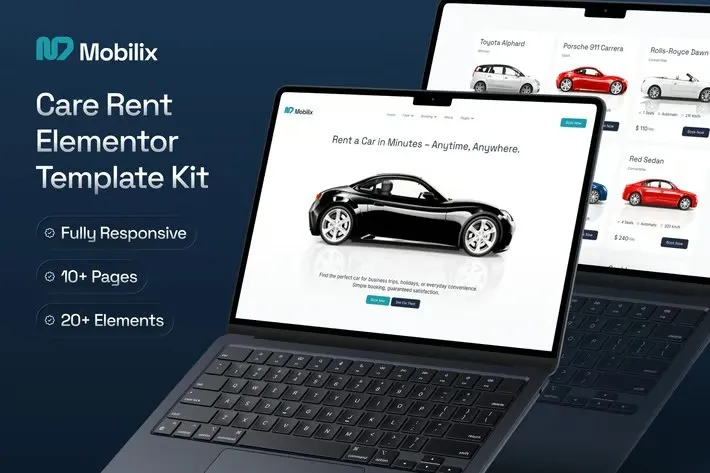
Mobilix – Car Rent Elementor Template Kit
- Updated on May 2, 2026
- 100% Original Product & Well Documented
- Unlimited Domain Usage
*Important Note:
The image should not be Part of the template kit. You need to use your own reliable Source.


Original price was: ₹999.00.₹299.00Current price is: ₹299.00.
Launch a car rental site in an afternoon. Mobilix gives you 10 pre-built pages, a working booking flow, and fleet showcase layouts — all customizable in Elementor. Pick your pages and go live today.
- Secured & Scanned by Virus total & McAfee.
- Access to Free updates for Lifetime
- All products are Under GPL License (Unlimited Domain Usage)
- We Not Provide any Support For this Product

Lifetime Membership
Access 6700+ Premium WordPress Themes & Plugins, Elementor Templates, Mobile Apps, PHP scripts with Lifetime Updates.
Join Premium MembershipRecently Viewed
Build Your Car Rental Website with Mobilix Elementor Template Kit
Starting from scratch takes forever. Mobilix cuts that time down to hours. This kit includes 10 pre-built pages, a complete booking flow, fleet showcases, and pricing tables — everything you need to get a professional site running without touching code or hiring a developer.
Local car hire, chauffeur service, or full fleet operation — Mobilix handles it. The layouts are conversion-focused and work on mobile, tablet, and desktop. Import what you need, swap in your photos and branding, and publish.
What’s Inside the Kit
- Homepage with hero section, vehicle spotlights, and a prominent booking button
- Full fleet catalog with category filters and individual car detail pages
- Reservation form with date picker built in
- Service pages for hourly rentals, airport pickups, and long-term deals
- Pricing tables, customer testimonials, and FAQ sections
- Contact page with location map and inquiry form
The layout walks visitors from vehicle browsing straight to the reservation form. No dead ends, no hunting for a book-now button.
Built for Car Rental Businesses
Most templates feel generic. Mobilix was designed around how vehicle reservations actually work.
Booking flows handle date selection, vehicle choice, and form submission in one smooth sequence. Fleet pages support specs, photo galleries, and feature lists. Pricing tables accommodate daily rates, hourly charges, and package pricing without awkward workarounds.
Vehicle showcase pages give customers the details they want before committing — capacity, transmission, included extras. The booking widget keeps everything on one page so customers don’t abandon the process to hunt for forms.
Who This Works For
- New car rental businesses that need a professional site fast
- Existing operators with outdated or broken websites
- Freelancers and agencies building for automotive clients
- Chauffeur and private transport services displaying packages
If you can drag elements around in Elementor, you can build this site. Everything’s organized clearly — headers, footers, inner pages — so you import what you need and start customizing right away.
Getting Started
Download, install in Elementor (works with free and Pro versions), and open the template files. Add your logo, upload fleet photos, tweak colors to match your brand, and hit publish. Most users finish in one session.
All templates are responsive. Your customers book from phones, tablets, and desktops — the layout adjusts automatically.
Why This Kit
Designer rates easily hit four figures. This kit costs a fraction of that and downloads instantly. Unlike free templates, you get a complete solution built specifically for car rental — not a generic template with vehicle stock photos awkwardly dropped in.
One payment. Lifetime access. Use it for your own business or client projects. Commercial license included with no restrictions.
Launch Your Car Rental Website
Your competitors already have professional booking pages. Mobilix gets you there without the agency waitlist or developer fees. Choose your pages, customize, and go live today.
Only logged in customers who have purchased this product may leave a review.
How to use Kit:
Install and activate the “Template Kit – Import” plugin from Plugins > Add New in WordPress.
Do not unzip.
Go to Template Kit – Import > Upload Template Kit Zip File button.
Before importing a template, ensure the Install Requirements button is clicked to activate required plugins.
For best results, do not import more than one template at a time.
RELATED PRODUCTS

DIVI – Original License | One Time Payment – Exclusive Deal

Elementor Pro 4.1.3 + Elementorism Landing Pages WordPress Plugin

907 5.3.6 – Responsive Multi-Purpose WordPress Theme

Element Pack Pro 9.1.0 – Addon For Elementor

Lifetime Mini Membership





 Mobile Apps
 php script
 How to
Reviews
There are no reviews yet