
Alivra – Hajj & Umrah Tour Elementor Template Kit
- Updated on May 2, 2026
- 100% Original Product & Well Documented
- Unlimited Domain Usage
*Important Note:
The image should not be Part of the template kit. You need to use your own reliable Source.


Original price was: ₹999.00.₹299.00Current price is: ₹299.00.
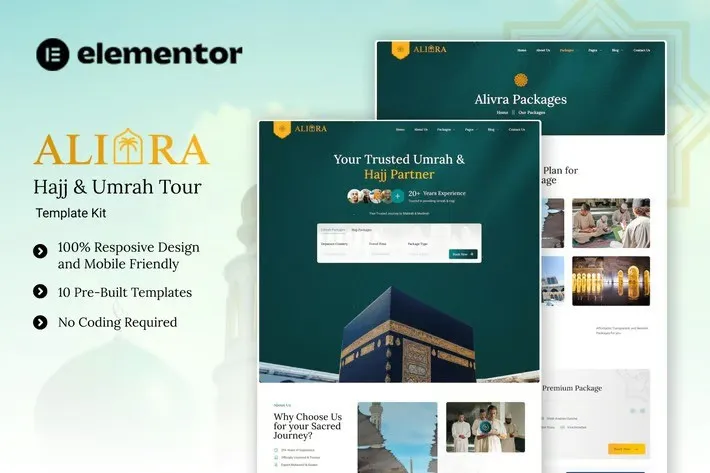
Build a professional Hajj and Umrah travel website in minutes. This Elementor Template Kit includes 8 pre-built pages, instant download, lifetime updates, and a commercial license — no coding required.
- Secured & Scanned by Virus total & McAfee.
- Access to Free updates for Lifetime
- All products are Under GPL License (Unlimited Domain Usage)
- We Not Provide any Support For this Product

Lifetime Membership
Access 6700+ Premium WordPress Themes & Plugins, Elementor Templates, Mobile Apps, PHP scripts with Lifetime Updates.
Join Premium MembershipRecently Viewed
Best Hajj and Umrah Elementor Template Kit for Travel Agencies
Your pilgrimage travel business needs a website that builds instant trust and converts visitors into bookings. Alivra delivers exactly that — a beautifully crafted Elementor Template Kit designed exclusively for Hajj and Umrah tour services. Launch a professional website today without hiring a developer or spending weeks on customization.
What This Kit Includes
Alivra comes loaded with 8 essential pages tailored for pilgrimage travel businesses. Every layout speaks to the spiritual journey your clients are about to undertake. The design feels premium, trustworthy, and warm — exactly what Muslim travelers expect when booking their sacred pilgrimage. No bloated features, no unnecessary complexity. Just clean pages that showcase your packages, highlight your services, and tell your agency’s story.
Key Features Built for Your Business
- 8 Pre-Built Pages: Home, Packages, Package Details, About, Services, Gallery, FAQ, and Contact
- 100% Responsive Design: Flawless on mobile, tablet, and desktop — pilgrims browse on all devices
- Drag-and-Drop Editing: Customize text, images, and colors without touching code
- Free Elementor Widgets: Uses only free elements so you can launch without extra costs
- SEO-Ready Structure: Clean code and proper heading hierarchy for better Google rankings
- Fast Loading Speed: Optimized for performance so visitors don’t bounce
- RTL Support: Ready for Arabic content and right-to-left layouts
Who Should Buy This Template Kit
Hajj and Umrah travel agencies, pilgrimage organizers, group tour providers, and Islamic travel companies will benefit most. Whether you’re launching a new venture or refreshing an outdated website, Alivra gives you a professional online presence immediately. Even if you’ve never touched WordPress before, you can have a stunning site live within hours.
How to Get Started in 3 Steps
First, download the kit instantly after purchase. Next, install it on any WordPress site running the free Elementor plugin. Finally, import your chosen pages, swap in your branding, add your package details, and publish. No shortcodes to worry about, no complex setup required. The documentation walks you through each step if you need guidance.
Why Choose Alivra Over Generic Templates
Generic travel templates make pilgrims scroll past your site. Alivra speaks directly to their spiritual needs with layouts designed for Hajj and Umrah services. Other template kits charge recurring fees — this one-time purchase includes lifetime updates and lifetime support. You also get a commercial license, meaning you can use this for client projects and charge your own rates. The design, the functionality, and the value all stack in your favor.
Ready to Launch Your Pilgrimage Travel Website?
Stop delaying your online presence. Alivra gives you everything you need to attract more pilgrims, showcase your packages professionally, and grow your Hajj and Umrah travel business. Instant download, commercial license, lifetime updates, and support — all included with one affordable payment. Get Alivra now and have a stunning website live today.
Only logged in customers who have purchased this product may leave a review.
How to use Kit:
Install and activate the “Template Kit – Import” plugin from Plugins > Add New in WordPress.
Do not unzip.
Go to Template Kit – Import > Upload Template Kit Zip File button.
Before importing a template, ensure the Install Requirements button is clicked to activate required plugins.
For best results, do not import more than one template at a time.
RELATED PRODUCTS

DIVI – Original License | One Time Payment – Exclusive Deal

Elementor Pro 4.2.1 + Elementorism Landing Pages WordPress Plugin

907 5.3.6 – Responsive Multi-Purpose WordPress Theme

Element Pack Pro 9.1.0 – Addon For Elementor






 Mobile Apps
 php script
 How to
Reviews
There are no reviews yet