
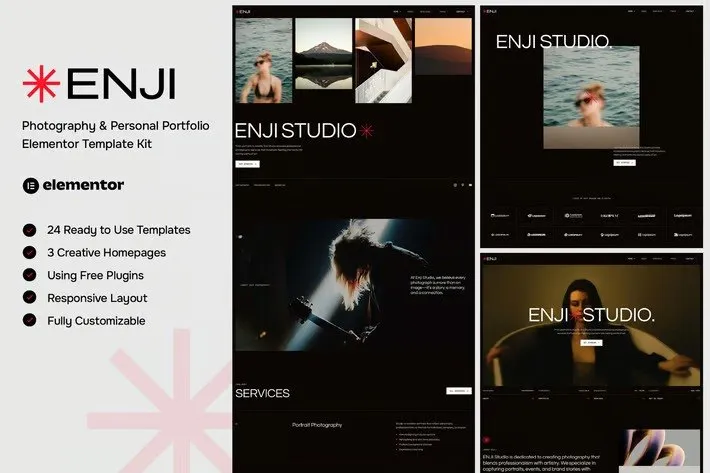
Enji – Photography & Personal Portfolio Elementor Template Kit
- Updated on May 2, 2026
- 100% Original Product & Well Documented
- Unlimited Domain Usage
*Important Note:
The image should not be Part of the template kit. You need to use your own reliable Source.


Original price was: ₹999.00.₹299.00Current price is: ₹299.00.
Stop tweaking generic templates. Enji gives photographers a portfolio site that actually showcases their work — ready in under 30 minutes, commercial license included, no subscription ever.
- Secured & Scanned by Virus total & McAfee.
- Access to Free updates for Lifetime
- All products are Under GPL License (Unlimited Domain Usage)
- We Not Provide any Support For this Product

Lifetime Membership
Access 6700+ Premium WordPress Themes & Plugins, Elementor Templates, Mobile Apps, PHP scripts with Lifetime Updates.
Join Premium MembershipRecently Viewed
Photography Portfolio Template for Elementor
Your photography deserves better than another cookie-cutter template. Enji is a complete Elementor template kit built for photographers and creative professionals who want a polished, client-ready website — without the designer price tag or weeks of back-and-forth revisions.
What Enji Is
Think of it as a design foundation for your portfolio. Enji includes ready-made layouts for homepages, galleries, services, about pages, and contact sections — everything organized so you can swap in your own images and launch.
Every layout prioritizes image presentation. Large hero sections. Clean typography that stays out of the way. Navigation that actually works. The template kit runs inside Elementor, so you customize with drag-and-drop — no code, no developer, no stress.
Key Features
Here’s what’s included:
- Homepage with hero showcase, portfolio preview grid, and a call-to-action section
- Six gallery layouts — masonry, grid, and full-width options that handle portrait, landscape, and square images
- Services page template with space for offerings and pricing
- About section with bio layout and headshot placement
- Contact form with booking integration
- Blog layout for behind-the-scenes posts and photography tips
Who It’s For
Portrait photographers use it to land new clients. Wedding and event photographers showcase their coverage style. Travel photographers tell visual stories. Brand and commercial photographers display their client roster. Creative studios present team portfolios.
Whether you’re building your first portfolio or giving an existing site a refresh, Enji gives you a professional starting point. The layouts scale from solo photographers to multi-person studios without looking templated.
How To Use It
Setting up takes about 30 minutes. Install the free Elementor plugin on WordPress, import the Enji kit, pick your layouts, drop in your images, adjust colors to match your brand, and publish.
You get the full homepage plus individual section templates you can mix and match. Want a testimonial slider on your about page? Grab it. Need a portfolio grid instead of a masonry layout? Swap it. Elementor’s interface makes reordering sections and tweaking spacing straightforward.
Why Buy This Template Kit
Three things that set this apart from building from scratch or using a generic page builder:
- Commercial license included. Use Enji for your own portfolio and for client projects. No extra fees, no restrictions.
- One payment, lifetime access. Buy once, keep it forever. No subscriptions eating into your income.
- Beginner-friendly but designed by professionals. You get polished results even if you’ve never opened WordPress before.
Free updates are included. As Elementor evolves, you’ll get the latest versions at no additional cost.
Enji works for photographers, creative professionals, studios, and agencies who need a professional website without the professional overhead. It’s not a full WordPress theme — it’s the design layer you need to build a portfolio that actually represents your work.
Ready to Get Started?
Download Enji now and have a professional photography portfolio live today. Instant delivery. Commercial license included. One-time payment.
Only logged in customers who have purchased this product may leave a review.
How to use Kit:
Install and activate the “Template Kit – Import” plugin from Plugins > Add New in WordPress.
Do not unzip.
Go to Template Kit – Import > Upload Template Kit Zip File button.
Before importing a template, ensure the Install Requirements button is clicked to activate required plugins.
For best results, do not import more than one template at a time.
RELATED PRODUCTS

DIVI – Original License | One Time Payment – Exclusive Deal

Elementor Pro 4.2.3 + Elementorism Landing Pages WordPress Plugin

907 5.3.6 – Responsive Multi-Purpose WordPress Theme

Element Pack Pro 9.1.0 – Addon For Elementor






 Mobile Apps
 php script
 How to
Reviews
There are no reviews yet