
Pintar – Online Courses Elementor Template Kit
- Updated on May 2, 2026
- 100% Original Product & Well Documented
- Unlimited Domain Usage
*Important Note:
The image should not be Part of the template kit. You need to use your own reliable Source.


Original price was: ₹999.00.₹299.00Current price is: ₹299.00.
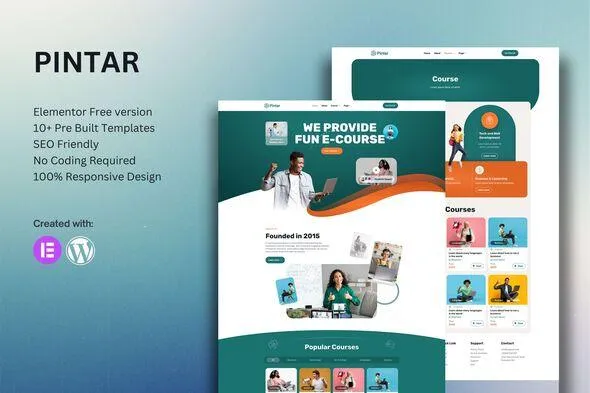
Build a professional online course platform in hours, not weeks. Pintar gives you a complete, ready-to-use Elementor template kit with 15+ pages — instant download, lifetime updates, commercial license included.
- Secured & Scanned by Virus total & McAfee.
- Access to Free updates for Lifetime
- All products are Under GPL License (Unlimited Domain Usage)
- We Not Provide any Support For this Product

Lifetime Membership
Access 6700+ Premium WordPress Themes & Plugins, Elementor Templates, Mobile Apps, PHP scripts with Lifetime Updates.
Join Premium MembershipRecently Viewed
Build Your Online Course Website Without Touching Code
You’ve got knowledge worth sharing. The last thing you need is weeks of back-and-forth with developers or getting lost in expensive theme customization. Pintar is a ready-to-use Elementor Template Kit built specifically for online course creators, educators, and training businesses who want a professional website without the technical headaches.
No coding required. No premium plugin subscriptions needed. Just open Elementor (free version works), import the template, and start customizing. Your course platform can be live in a single afternoon.
What You Get With Pintar
This template kit comes loaded with everything a modern course website needs. Each layout is designed with conversion in mind — clean typography, strategic spacing, and clear calls-to-action that guide visitors toward enrollment.
- 15+ pre-designed pages covering homepage, course listings, individual lesson pages, pricing plans, instructor profiles, blog, and contact forms
- Fully responsive layouts that look sharp on phones, tablets, and desktops
- Drag-and-drop editing through Elementor’s visual builder — see changes instantly as you make them
- Consistent design system with matching headers, footers, and section styles throughout
- Optimized for speed and SEO out of the box
Who It’s Built For
Pintar works best for course creators who are tired of wrestling with complicated themes. Whether you’re launching a single course, running a full academy, or offering corporate training programs, this template adapts to your structure.
- Solo course creators launching their first educational website
- Coaches and consultants expanding into online training
- Schools and training organizations modernizing their web presence
- YouTubers and content creators building a paid membership area
How To Use It
Getting started takes minutes. Install the free Elementor plugin, upload the template kit through Elementor’s import feature, and select which pages you want to use. Replace the placeholder text with your course content, upload your images, and publish. The included documentation walks you through every step if you hit any snags.
Because it’s built with Elementor, you can tweak any section without touching code. Want a different layout for your course cards? Drag a new widget in. Need to add a testimonial section? It’s already in the kit — just drop it in.
Why Choose Pintar Over Building From Scratch
Starting from a blank canvas sounds flexible, but it usually means months of design decisions, revisions, and trial-and-error. Pintar gives you a professional foundation that’s already tested for both aesthetics and usability.
You get instant access to all template files, a commercial license that lets you use it on client projects or your own business, and lifetime free updates as Elementor evolves. One simple payment — no recurring subscriptions eating into your margins.
For the price of a couple hours with a designer, you get a complete website template that you fully own and control.
Ready to Launch Your Course Platform?
Stop delaying your launch because the technical setup feels overwhelming. Pintar gives you the professional foundation you need to start accepting students today. Buy once, build your site, grow your audience.
Only logged in customers who have purchased this product may leave a review.
How to use Kit:
Install and activate the “Template Kit – Import” plugin from Plugins > Add New in WordPress.
Do not unzip.
Go to Template Kit – Import > Upload Template Kit Zip File button.
Before importing a template, ensure the Install Requirements button is clicked to activate required plugins.
For best results, do not import more than one template at a time.
RELATED PRODUCTS

DIVI – Original License | One Time Payment – Exclusive Deal

Elementor Pro 4.1.3 + Elementorism Landing Pages WordPress Plugin

907 5.3.6 – Responsive Multi-Purpose WordPress Theme

Element Pack Pro 9.1.0 – Addon For Elementor

Lifetime Mini Membership





 Mobile Apps
 php script
 How to
Reviews
There are no reviews yet