
Meddic – Hospital and Medical Clinic Elementor Template Kit
- Updated on May 2, 2026
- 100% Original Product & Well Documented
- Unlimited Domain Usage
*Important Note:
The image should not be Part of the template kit. You need to use your own reliable Source.


Original price was: ₹999.00.₹299.00Current price is: ₹299.00.
Launch your medical website today — not in two months. Meddic gives you appointment booking, service pages, doctor profiles, and patient intake forms, all pre-built for Elementor. Swap in your content and go live this week.
- Secured & Scanned by Virus total & McAfee.
- Access to Free updates for Lifetime
- All products are Under GPL License (Unlimited Domain Usage)
- We Not Provide any Support For this Product

Lifetime Membership
Access 6700+ Premium WordPress Themes & Plugins, Elementor Templates, Mobile Apps, PHP scripts with Lifetime Updates.
Join Premium MembershipRecently Viewed
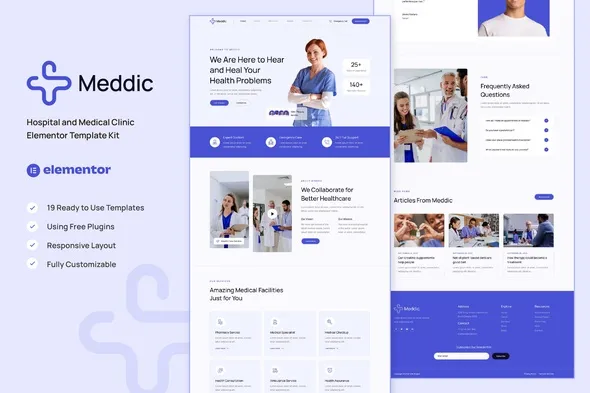
Meddic Hospital and Medical Clinic Elementor Template Kit
Your patients need to book appointments online, read about your services, and trust your practice before they walk through the door. A website that does all that usually means six weeks of back-and-forth with developers — and a bill for $10,000 or more.
Meddic skips the waiting. It’s a complete Elementor template kit built specifically for hospitals and medical clinics. Every page, section, and form is ready to go. Swap in your logo, add your services, and publish.
Pages Included
No piecing together random templates here. Meddic includes full pages that connect logically:
- Homepage — hero, services overview, doctor spotlights, patient reviews
- Service pages — treatment descriptions with space for pricing and details
- Appointment booking — integrated forms your patients can fill out directly
- About page — tell your clinic’s story your way
- Contact page — office address, hours, embedded map
- Blog layout — ready for health tips, clinic news, or medical education content
These templates use standard Elementor widgets. If you have the free version, you’re good to go. No premium plugins required.
Design That Works for Healthcare
Medical websites have one purpose: turn a visitor into a patient. Meddic uses blue and white — colors research links to cleanliness, professionalism, and calm. Typography balances authority with warmth. Serious enough for a hospital. Approachable enough for a neighborhood clinic.
Every page looks solid on phones. Sixty percent of patients find healthcare providers on mobile devices. Tap-friendly buttons, readable text, no pinching to zoom.
Who Uses This
Meddic fits:
- Independent hospitals and medical centers building or refreshing their web presence
- Private practices — general practice, dental, dermatology, specialty care
- Healthcare startups and telehealth services that need a professional site fast
- Practitioners who’d rather spend $50-150 than $10,000+ on a website
You don’t need to know code. If you’ve dragged elements around in any page builder, you can customize Meddic. Change colors to match your brand. Drop in your photos. Update the copy.
Getting Started
Three steps. First, install Elementor (the free version works). Second, import the Meddic kit through Elementor’s template library. Third, replace the placeholder text with your clinic name, services, staff info, and contact details.
Most users finish in an afternoon. No developers. No revision rounds. No waiting.
The Cost Comparison
Custom healthcare websites run $3,000 to $15,000+. Build time: 6 to 12 weeks. Meddic gets you the same polished result instantly. One-time purchase, commercial license included — the site you build is yours. No monthly fees.
Updates come free. As Elementor improves, Meddic improves with it.
If you’ve delayed your clinic’s website because the process felt overwhelming, this removes every excuse. You get a complete, professional foundation. Launch as-is or customize further — either way, you’re months ahead of starting from scratch.
Download Meddic
Stop emailing developers for quotes. Stop waiting for timelines. Download now and have a working medical website structure in Elementor within the hour. Your potential patients are searching for you right now. Make sure they find something worth trusting.
Only logged in customers who have purchased this product may leave a review.
How to use Kit:
Install and activate the “Template Kit – Import” plugin from Plugins > Add New in WordPress.
Do not unzip.
Go to Template Kit – Import > Upload Template Kit Zip File button.
Before importing a template, ensure the Install Requirements button is clicked to activate required plugins.
For best results, do not import more than one template at a time.
RELATED PRODUCTS

DIVI – Original License | One Time Payment – Exclusive Deal

Elementor Pro 4.1.3 + Elementorism Landing Pages WordPress Plugin

907 5.3.6 – Responsive Multi-Purpose WordPress Theme

Element Pack Pro 9.1.0 – Addon For Elementor

Lifetime Mini Membership





 Mobile Apps
 php script
 How to
Reviews
There are no reviews yet