
Devvata – NFT Portfolio Elementor Template Kit
- Updated on May 2, 2026
- 100% Original Product & Well Documented
- Unlimited Domain Usage
*Important Note:
The image should not be Part of the template kit. You need to use your own reliable Source.


Original price was: ₹999.00.₹299.00Current price is: ₹299.00.
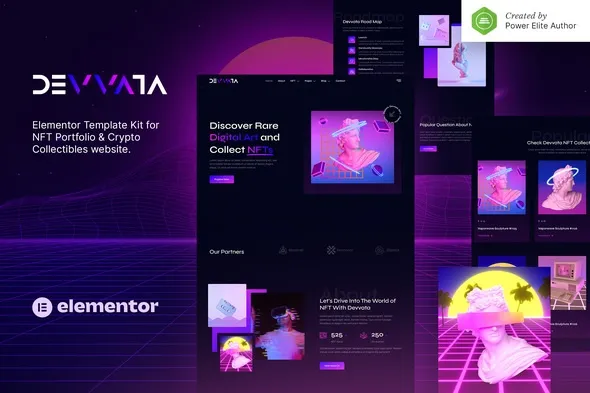
Your NFT collection deserves a portfolio that actually looks the part. Devvata gives you 8+ pages, drag-and-drop editing, and a design that’ll make your work look professional from the first scroll. Swap out the placeholder content with your own, hit publish, and you’re live.
- Secured & Scanned by Virus total & McAfee.
- Access to Free updates for Lifetime
- All products are Under GPL License (Unlimited Domain Usage)
- We Not Provide any Support For this Product

Lifetime Membership
Access 6700+ Premium WordPress Themes & Plugins, Elementor Templates, Mobile Apps, PHP scripts with Lifetime Updates.
Join Premium MembershipRecently Viewed
Devvata – NFT Portfolio Template Kit for Elementor
Most NFT artists spend more time explaining where to find their work than showing it off. Devvata fixes that. It’s an Elementor Template Kit that gets you from download to live website in an afternoon — no developer required, no design degree needed.
What Is Devvata?
Eight pre-built pages built specifically for NFT projects, crypto startups, and blockchain businesses. Hero section, portfolio gallery, about page, team showcase, roadmap timeline, FAQ, contact form — it’s all here. Import the templates into Elementor, swap in your content, and publish. That’s it.
The look? Dark background, neon accents, bold typography. It has that Web3 aesthetic without looking like every other crypto site out there. Everything is spaced to let your art or project take center stage.
What’s Inside
Built for actual use, not just pretty previews:
- 8+ Ready-Made Pages — Home, About, Services, Portfolio, Blog, Contact, 404, Coming Soon
- Elementor Drag-and-Drop — Edit visually. Move sections, change colors, update text without touching code
- Works Everywhere — Mobile, tablet, desktop. Retina-ready so images stay crisp
- Dark Mode Default — Crypto-native look. Swap accent colors to match your brand
- Global Styles — Change a font once, it updates across every page
- Lightweight Code — Fast load times. Clean structure that search engines like
- Commercial License — Your projects, client work, or side hustles — all covered
Who Is This For?
This template works best when you need to look established quickly:
- NFT Artists — A portfolio that matches the quality of your work
- Crypto Projects — Landing pages for token launches, DAOs, or blockchain startups
- Web3 Agencies — Use the commercial license to ship client sites faster
- DeFi Traders — A hub for your marketplace activity and community updates
- Blockchain Consultants — A personal brand site that builds credibility
Getting Started
Fifteen minutes, tops:
1. Install Elementor Free on WordPress. 2. Download Devvata and import from Elementor’s template library. 3. Replace the placeholder text and images with yours. 4. Hit publish.
No special theme required. No complex setup. If you can use WordPress, you can build this site.
Why Pay for a Template?
Free templates are hit or miss — outdated designs, bloated code, watermarks everywhere. Devvata was built purpose-built for the NFT space. You get a commercial license (use it for clients, your own projects, whatever), free lifetime updates, and support if you get stuck during setup.
Launch your collection. Build your crypto brand. Deliver client sites faster. One template kit handles all of it.
Ready to Go?
Skip the generic templates and the weeks of back-and-forth with developers. Download Devvata, spend an afternoon customizing it, and have a professional NFT portfolio live tomorrow. Instant download. Commercial license included. No coding required.
Only logged in customers who have purchased this product may leave a review.
How to use Kit:
Install and activate the “Template Kit – Import” plugin from Plugins > Add New in WordPress.
Do not unzip.
Go to Template Kit – Import > Upload Template Kit Zip File button.
Before importing a template, ensure the Install Requirements button is clicked to activate required plugins.
For best results, do not import more than one template at a time.
RELATED PRODUCTS

DIVI – Original License | One Time Payment – Exclusive Deal

Elementor Pro 4.1.3 + Elementorism Landing Pages WordPress Plugin

907 5.3.6 – Responsive Multi-Purpose WordPress Theme

Element Pack Pro 9.1.0 – Addon For Elementor

Lifetime Mini Membership





 Mobile Apps
 php script
 How to
Reviews
There are no reviews yet