
Revoltz – Electrical Installation & Maintenance Elementor Template Kit
- Updated on May 1, 2026
- 100% Original Product & Well Documented
- Unlimited Domain Usage
*Important Note:
The image should not be Part of the template kit. You need to use your own reliable Source.


Original price was: ₹999.00.₹299.00Current price is: ₹299.00.
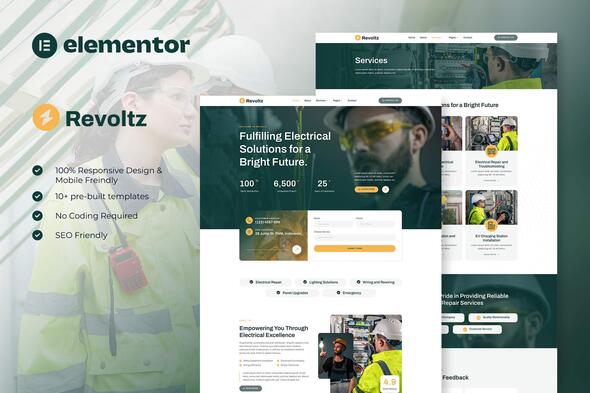
A polished Elementor template kit built for electrical contractors and maintenance businesses. Edit everything visually, launch faster, and look like you hired a pro — without the agency price tag. Instant download, full commercial license included.
- Secured & Scanned by Virus total & McAfee.
- Access to Free updates for Lifetime
- All products are Under GPL License (Unlimited Domain Usage)
- We Not Provide any Support For this Product

Lifetime Membership
Access 6700+ Premium WordPress Themes & Plugins, Elementor Templates, Mobile Apps, PHP scripts with Lifetime Updates.
Join Premium MembershipRecently Viewed
Best Electrical Services Website Template for Elementor
Most electrical businesses look identical online. Same generic stock photos. Same clunky layouts. Same contact forms that go nowhere. Revoltz breaks that pattern. It’s a clean, modern template built specifically for electrical installation and maintenance companies — at a fraction of what custom design costs.
Solo electrician launching your first real website? Contractor refreshing a dated online presence? Agency needing faster client turnaround? This kit handles all of it. Built for Elementor, the WordPress page builder millions of sites run on, so you edit headers, colors, copy, and images visually — zero code required.
What’s Included
This isn’t a bare-bones landing page. Revoltz gives you complete sections and pages covering every essential:
- Homepage with service showcases, client testimonials, and calls-to-action that actually generate calls
- Dedicated services pages for residential, commercial, and industrial electrical work
- About section to build credibility and introduce your team
- Contact area with working forms — clients reach you with one tap
- Project gallery to show off completed installations and maintenance jobs
Who It’s For
Revoltz fits:
- Electricians and electrical contractors building or scaling their web presence
- Maintenance companies offering electrical work alongside other services
- Web designers and agencies who need to deliver client sites quickly
- Freelancers juggling multiple electrical service websites
Setup Process
Drag. Drop. Done. If you’ve used any website builder before, you’ll be fine. Elementor’s visual editor means no coding knowledge whatsoever. Install the kit directly to your WordPress dashboard and start customizing within minutes. Sections are logically organized — swap in your logo, photos, service details, and contact info without digging through files.
No design experience. No developer on call. Install, personalize, launch.
Why Skip Generic Templates
Searching for a generic template and forcing it to work for electrical services takes hours. Worse, it shows. Clients sizing up electricians online make split-second judgments based on website quality. A template built for your industry instantly communicates competence and trustworthiness — the two things that win jobs.
Every page is fully responsive. Phones, tablets, desktops — perfect on all of them. When someone’s dealing with an electrical emergency at 11pm, they’re on their phone searching. Your site needs to deliver there most.
Commercial License — Use It Your Way
One purchase. Unlimited projects. Build your own business site or create client websites for profit. The commercial license covers everything, so you’re protected whether you’re working for yourself or billing clients.
Get Your Site Live Today
Ditch templates that don’t fit your industry. Get Revoltz now and have a professional electrical services website running tonight. Instant download, lifetime updates, and direct support included. Your next client is searching right now — make sure they find a site worth calling.
Only logged in customers who have purchased this product may leave a review.
How to use Kit:
Install and activate the “Template Kit – Import” plugin from Plugins > Add New in WordPress.
Do not unzip.
Go to Template Kit – Import > Upload Template Kit Zip File button.
Before importing a template, ensure the Install Requirements button is clicked to activate required plugins.
For best results, do not import more than one template at a time.
RELATED PRODUCTS

DIVI – Original License | One Time Payment – Exclusive Deal

Elementor Pro 4.1.3 + Elementorism Landing Pages WordPress Plugin

907 5.3.6 – Responsive Multi-Purpose WordPress Theme

Element Pack Pro 9.1.0 – Addon For Elementor

Lifetime Mini Membership





 Mobile Apps
 php script
 How to
Reviews
There are no reviews yet