
Flaten – Restaurant & Catering Services Elementor Template Kit
- Updated on May 1, 2026
- 100% Original Product & Well Documented
- Unlimited Domain Usage
*Important Note:
The image should not be Part of the template kit. You need to use your own reliable Source.


Original price was: ₹999.00.₹299.00Current price is: ₹299.00.
Launch your restaurant or catering website in hours, not weeks. Flaten gives you a complete, professional Elementor template kit with 8 pre-built pages — no coding required, instant download included.
- Secured & Scanned by Virus total & McAfee.
- Access to Free updates for Lifetime
- All products are Under GPL License (Unlimited Domain Usage)
- We Not Provide any Support For this Product

Lifetime Membership
Access 6700+ Premium WordPress Themes & Plugins, Elementor Templates, Mobile Apps, PHP scripts with Lifetime Updates.
Join Premium MembershipRecently Viewed
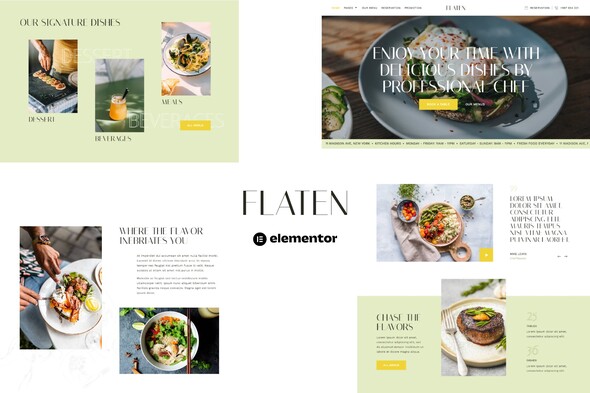
Flaten Restaurant & Catering Services Template Kit for Elementor
Building a restaurant website that actually looks professional shouldn’t take three weeks and a developer retainer. Flaten gives you everything you need to get online fast — a complete Elementor template kit designed specifically for restaurants, cafes, and catering businesses. Drag, drop, publish. That’s it.
This isn’t a generic template repurposed for food businesses. We built Flaten specifically for the restaurant industry. Every section, every layout, every design choice serves one purpose: helping food businesses look credible and book more customers.
What You Get With Flaten
Eight pre-built pages ready to customize in minutes:
- Homepage with hero section, featured dishes, and reservation callout
- About Us page for your restaurant story and team
- Services page for catering offerings and event packages
- Full menu page with pricing and category filters
- Gallery page to showcase food photography
- Testimonials section for social proof
- Contact page with map integration
- Reservation/booking page to capture leads
Who It’s Built For
You don’t need coding knowledge to use Flaten. If you can point and click, you can build your website with this kit. Elementor handles the heavy lifting — no PHP, no CSS files, no custom development. Just open Elementor, select your page, and start editing text and images.
Perfect for:
- Restaurant owners launching their first website
- Catering companies needing a quick online presence
- Freelance designers working on restaurant client projects
- Food truck owners and pop-up chefs building a brand
- Event venues offering catering services
No Hidden Costs, No Subscriptions
Elementor Free is all you need. There’s no premium plugin required to run Flaten. No monthly fees, no recurring costs. Pay once, download instantly, and own the template kit forever. We also include a commercial license so you can use it for client projects without worrying about restrictions.
Need help along the way? Lifetime support comes included. Stuck on a layout? Need advice on color changes? We’re here.
Why Buy This Template Kit
Custom website builds for restaurants typically cost $2,000-$5,000 and take 4-8 weeks. Flaten gives you that same professional appearance for a fraction of the price. You get pixel-perfect design, mobile-responsive layouts that look great on phones and tablets, fast-loading pages that search engines love, and all the core pages a food business needs to convert visitors into customers.
The catch? You still have to customize it with your actual content. But once you do, you’re live.
Ready to Get Started?
Skip the waiting game. Get Flaten now and have your restaurant or catering website live before your next shift starts. Instant download, lifetime updates, and the professional design your food business deserves — all yours with one purchase.
Only logged in customers who have purchased this product may leave a review.
How to use Kit:
Install and activate the “Template Kit – Import” plugin from Plugins > Add New in WordPress.
Do not unzip.
Go to Template Kit – Import > Upload Template Kit Zip File button.
Before importing a template, ensure the Install Requirements button is clicked to activate required plugins.
For best results, do not import more than one template at a time.
RELATED PRODUCTS

DIVI – Original License | One Time Payment – Exclusive Deal

Elementor Pro 4.1.3 + Elementorism Landing Pages WordPress Plugin

907 5.3.6 – Responsive Multi-Purpose WordPress Theme

Element Pack Pro 9.1.0 – Addon For Elementor

Lifetime Mini Membership





 Mobile Apps
 php script
 How to

Reviews
There are no reviews yet