
Yoganesia – Yoga Training Elementor Template Kit
- Updated on April 30, 2026
- 100% Original Product & Well Documented
- Unlimited Domain Usage
*Important Note:
The image should not be Part of the template kit. You need to use your own reliable Source.


Original price was: ₹999.00.₹299.00Current price is: ₹299.00.
Launch your yoga studio website in minutes — no coding required. Yoganesia comes with 15+ pre-built sections, responsive layouts, and a commercial license so you can go live fast and stress-free. Get instant access now.
- Secured & Scanned by Virus total & McAfee.
- Access to Free updates for Lifetime
- All products are Under GPL License (Unlimited Domain Usage)
- We Not Provide any Support For this Product

Lifetime Membership
Access 6700+ Premium WordPress Themes & Plugins, Elementor Templates, Mobile Apps, PHP scripts with Lifetime Updates.
Join Premium MembershipRecently Viewed
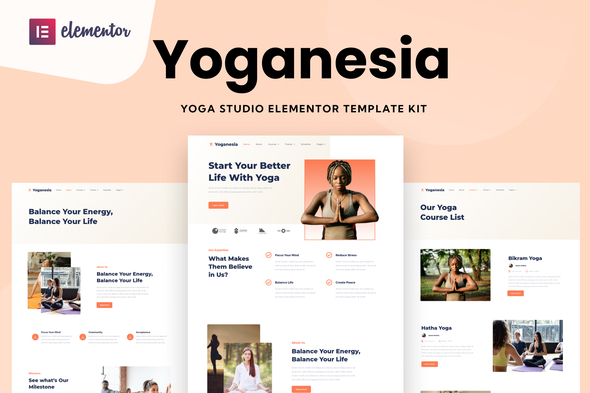
Yoganesia – Yoga Training Website Template Kit for Elementor
Building a yoga studio website from scratch eats up time you could spend teaching, planning classes, or growing your community. Yoganesia eliminates that headache. This ready-to-use Elementor Template Kit gives you a polished, professional yoga website — no developers, no design degrees, no waiting weeks for a custom build. Open it in Elementor, swap in your photos and text, and hit publish. That’s it.
What It Is
Yoganesia is a pre-built website template kit designed specifically for yoga studios, trainers, wellness coaches, and meditation centers. It includes 15+ carefully designed sections covering everything from hero banners and class schedules to instructor profiles, pricing packages, and a contact form. Every layout is responsive, meaning your site looks sharp on phones, tablets, and desktops without extra tweaking.
Key Features
Yoganesia packs professional design into a beginner-friendly structure. Here’s what’s included:
- 15+ pre-built sections: hero, about, class schedule, trainers, pricing, testimonials, blog, FAQ, contact, and footer
- Fully responsive layouts that adapt to mobile, tablet, and desktop automatically
- Clean, calming visual style built for wellness and mindfulness brands
- Easy-to-edit typography, colors, and imagery using Elementor’s drag-and-drop builder
- Built-in pricing tables and a booking inquiry section for new students
- Commercial license included — use it for client projects or your own studio without additional fees
Who It’s For
Yoganesia works best for yoga studio owners who need a professional online presence fast. If you’re launching a new studio and want to stop using a placeholder page or social link, this template kit gets you a real website today. Wellness coaches, meditation teachers, Pilates instructors, and holistic health practitioners also benefit — the layout adapts to any wellness-focused brand without looking generic.
How To Use It
You need the free Elementor plugin installed on a WordPress site. Once active, import the kit directly from your WordPress dashboard. All sections appear in your Elementor library — drag, drop, customize, publish. Replace placeholder images with your own studio photos. Update class names, trainer bios, and pricing. No code. No complicated setup. Most users report having a live homepage within an hour of installing the kit.
Why Buy This
Hiring a designer to build a yoga website from scratch typically costs $1,500–$5,000 and takes weeks. Yoganesia gives you that same professional look at a fraction of the price. You get instant download, lifetime free updates, and a commercial license that covers both personal and client projects. Whether you’re a yoga trainer building your personal brand or an agency managing multiple wellness clients, this template kit scales with your needs without recurring subscription fees.
Ready to Get Started?
Stop delaying your online presence. Buy Yoganesia now and download the template kit instantly. It’s beginner-friendly, professionally designed, and ready to publish today.
Only logged in customers who have purchased this product may leave a review.
How to use Kit:
Install and activate the “Template Kit – Import” plugin from Plugins > Add New in WordPress.
Do not unzip.
Go to Template Kit – Import > Upload Template Kit Zip File button.
Before importing a template, ensure the Install Requirements button is clicked to activate required plugins.
For best results, do not import more than one template at a time.
RELATED PRODUCTS

DIVI – Original License | One Time Payment – Exclusive Deal

Elementor Pro 4.2.1 + Elementorism Landing Pages WordPress Plugin

907 5.3.6 – Responsive Multi-Purpose WordPress Theme

Element Pack Pro 9.1.0 – Addon For Elementor






 Mobile Apps
 php script
 How to

Reviews
There are no reviews yet