
BigBurger – Burger & Fast Food Restaurant Elementor Template Kit
- Updated on April 30, 2026
- 100% Original Product & Well Documented
- Unlimited Domain Usage
*Important Note:
The image should not be Part of the template kit. You need to use your own reliable Source.


Original price was: ₹999.00.₹299.00Current price is: ₹299.00.
BigBurger gets your burger joint online today. A ready-made Elementor website with menu pages, gallery, contact forms, and a design built specifically for fast-food brands. No developer needed.
- Secured & Scanned by Virus total & McAfee.
- Access to Free updates for Lifetime
- All products are Under GPL License (Unlimited Domain Usage)
- We Not Provide any Support For this Product

Lifetime Membership
Access 6700+ Premium WordPress Themes & Plugins, Elementor Templates, Mobile Apps, PHP scripts with Lifetime Updates.
Join Premium MembershipRecently Viewed
BigBurger Elementor Template Kit for Fast Food Restaurants
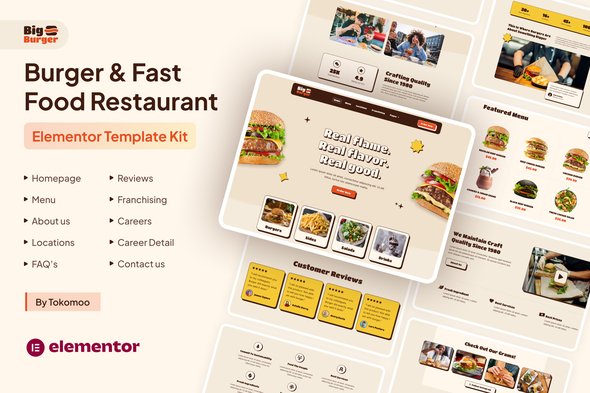
BigBurger gives burger joints, food trucks, and fast-casual diners a professional website without the professional price tag. This Elementor Template Kit includes everything you need to showcase your menu, tell your story, and convert hungry visitors into paying customers — all built with the free Elementor page builder you already use.
No coding. No design degree. No waiting weeks for a developer. Just download, install, and customize. Your online presence should work as fast as your kitchen during the lunch rush.
What You Get with BigBurger
This isn’t a generic restaurant template with stock photos and placeholder text. BigBurger was built specifically for burger and fast-food brands — warm wood tones, bold typography, and a layout that puts your food front and center. Every section flows logically from discovery to ordering.
- Pre-built homepage with hero banner, featured items, and location info
- Full menu page template with categories and pricing tables
- About section to share your restaurant’s story and team
- Contact and reservations page with embedded forms
- Gallery template to show off your signature burgers
- Fully responsive design — looks great on phones, tablets, and desktops
Who This Template Kit Is For
BigBurger works if you fall into any of these categories:
- Independent burger restaurants wanting to compete with chains online
- Food trucks needing a quick, professional web presence
- Fast-casual diners modernizing their digital footprint
- WordPress beginners who want pro results without hiring a developer
- Freelance designers building client sites on a budget
If you can drag and drop in WordPress, you can launch this template. Elementor’s visual builder means you see changes instantly — no preview tab, no guesswork.
How to Get Started
Setting up BigBurger takes three steps:
- Download the kit from your account after purchase
- Install the free Elementor plugin if you haven’t already
- Import the template files and start customizing your content
The kit includes pre-styled headers, footers, inner pages, and global widgets. Swap in your logo, update your menu items, add your photos, and publish. Most users are live within a single afternoon.
Why Choose BigBurger Over Free Templates
Free WordPress themes get you started, but they come with limitations: generic layouts, limited support, no commercial license clarity, and constant pressure to upgrade. BigBurger flips the script.
You get a commercial license included — use it for client projects or your own restaurant. Lifetime free updates mean your site stays compatible as WordPress evolves. One-time payment, no subscriptions eating into your margins. And if you hit a snag, lifetime support connects you with people who actually know their stuff.
Plus, this template was designed by someone who understands food brands. Not a generic “restaurant theme” — a burger-specific solution that makes sense for your industry.
Ready to Get Started?
Your perfect burger deserves a website that looks as good as it tastes. Download BigBurger today and have a professional fast-food restaurant site live before your next shift starts. Instant delivery, one-time payment, lifetime access.
Only logged in customers who have purchased this product may leave a review.
How to use Kit:
Install and activate the “Template Kit – Import” plugin from Plugins > Add New in WordPress.
Do not unzip.
Go to Template Kit – Import > Upload Template Kit Zip File button.
Before importing a template, ensure the Install Requirements button is clicked to activate required plugins.
For best results, do not import more than one template at a time.
RELATED PRODUCTS

DIVI – Original License | One Time Payment – Exclusive Deal

Elementor Pro 4.2.1 + Elementorism Landing Pages WordPress Plugin

907 5.3.6 – Responsive Multi-Purpose WordPress Theme

Element Pack Pro 9.1.0 – Addon For Elementor






 Mobile Apps
 php script
 How to
Reviews
There are no reviews yet