
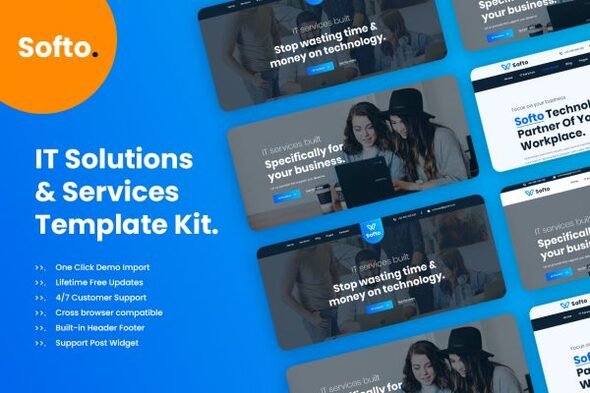
Softo IT Solutions & Business Elementor Template Kit
- Updated on April 29, 2026
- 100% Original Product & Well Documented
- Unlimited Domain Usage
*Important Note:
The image should not be Part of the template kit. You need to use your own reliable Source.


Original price was: ₹999.00.₹299.00Current price is: ₹299.00.
Launch your IT company website in hours with Softo — 15+ ready pages, smart layouts built for tech businesses, and lifetime updates. Stop waiting on developers. Be live today.
- Secured & Scanned by Virus total & McAfee.
- Access to Free updates for Lifetime
- All products are Under GPL License (Unlimited Domain Usage)
- We Not Provide any Support For this Product

Lifetime Membership
Access 6700+ Premium WordPress Themes & Plugins, Elementor Templates, Mobile Apps, PHP scripts with Lifetime Updates.
Join Premium MembershipRecently Viewed
Softo IT Solutions & Business Elementor Template Kit
Most IT companies wait months for a website because custom development costs thousands and agency communication takes forever. Softo skips that. Fifteen-plus pages designed specifically for tech businesses, ready to install through Elementor in minutes.
No generic IT skins here. Every section, layout, and typography choice comes from how real technology companies present themselves online — clean, direct, built to convert visitors into clients.
What You Get With This Template Kit
Softo covers every page your IT business needs:
- Homepage options with hero sections, service showcases, and testimonial blocks
- Services and Solutions pages with pricing tables and feature comparison layouts
- About Us, Team, and Company Culture pages
- Portfolio and Case Studies layouts to show off your actual work
- Contact forms, FAQ sections, and dedicated landing pages for campaigns
Pixel-perfect designs. Fully responsive. Clean CSS underneath that any developer can extend without fighting through bloated frameworks or unnecessary plugins.
Who Is This Template Kit For?
Softo fits:
- IT solutions providers and managed service providers (MSPs)
- Software companies and SaaS businesses
- Tech startups that need a professional website fast
- Web agencies looking for client-ready starting points
- Freelancers who need to deliver client sites without the usual turnaround time
If you can drag and drop in Elementor, you can have a complete IT company website live within a day. The structure’s handled — you focus on your content and branding.
How To Use It
Three steps: download from your account, import into Elementor (Tools → Import Kit), swap the placeholder content for yours. Every section is clearly labeled. Mix, match, or replace entirely — your call.
Global styles handle fonts, colors, and buttons across the whole kit. Change once, it updates everywhere. Basic customization happens in your WordPress dashboard. No FTP access needed.
Why Buy This Template Kit?
Commercial license included. Unlimited client projects — no hidden restrictions, no recurring fees. One payment, and you get lifetime updates as the kit evolves with Elementor and WordPress.
Compare that to custom development (weeks of back-and-forth, $3,000+ minimum) or marketplace templates (cookie-cutter designs, murky resale rights, no real support). Softo hits a sweet spot — professional quality without the professional price tag, with enough flexibility to make it yours.
Your competitors already have websites that look the part. Softo closes that gap so you can spend your energy winning clients instead of wrestling with code.
Ready to Get Started?
Download Softo IT Solutions & Business Elementor Template Kit today. Instant delivery. Lifetime updates. One simple price.
Only logged in customers who have purchased this product may leave a review.
How to use Kit:
Install and activate the “Template Kit – Import” plugin from Plugins > Add New in WordPress.
Do not unzip.
Go to Template Kit – Import > Upload Template Kit Zip File button.
Before importing a template, ensure the Install Requirements button is clicked to activate required plugins.
For best results, do not import more than one template at a time.
RELATED PRODUCTS

DIVI – Original License | One Time Payment – Exclusive Deal

Elementor Pro 4.1.3 + Elementorism Landing Pages WordPress Plugin

907 5.3.6 – Responsive Multi-Purpose WordPress Theme

Element Pack Pro 9.1.0 – Addon For Elementor

Lifetime Mini Membership





 Mobile Apps
 php script
 How to

Reviews
There are no reviews yet