
JWatch – Watch Store & Repair Service Elementor Template Kit
- Updated on April 28, 2026
- 100% Original Product & Well Documented
- Unlimited Domain Usage
*Important Note:
The image should not be Part of the template kit. You need to use your own reliable Source.


Original price was: ₹999.00.₹299.00Current price is: ₹299.00.
8 pre-built pages. A working repair booking system. A design that actually looks expensive. One payment, and your watch store website is done — no developer needed, ever.
- Secured & Scanned by Virus total & McAfee.
- Access to Free updates for Lifetime
- All products are Under GPL License (Unlimited Domain Usage)
- We Not Provide any Support For this Product

Lifetime Membership
Access 6700+ Premium WordPress Themes & Plugins, Elementor Templates, Mobile Apps, PHP scripts with Lifetime Updates.
Join Premium MembershipRecently Viewed
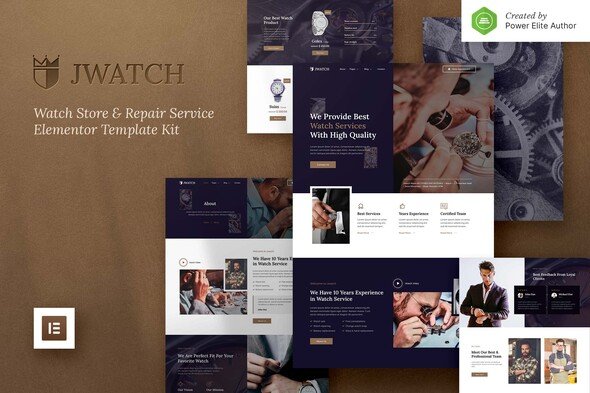
JWatch Elementor Template Kit for Watch Stores and Repair Services
Most watch store owners spend weeks getting their website right. JWatch changes that. It’s a complete template kit with 8 inner pages, a repair booking form, product showcases, and pricing layouts — everything you need to launch, all in one download.
What You Get
No fluff here. Just pages that work.
- Home, About, Services, Repair Booking, Product Catalog, Single Product, Blog, Contact — all pre-built and ready to customize
- Working repair form with date/time selection and service type dropdowns (customers book themselves, no back-and-forth emails)
- Product grids with hover effects and quick-view popups
- Mobile-responsive layouts that look sharp on any device
- Works with Elementor Free and Elementor Pro
Who It’s For
Independent retailers. Authorized dealers. Repair shops that want to stop losing business to customers who can’t find them online. Even jewelry stores adding timepieces to their lineup.
Freelance designers: the commercial license lets you use this for client projects. No extra fees. One template kit, unlimited client sites.
- Watch retail stores and boutiques
- Watch repair shops and service centers
- Jewelry stores expanding into timepieces
- Freelancers building client websites
How It Works
Install the Envato Elements plugin. Import into Elementor. Replace the placeholder text and images with your own. Headers, footers, buttons, forms — everything tweaks without touching code. Most users publish within 48 hours.
Why This Template Kit
At this price, you’re getting a fully functional watch store website plus commercial licensing. One payment. No monthly fees. No surprises.
- Commercial license included — use it for your own store or client projects
- Instant download after purchase
- Lifetime free updates
- Support team responds within 24 hours
Your Turn
Stop paying agencies to build what you can do yourself in a weekend. Download JWatch, swap in your photos and branding, and launch. That’s it.
Only logged in customers who have purchased this product may leave a review.
How to use Kit:
Install and activate the “Template Kit – Import” plugin from Plugins > Add New in WordPress.
Do not unzip.
Go to Template Kit – Import > Upload Template Kit Zip File button.
Before importing a template, ensure the Install Requirements button is clicked to activate required plugins.
For best results, do not import more than one template at a time.
RELATED PRODUCTS

DIVI – Original License | One Time Payment – Exclusive Deal

Elementor Pro 4.1.3 + Elementorism Landing Pages WordPress Plugin

907 5.3.6 – Responsive Multi-Purpose WordPress Theme

Element Pack Pro 9.1.0 – Addon For Elementor

Lifetime Mini Membership





 Mobile Apps
 php script
 How to

Reviews
There are no reviews yet