
Archouse – Architecture & Interior Design Studio Elementor Template Kit
- Updated on April 28, 2026
- 100% Original Product & Well Documented
- Unlimited Domain Usage
*Important Note:
The image should not be Part of the template kit. You need to use your own reliable Source.


Original price was: ₹999.00.₹299.00Current price is: ₹299.00.
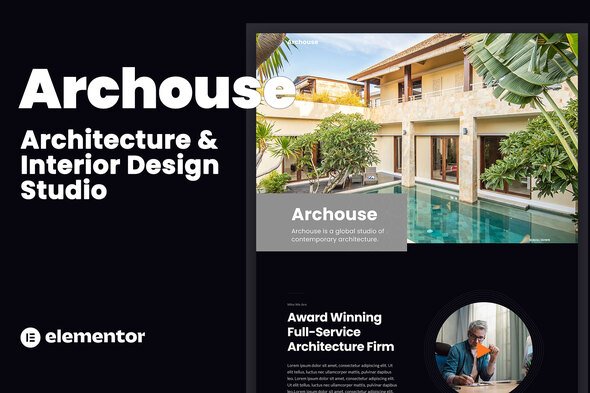
Finally, a website that matches your portfolio. Archouse gives architecture firms 8 polished pages with bold layouts and drag-and-drop editing — no coder needed. Commercial license included, launch this week.
- Secured & Scanned by Virus total & McAfee.
- Access to Free updates for Lifetime
- All products are Under GPL License (Unlimited Domain Usage)
- We Not Provide any Support For this Product

Lifetime Membership
Access 6700+ Premium WordPress Themes & Plugins, Elementor Templates, Mobile Apps, PHP scripts with Lifetime Updates.
Join Premium MembershipRecently Viewed
Archouse Architecture & Interior Design Template Kit for Elementor
Your work deserves better than a template built for everyone. Archouse was designed for architecture studios, interior designers, and creative firms who want a site that looks like they paid someone to build it — without the agency price tag. Eight complete pages. No code. A design aesthetic that fits high-end practice.
What’s Inside the Kit
Each page handles a specific job: hero sections that make an impression, portfolio grids that let your projects breathe, service breakdowns that actually explain what you do, and contact pages that make it easy for clients to reach out. The kit covers Home, About, Services, Portfolio, Project Detail, Team, Contact, and Blog.
- 8 pages ready to customize in minutes
- Pre-built sections for testimonials, logos, services, and calls-to-action
- Responsive design that holds up on phones, tablets, and retina screens
- Lightweight code that won’t slow your site down
Who Is This For?
Architecture firms launching fresh sites. Interior design studios giving their online presence a refresh. Freelancers tired of sending clients to bare-bones portfolio pages. Agencies that need to spin up client sites without starting from zero each time. If you’ve been putting off your website because the technical stuff feels like a foreign language, this kit speaks your language instead.
Setup in Three Steps
Install Elementor (free plugin). Import the kit. Swap in your own images and copy. That’s the whole process. Everything uses Elementor’s free widgets — no premium plugins to buy. Change fonts and colors through the WordPress Customizer to match your brand. No developer. No 50-page documentation to read.
Design That Gets Out of the Way
Architecture work speaks for itself. The template gives it room to do that. Large images. Smart spacing. Typography that reads well without competing with your projects. The portfolio grid handles single images and masonry layouts equally well. Service pages break down your offerings without fluffy marketing speak. The about section has space for your firm’s story and your team’s photos.
- Portfolio grid with filtering by project type
- Project detail pages with image galleries
- Contact page with form, map placeholder, and contact info
- Blog template for case studies and firm updates
The Bottom Line
Building from scratch takes weeks. Hiring a developer takes thousands. Archouse gets you there today. Commercial license covers client work — no extra fees. Lifetime updates keep things compatible as WordPress and Elementor release new versions. One payment. No subscriptions.
Start Building
Download Archouse and have a real architecture website running by end of week. Works with any modern WordPress theme. Only needs the free Elementor plugin. Built for firms ready to stand out instead of blend in.
Only logged in customers who have purchased this product may leave a review.
How to use Kit:
Install and activate the “Template Kit – Import” plugin from Plugins > Add New in WordPress.
Do not unzip.
Go to Template Kit – Import > Upload Template Kit Zip File button.
Before importing a template, ensure the Install Requirements button is clicked to activate required plugins.
For best results, do not import more than one template at a time.
RELATED PRODUCTS

DIVI – Original License | One Time Payment – Exclusive Deal

Elementor Pro 4.2.1 + Elementorism Landing Pages WordPress Plugin

907 5.3.6 – Responsive Multi-Purpose WordPress Theme

Element Pack Pro 9.1.0 – Addon For Elementor






 Mobile Apps
 php script
 How to
Reviews
There are no reviews yet