
Lafuma – Car Rental & Auto Dealer Elementor Template Kit
- Updated on April 28, 2026
- 100% Original Product & Well Documented
- Unlimited Domain Usage
*Important Note:
The image should not be Part of the template kit. You need to use your own reliable Source.


Original price was: ₹999.00.₹299.00Current price is: ₹299.00.
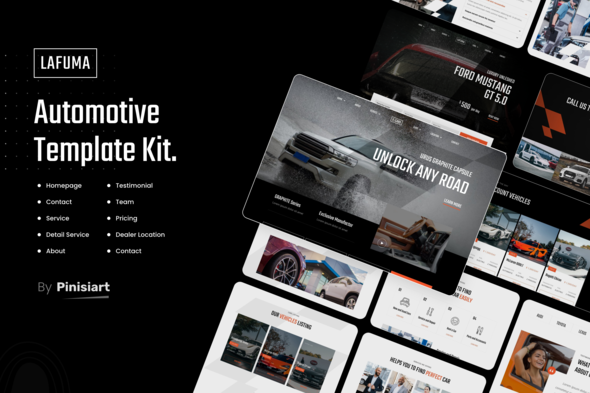
Launch a polished car rental or auto dealership website in hours, not weeks. The Lafuma Elementor Template Kit gives your business a professional online presence — complete with booking forms, vehicle listings, and a design that converts.
- Secured & Scanned by Virus total & McAfee.
- Access to Free updates for Lifetime
- All products are Under GPL License (Unlimited Domain Usage)
- We Not Provide any Support For this Product

Lifetime Membership
Access 6700+ Premium WordPress Themes & Plugins, Elementor Templates, Mobile Apps, PHP scripts with Lifetime Updates.
Join Premium MembershipRecently Viewed
Lafuma Elementor Template Kit for Car Rental & Auto Dealer Websites
Building a website that actually books vehicles and generates leads takes time most business owners don’t have. The Lafuma Elementor Template Kit eliminates the design and development guesswork, giving you a fully structured website that’s ready to launch today. No coding required — just drag, drop, and customize to match your brand. Instant download means you’re editing your live site within minutes of purchase, not waiting days for a developer to deliver files.
This template kit targets a specific problem: car rental companies and auto dealerships need websites that do more than look pretty. You need functionality that works — appointment booking, vehicle inventory displays, service request forms, and pricing tables that don’t require a developer to update. Lafuma delivers all of this in a single package, built specifically for the automotive industry using Elementor, the world’s most popular WordPress page builder.
What the Lafuma Template Kit Includes
This isn’t a generic business template with a car stock photo slapped in. Every section serves a purpose for vehicle rental and sales operations. You get pre-designed pages for home, about, services, vehicle fleet listings, pricing, team profiles, contact forms, and a blog. The layouts adapt to your content automatically, so you’re not rebuilding sections when you add a new vehicle or service package.
- Homepage with hero section, featured vehicles, and call-to-action blocks
- Vehicle inventory grid layouts with filters and individual listing pages
- Online booking and reservation forms connected to your workflow
- Service pages for maintenance, detailing, and specialty rentals
- Pricing tables with daily, weekly, and monthly rate options
- Contact page with embedded maps, business hours, and multi-location support
- Testimonial and review sections to build trust with first-time visitors
Who Should Buy the Lafuma Template Kit
If you’re launching a car rental company, an independent auto dealership, a luxury vehicle fleet service, or even a boat and RV rental business, this template kit works for you. It’s built for WordPress users who want professional results without hiring a designer or spending weeks learning web development. You don’t need to be an Elementor expert — the kit includes documentation and the interface works exactly like standard WordPress editing.
Freelance designers and web agencies also use template kits like Lafuma to speed up client projects. Start with a professional foundation, customize the branding, and deliver a complete website in days instead of weeks. Your clients get a functional, attractive site and you keep more profit on every project.
How to Use This Template Kit
After purchase, you download a ZIP file containing the template kit. In your WordPress dashboard, navigate to Templates > Theme Builder, import the kit, and you’re ready to begin. Replace the placeholder content with your vehicles, pricing, contact information, and branding. The responsive design works on mobile devices automatically — your site visitors will see a polished experience whether they’re browsing on a phone at a car lot or a desktop at home.
All sections use Elementor’s native widgets, meaning you can further customize colors, fonts, spacing, and animations without touching code. When you’re satisfied with the design, publish and start driving traffic. The template is optimized for speed and SEO, so your vehicle listings have a better chance of ranking in local search results for car rental services in your area.
Why Buy the Lafuma Template Kit
Three words: time, money, and professionalism. Hiring a developer to build a custom car rental website costs between $2,000 and $10,000 depending on features. This template kit costs a fraction of that while delivering a design that matches or exceeds what you’d get from a mid-range development project. You also get a commercial license included — use it for client projects, your own business, or multiple sites without additional fees.
The kit includes lifetime free updates. When Elementor releases new features or WordPress standards shift, you receive the updated files at no extra cost. One-time payment, lifetime access. No subscriptions, no recurring charges, no surprises on your credit card statement next year.
Support is included. If you run into installation issues or have questions about customizing a specific section, help is available. You won’t be left hanging with a half-finished website and no way to fix it.
Ready to Get Started?
Your competitors already have professional websites booking vehicles and capturing leads while you’re still deciding whether to DIY or hire out. The Lafuma Elementor Template Kit removes that decision. Download instantly, install today, and have a live car rental or auto dealer website by tomorrow morning. The commercial license covers your first project or client — no strings attached. Click buy now and get your template kit in seconds.
Only logged in customers who have purchased this product may leave a review.
How to use Kit:
Install and activate the “Template Kit – Import” plugin from Plugins > Add New in WordPress.
Do not unzip.
Go to Template Kit – Import > Upload Template Kit Zip File button.
Before importing a template, ensure the Install Requirements button is clicked to activate required plugins.
For best results, do not import more than one template at a time.
RELATED PRODUCTS

DIVI – Original License | One Time Payment – Exclusive Deal

Elementor Pro 4.1.3 + Elementorism Landing Pages WordPress Plugin

907 5.3.6 – Responsive Multi-Purpose WordPress Theme

Element Pack Pro 9.1.0 – Addon For Elementor

Lifetime Mini Membership





 Mobile Apps
 php script
 How to
Reviews
There are no reviews yet