
Aevine – Creative Portfolio & Agency Elementor Template Kit
- Updated on April 28, 2026
- 100% Original Product & Well Documented
- Unlimited Domain Usage
*Important Note:
The image should not be Part of the template kit. You need to use your own reliable Source.


Original price was: ₹999.00.₹299.00Current price is: ₹299.00.
Stop spending weeks on portfolio setup. Aevine is a complete Elementor template kit for agencies and creatives — download today, build tonight, launch tomorrow. Commercial license included.
- Secured & Scanned by Virus total & McAfee.
- Access to Free updates for Lifetime
- All products are Under GPL License (Unlimited Domain Usage)
- We Not Provide any Support For this Product

Lifetime Membership
Access 6700+ Premium WordPress Themes & Plugins, Elementor Templates, Mobile Apps, PHP scripts with Lifetime Updates.
Join Premium MembershipRecently Viewed
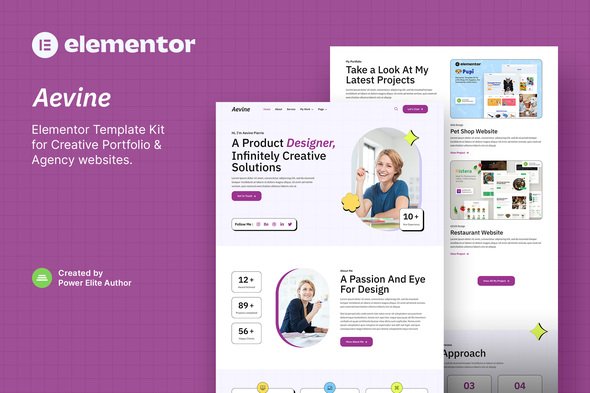
Creative Portfolio Template Kit for Modern Agencies
Most designers spend more time building their portfolio than their actual portfolio work. Aevine fixes that. It’s an Elementor template kit built for freelancers, agencies, and creatives who need a professional site up fast — no code, no developers, no month-long project cycles.
Out of the box, you get 15+ pre-built pages covering everything: homepage layouts, portfolio grids with lightbox views, service pages, team profiles, testimonials, and contact forms. The whole thing slots into Elementor’s drag-and-drop builder. Tweak fonts, swap colors, upload your work — it takes minutes, not hours.
No placeholder fluff here. Every section is designed to actually convert visitors into paying clients.
What’s Inside the Kit
- 15+ ready-to-use pages and section templates
- Fully responsive layouts that look sharp on phones, tablets, and desktops
- Clean typography and color systems you can customize to match any brand
- Portfolio grids with hover animations and full-screen lightbox views
- Pricing tables for service-based businesses
- Lead-generating contact sections and calls-to-action
- Team profiles with social media links
- Blog templates if content marketing is part of your strategy
Who This Is For
Aevine was made for creatives who are tired of generic website builders but don’t want to learn WordPress development just to have a decent online presence. If you’re a photographer, illustrator, brand strategist, or web designer, you can have a site live today.
Agency owners love it because they can spin up client-ready portfolios in a couple hours. That means more billable work and fewer backend headaches. The kit pays for itself on the first project.
How to Get Started
Setup is simple. Buy, download, install through your WordPress dashboard or upload manually. The included guide walks you through importing pages, swapping placeholder content, and publishing. Most people are live within 30 minutes of purchase.
Customization is visual — pick your brand colors, drop in your portfolio pieces, update the text, done. The modular structure lets you reuse sections across pages without starting over each time.
Why Aevine Over Other Kits
Most template kits load slow or look dated within a year. Aevine was built clean from scratch. Pages load fast, code stays lightweight, and the design language stays relevant. No bloat.
One payment. Lifetime access. Use it on unlimited client projects — the commercial license covers commercial work, no add-ons needed. As WordPress and Elementor evolve, your template gets updated for free.
Stuck on something? Documentation and community resources are available. You’re not buying this blind.
Launch Your Portfolio Today
No monthly fees. No subscriptions eating into project margins. Instant download, commercial license, and a template that actually looks like it cost thousands to build. You handle the creative work — Aevine handles the website.
Only logged in customers who have purchased this product may leave a review.
How to use Kit:
Install and activate the “Template Kit – Import” plugin from Plugins > Add New in WordPress.
Do not unzip.
Go to Template Kit – Import > Upload Template Kit Zip File button.
Before importing a template, ensure the Install Requirements button is clicked to activate required plugins.
For best results, do not import more than one template at a time.
RELATED PRODUCTS

DIVI – Original License | One Time Payment – Exclusive Deal

Elementor Pro 4.2.3 + Elementorism Landing Pages WordPress Plugin

907 5.3.6 – Responsive Multi-Purpose WordPress Theme

Element Pack Pro 9.1.0 – Addon For Elementor






 Mobile Apps
 php script
 How to
Reviews
There are no reviews yet