
Alivra – Hajj & Umrah Tour Elementor Template Kit
- Updated on September 18, 2025
- 100% Original Product & Well Documented
- Unlimited Domain Usage

*Important Note:
The image should not be Part of the template kit. You need to use your own reliable Source.


Original price was: ₹999.00.₹299.00Current price is: ₹299.00.
- Secured & Scanned by Virus total & McAfee.
- Access to Free updates for Lifetime
- All products are Under GPL License (Unlimited Domain Usage)
- We Not Provide any Support For this Product

Lifetime Membership
Access 6700+ Premium WordPress Themes & Plugins, Elementor Templates, Mobile Apps, PHP scripts with Lifetime Updates.
Join Premium MembershipRecently Viewed
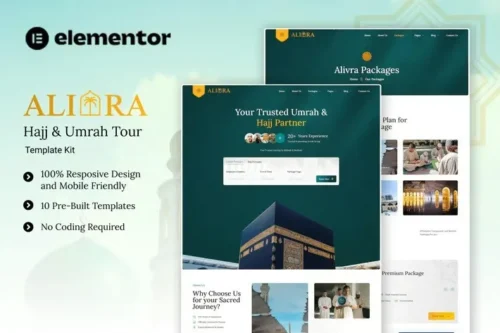
Alivra is a modern and elegant Elementor Template Kit designed for Umrah and Hajj travel services. Perfect for travel agencies, pilgrimage organizers, and group tour providers, this kit helps you showcase packages, highlight pilgrim experiences, and present your services with trust and professionalism. Alivra uses only free elements—so you can easily explore, customize, and launch your website with confidence and ease. Alivra provides various pages including Home, About Us, Packages, Details Packages, Pricing Plans, Service, Our Team, 404, Blog, Single Blog, Contact Us.
Plugin Dependencies :
Elementor
Jeg Elementor Kit
The Plus Addons for Elementor
Ultimate Addons for Elementor Lite
Templates
- Home
- About Us
- Packages
- Details Packages
- Pricing Plans
- Service
- Our Team
- 404
- Blog
- Single Blog
- Contact Us
Font Used
Lora
Roboto
How to setup header in Jeg Elementor Kit plugin
If you have Elementor Pro, setup headers and footers in Theme Builder. Pages you create with Elementor must have the Page Layout set to Elementor Full width for the global header and footer to appear.
- Go to Jeg Elementor Kit menu item > Header Template
- Click Add New Header
- Add condition > All Site and click Create
- Click the pencil icon to Edit and elementor will appear
- Click gray folder icon to access My Templates tab
- Insert the header template.
- Customize and Save.
How to Import MetForm Custom Form:
- While edititing a page where a form should appear, open the Elementor navigator to locate the Metform widget.
- Click Edit Form in the builder panel.
- Select New, leave blank selected then click Edit Form button.
- Click ‘Add Template’ grey folder button.
- Click ‘My Templates’ tab.
- Choose your imported MetForm template, then click ‘Insert’.
- Once the template is loaded, click ‘Update’.
 Alivra - Hajj & Umrah Tour Elementor Template Kit
How to use Kit:
Install and activate the “Template Kit – Import” plugin from Plugins > Add New in WordPress.
Do not unzip.
Go to Template Kit – Import > Upload Template Kit Zip File button.
Before importing a template, ensure the Install Requirements button is clicked to activate required plugins.
For best results, do not import more than one template at a time.










 Mobile Apps
 php script
 How to
Reviews
There are no reviews yet