
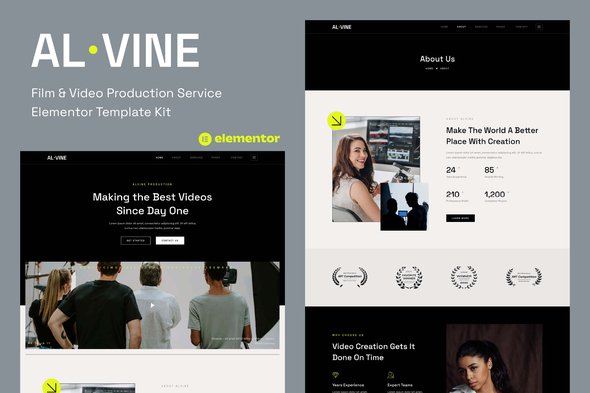
Alvine – Film & Video Production Service Elementor Template Kit
- Updated on April 28, 2026
- 100% Original Product & Well Documented
- Unlimited Domain Usage
*Important Note:
The image should not be Part of the template kit. You need to use your own reliable Source.


Original price was: ₹999.00.₹299.00Current price is: ₹299.00.
A complete film production website that actually looks like you paid a designer. 8 Elementor pages, filterable portfolio, video headers, and service layouts—everything you need to launch in an afternoon. Commercial license included.
- Secured & Scanned by Virus total & McAfee.
- Access to Free updates for Lifetime
- All products are Under GPL License (Unlimited Domain Usage)
- We Not Provide any Support For this Product

Lifetime Membership
Access 6700+ Premium WordPress Themes & Plugins, Elementor Templates, Mobile Apps, PHP scripts with Lifetime Updates.
Join Premium MembershipRecently Viewed
Alvine – Film & Video Production Service Elementor Template Kit
Stop spending weeks trying to DIY your online presence. Alvine gives you a professional film and video production website without the design headaches. Built for studios, videographers, and production agencies, this Elementor template kit comes with eight complete pages ready to customize and publish. Hero sections that move, portfolio grids that filter automatically, service pages that actually explain what you do, team profiles, and a contact form that doesn’t make people hunt for your email. Import, tweak, launch.
What It Is
A pre-built website template for film and video production businesses. It runs inside Elementor—no coding knowledge needed. The kit includes eight pages that share consistent fonts, colors, and layout patterns, so your whole site looks intentional rather than cobbled together. Every section uses Elementor’s standard widgets. Drag, drop, type, swap images. That’s it.
Key Features
- 8 pages: Homepage, About, Services, Portfolio, Single Portfolio, Team, Contact, and 404
- Filterable portfolio grid—clients can browse your work by category without clicking through everything
- Video backgrounds in hero sections that autoplay without being annoying
- Service layouts with pricing tables and feature lists that actually fit your content
- Testimonial slider for client reviews
- Looks good on phones, tablets, and desktops—no weird stretching or cut-off text
- Works with Elementor Free and Elementor Pro
Who It’s For
Freelance videographers building their first real portfolio. Small production companies that need a website up yesterday. Agencies turning around client sites on a deadline. If you’ve touched WordPress and Elementor before, you’ll figure this out in minutes. If you haven’t, the included setup guide holds your hand through every step. The look is clean and minimal—your reel does the heavy lifting, not flashy effects.
How To Use It
Download the ZIP after purchase. In WordPress, go to Elementor Tools and import the kit. Pick which pages you want, and they’ll load with placeholder content you replace with your own. Portfolio accepts YouTube, Vimeo, or self-hosted videos. Change colors and fonts through Elementor’s site settings to match your brand. No child theme, no code, no complicated setup steps. Import and go.
Why Buy This
Custom design costs money and time. Diy page builders take forever and often look like DIY projects. Alvine removes that friction. One price, commercial license included—you can use this for client work without paying again. Lifetime free updates mean if Elementor adds new features or we refresh the design, you get the new version automatically. Stuck during setup? Support is available.
For roughly what you’d pay a designer for one revision round, you get a complete website foundation you can expand as your business grows. Portfolio site for new clients? Done. Full production company presence with services and testimonials? Also done. Download the kit and get something live before your next project kicks off.
Ready to Get Started?
Download Alvine and have a professional film production website ready before your next deadline. Instant access, commercial license, lifetime updates—one purchase, ongoing value. No subscriptions, no surprises.
Only logged in customers who have purchased this product may leave a review.
How to use Kit:
Install and activate the “Template Kit – Import” plugin from Plugins > Add New in WordPress.
Do not unzip.
Go to Template Kit – Import > Upload Template Kit Zip File button.
Before importing a template, ensure the Install Requirements button is clicked to activate required plugins.
For best results, do not import more than one template at a time.
RELATED PRODUCTS

DIVI – Original License | One Time Payment – Exclusive Deal

Elementor Pro 4.2.3 + Elementorism Landing Pages WordPress Plugin

907 5.3.6 – Responsive Multi-Purpose WordPress Theme

Element Pack Pro 9.1.0 – Addon For Elementor






 Mobile Apps
 php script
 How to
Reviews
There are no reviews yet