
Amplify – Digital Marketing Agency Elementor Template Kit
- Updated on May 3, 2026
- 100% Original Product & Well Documented
- Unlimited Domain Usage
*Important Note:
The image should not be Part of the template kit. You need to use your own reliable Source.


Original price was: ₹999.00.₹299.00Current price is: ₹299.00.
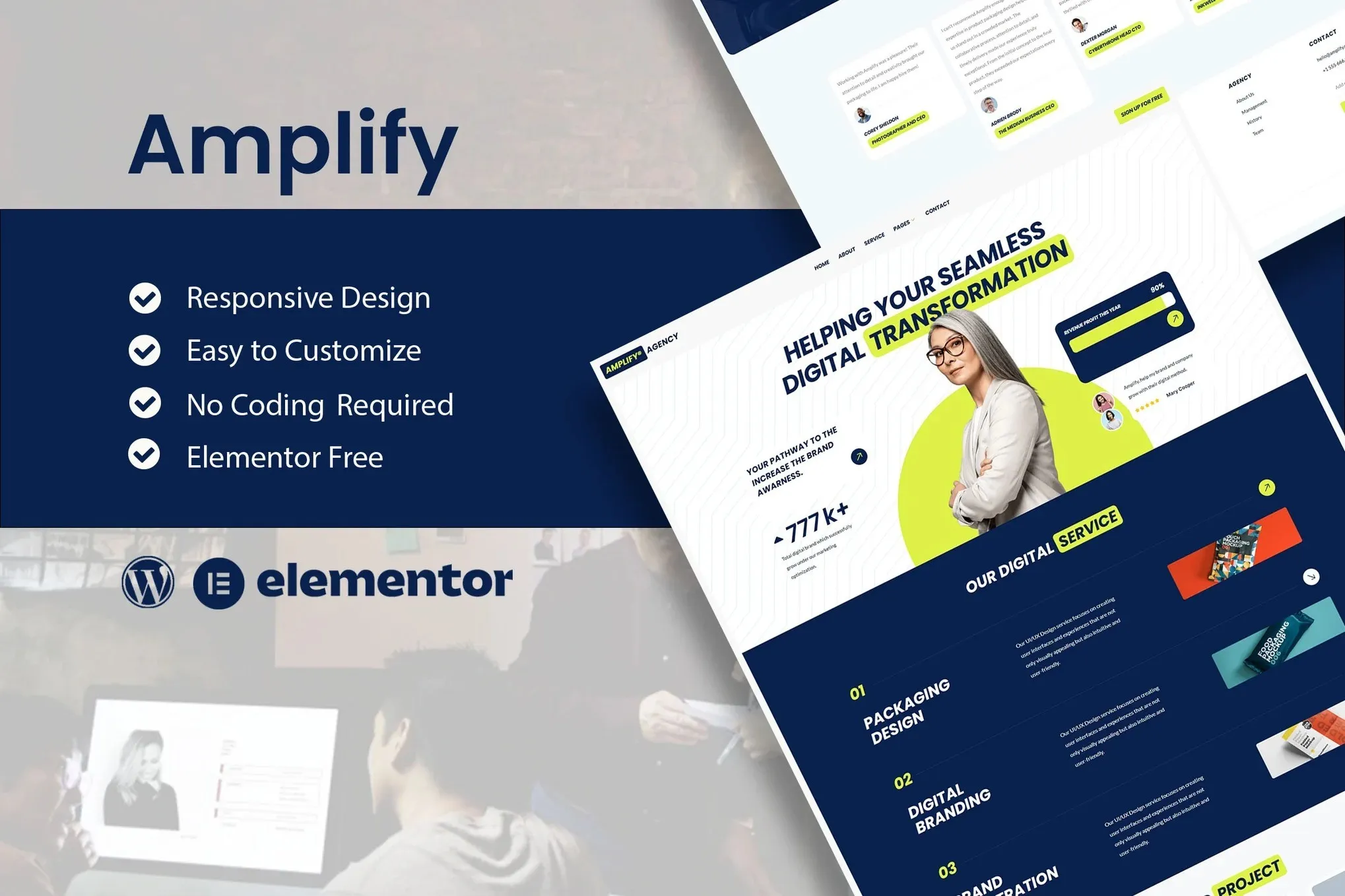
Build a professional digital marketing agency website without touching code. Amplify gives you 15+ ready-to-use pages, a commercial license, and everything you need to start booking clients the same day you download it.
- Secured & Scanned by Virus total & McAfee.
- Access to Free updates for Lifetime
- All products are Under GPL License (Unlimited Domain Usage)
- We Not Provide any Support For this Product

Lifetime Membership
Access 6700+ Premium WordPress Themes & Plugins, Elementor Templates, Mobile Apps, PHP scripts with Lifetime Updates.
Join Premium MembershipRecently Viewed
Amplify – Digital Marketing Agency Elementor Template Kit
Forget spending four weeks on development or dropping thousands on a designer. Amplify is a complete agency website you build with drag-and-drop — no code, no developer, no waiting. It gives marketing agencies, freelancers, and consultants a shortcut to a professional online presence that actually turns visitors into paying clients.
What’s Inside
Amplify isn’t a single landing page. It’s 15+ fully designed pages covering everything a modern agency needs: homepage, services, case studies, team, pricing, blog, and contact. Each page uses proven layouts — clear hierarchy, intentional spacing, copy placement that guides the eye toward your CTA.
- 15+ pre-built pages for Elementor (no Pro required)
- Fully responsive — looks sharp on phones, tablets, and desktops
- Matching header and footer templates
- Inner page layouts for services, portfolio, and blog posts
- Professional color palette and typography system included
The look is clean and confident without being sterile — the kind of site that makes prospects think, “These people know what they’re doing.”
Who It’s For
Digital marketing agencies, social media consultants, SEO specialists, branding studios, and freelance creatives. If your clients are businesses and you need a website that demonstrates credibility upfront, Amplify does that work for you.
It’s also a time-saver for web designers building client sites. Import Amplify, drop in their branding, and deliver a polished result in a few hours instead of days.
Getting Started
Download, install through your WordPress dashboard, import the pages into Elementor. The free version handles everything — no Pro needed. Swap in your own text, upload your portfolio, adjust the colors, and publish.
- Install via WordPress Plugins > Add New > Upload
- Import from Elementor > Tools > Import Template Kit
- Edit any page with drag-and-drop
- Publish and connect your domain
Most people have a live site the same day they download.
Why Amplify Beats the Other Options
Hiring a developer costs thousands and takes weeks of revisions. Free themes are built for blogs, not agencies — you’ll spend hours forcing them into something usable. Subscription services charge monthly, forever. Amplify is a one-time purchase. You own it. No recurring fees.
The commercial license means you can use it for client projects without restrictions. Lifetime updates keep things working as WordPress evolves. And if you get stuck during setup, support is available.
Ready to Launch?
Your website should do the selling before you even get on a call. Buy Amplify now and download the complete template kit instantly. Customize it in Elementor, go live, and start attracting clients who already trust you the moment they land on your page.
Only logged in customers who have purchased this product may leave a review.
How to use Kit:
Install and activate the “Template Kit – Import” plugin from Plugins > Add New in WordPress.
Do not unzip.
Go to Template Kit – Import > Upload Template Kit Zip File button.
Before importing a template, ensure the Install Requirements button is clicked to activate required plugins.
For best results, do not import more than one template at a time.
RELATED PRODUCTS

DIVI – Original License | One Time Payment – Exclusive Deal

Elementor Pro 4.2.3 + Elementorism Landing Pages WordPress Plugin

907 5.3.6 – Responsive Multi-Purpose WordPress Theme

Element Pack Pro 9.1.0 – Addon For Elementor






 Mobile Apps
 php script
 How to
Reviews
There are no reviews yet