
Appy – SaaS & App Landing Page Elementor Template Kit
- Updated on April 30, 2026
- 100% Original Product & Well Documented
- Unlimited Domain Usage
*Important Note:
The image should not be Part of the template kit. You need to use your own reliable Source.


Original price was: ₹999.00.₹299.00Current price is: ₹299.00.
Build a conversion-ready app landing page today. This Elementor template kit gives you 15+ pre-built sections, instant access after purchase, and a commercial license that covers every project you take on.
- Secured & Scanned by Virus total & McAfee.
- Access to Free updates for Lifetime
- All products are Under GPL License (Unlimited Domain Usage)
- We Not Provide any Support For this Product

Lifetime Membership
Access 6700+ Premium WordPress Themes & Plugins, Elementor Templates, Mobile Apps, PHP scripts with Lifetime Updates.
Join Premium MembershipRecently Viewed
Appy: Elementor Template Kit for Modern App Landing Pages
Most founders know they need a landing page. Fewer have the time to build one from scratch or the budget to hire an agency. That’s where Appy fits.
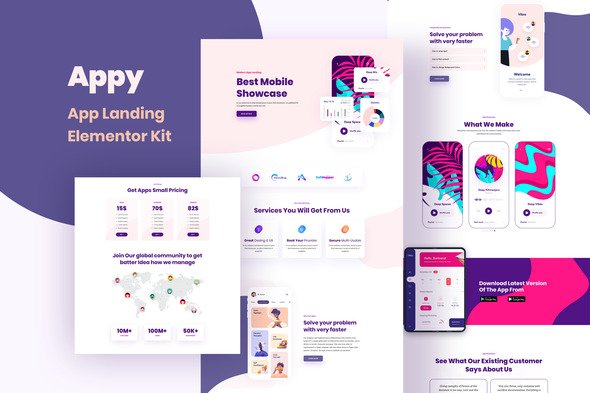
This kit gets you a professional, conversion-focused landing page without touching code. Hero sections, feature grids, pricing tables, testimonials, FAQ blocks, and CTA banners—all ready to drop into Elementor and customize with your brand.
What You Get With Appy
- 15+ pre-built sections tailored for app and SaaS landing pages
- Responsive layouts that hold up on mobile, tablet, and desktop
- Commercial license included—no hidden fees, no restrictions on client work
- Clean code structure that plays nice with SEO plugins
- Lightweight design that loads fast and keeps visitors engaged
The hero section sets the tone. Clean typography, a single clear message, and a prominent action button. Feature sections highlight three, four, or six benefits without overwhelming visitors. Pricing tables come pre-styled for SaaS tiers and app subscription models. Testimonial blocks include space for quotes and star ratings.
Who Appy Is Built For
This kit works well for:
- SaaS founders who need a landing page up fast to test product-market fit
- Mobile app developers launching on iOS, Android, or both platforms
- Freelancers building client sites without writing custom code
- Marketing teams running product launches or beta campaigns
- Small businesses wanting a professional look without a custom build
If you’ve been putting off your landing page because the cost or timeline felt overwhelming, this kit removes that excuse.
How to Use Appy
No coding skills required.
Install the free Elementor plugin on your WordPress site. Download the Appy kit from your account. In WordPress, go to Templates, click Import, and upload the kit file. The sections appear in your template library immediately.
From there, it’s just editing. Swap headings, change images, adjust colors to match your brand. Each section works independently, so pick what you need and skip what you don’t. Drop in your app screenshots, write your headline, set your pricing.
Hit publish. Done.
Why Buy This Template Kit
You could build from scratch. You could hire a designer. You could buy a generic theme and spend days making it fit.
Or you get a landing page kit designed specifically for apps—conversion-focused layouts, mobile-first structure, readable typography—at a fraction of the cost. One payment. Instant access. Commercial license covers unlimited projects, including client work.
Pre-built doesn’t mean boring. It means skipping the tedious parts so you can ship.
Ready to Get Started?
Stop delaying. Get Appy now and have a polished landing page ready today. Instant download. Commercial license included. No subscriptions.
Only logged in customers who have purchased this product may leave a review.
How to use Kit:
Install and activate the “Template Kit – Import” plugin from Plugins > Add New in WordPress.
Do not unzip.
Go to Template Kit – Import > Upload Template Kit Zip File button.
Before importing a template, ensure the Install Requirements button is clicked to activate required plugins.
For best results, do not import more than one template at a time.
RELATED PRODUCTS

DIVI – Original License | One Time Payment – Exclusive Deal

Elementor Pro 4.2.3 + Elementorism Landing Pages WordPress Plugin

907 5.3.6 – Responsive Multi-Purpose WordPress Theme

Element Pack Pro 9.1.0 – Addon For Elementor






 Mobile Apps
 php script
 How to
Reviews
There are no reviews yet