
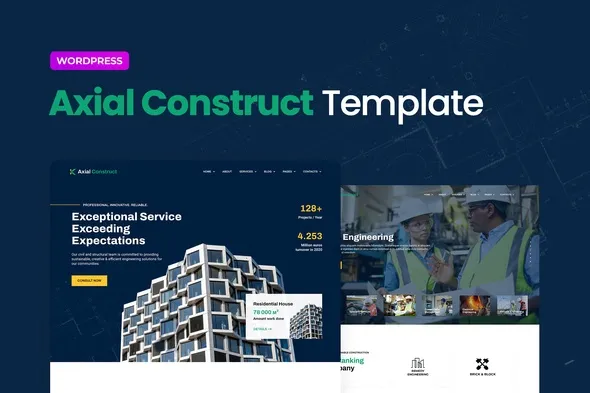
Axial – Construction Company Elementor Template Kit
- Updated on May 2, 2026
- 100% Original Product & Well Documented
- Unlimited Domain Usage
*Important Note:
The image should not be Part of the template kit. You need to use your own reliable Source.


Original price was: ₹999.00.₹299.00Current price is: ₹299.00.
Launch a construction website in an afternoon. Axial gives you 8+ pages, project galleries, and service layouts — no developer required, just drag, drop, and go live.
- Secured & Scanned by Virus total & McAfee.
- Access to Free updates for Lifetime
- All products are Under GPL License (Unlimited Domain Usage)
- We Not Provide any Support For this Product

Lifetime Membership
Access 6700+ Premium WordPress Themes & Plugins, Elementor Templates, Mobile Apps, PHP scripts with Lifetime Updates.
Join Premium MembershipRecently Viewed
Axial – Construction Company Elementor Template Kit
Axial is an Elementor Template Kit built for construction companies, architecture firms, and contractors who want a polished website without the developer bills. It comes with 8+ pre-designed pages: homepage, about, services, projects gallery, team, testimonials, and contact — all structured for the construction trade.
What It Is
Instead of building from scratch, you get a library of pre-styled templates that work right out of the box with the free Elementor plugin. Headers, footers, inner page layouts — the whole package gives your site a consistent, professional look immediately.
The kit focuses on what construction companies actually need: showing off completed projects, laying out services clearly, and making it simple for potential clients to get in touch. Bold typography. Project galleries that actually look good. No fluff.
Key Features
Everything you need for a complete construction website, packaged together.
- 8+ pre-built page templates covering your entire site
- Project portfolio pages with filtering and gallery options
- Service sections with pricing tables built in
- Team member profiles and testimonial blocks
- Contact and quote request forms, pre-styled and ready
- Fully responsive — looks good on phones, tablets, and desktops
- Header and footer templates that stay consistent across all pages
- Change colors and fonts through Elementor — no code needed
Who It’s For
Construction companies. Building contractors. Architecture firms. Interior designers. Real estate developers. Engineering consultancies.
Starting fresh or updating an old site — Axial gives you a professional base that makes potential clients take you seriously. The kind of website that helps you win more bids.
If you’ve been avoiding the website thing because custom work costs too much or takes too long, this fixes that. Professional result, no weeks of waiting, no five-figure price tag.
How To Use It
Install the free Elementor plugin on your WordPress site, upload the template kit file, and import the pages you want. Drag-and-drop editing handles everything after that. Swap your images in, update the text, match your brand colors, and launch.
Works with Elementor Free — no Pro subscription required. Import templates one at a time or all together, whatever fits your workflow.
Why Buy This
Construction websites tend to look either outdated or cost a fortune to build right. Axial is the affordable middle ground that ships same day.
Commercial license included — use it for client projects too. That makes it a solid investment for agencies and freelancers working with contractors.
Every template is built for getting results. Clear calls to action. Easy contact options. Project galleries that show what you can do. It helps you win business, not just fill a URL.
Download Axial now and have a professional construction website ready in hours instead of months.
Ready to Get Started?
Get instant access. One payment, lifetime use, commercial license included. No subscriptions. No surprises — just a template kit you can start using immediately.
Only logged in customers who have purchased this product may leave a review.
How to use Kit:
Install and activate the “Template Kit – Import” plugin from Plugins > Add New in WordPress.
Do not unzip.
Go to Template Kit – Import > Upload Template Kit Zip File button.
Before importing a template, ensure the Install Requirements button is clicked to activate required plugins.
For best results, do not import more than one template at a time.
RELATED PRODUCTS

DIVI – Original License | One Time Payment – Exclusive Deal

Elementor Pro 4.2.3 + Elementorism Landing Pages WordPress Plugin

907 5.3.6 – Responsive Multi-Purpose WordPress Theme

Element Pack Pro 9.1.0 – Addon For Elementor






 Mobile Apps
 php script
 How to
Reviews
There are no reviews yet