
Axpos – Point Of Sale Software & SaaS Landing Page Elementor Template Kit
- Updated on May 4, 2026
- 100% Original Product & Well Documented
- Unlimited Domain Usage
*Important Note:
The image should not be Part of the template kit. You need to use your own reliable Source.


Original price was: ₹999.00.₹299.00Current price is: ₹299.00.
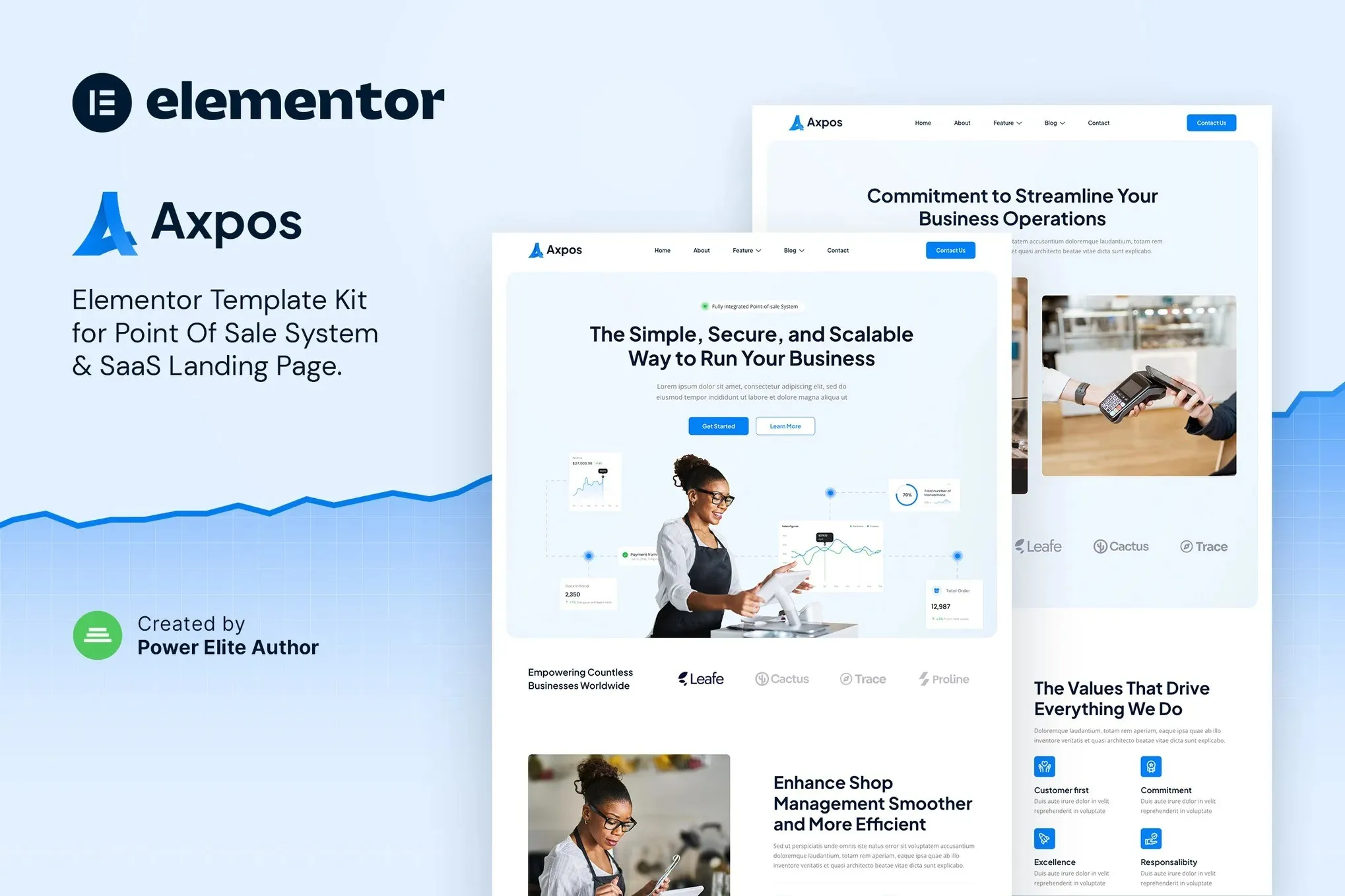
Launch your POS landing page in hours. 14+ Elementor templates, instant download, no coding required. Commercial license included.
- Secured & Scanned by Virus total & McAfee.
- Access to Free updates for Lifetime
- All products are Under GPL License (Unlimited Domain Usage)
- We Not Provide any Support For this Product

Lifetime Membership
Access 6700+ Premium WordPress Themes & Plugins, Elementor Templates, Mobile Apps, PHP scripts with Lifetime Updates.
Join Premium MembershipRecently Viewed
Build Your POS Landing Page in Hours, Not Weeks
Forget spending weeks wrestling with code or forking out thousands for a designer. Axpos gives you a complete Point of Sale website template kit built for Elementor — the WordPress page builder everyone’s using. Fourteen templates, ready to customize, and you could be live today.
What’s Inside This Kit
These aren’t cookie-cutter layouts with generic placeholder text. Each template in this collection is designed specifically for POS software, SaaS products, and tech companies. Every section guides your visitors toward signing up, starting a trial, or purchasing your software.
- 14+ fully customizable Elementor templates for complete website coverage
- Responsive design that looks great on desktop, tablet, and mobile
- Clean, modern aesthetic built for tech and SaaS brands
- Drag-and-drop customization — no coding required
- Professional typography and color schemes included
Key Features That Set This Template Apart
Axpos comes packed with everything you need to launch fast. The template kit includes hero sections designed to convert, feature showcases that highlight your POS system’s best qualities, pricing tables, testimonial sections, FAQ layouts, and compelling CTA blocks. Each template uses a consistent visual language so your entire site feels cohesive and premium.
- Pre-built inner pages: About, Services, Pricing, Contact, and more
- One-click import via Elementor Templates feature
- Optimized for speed and SEO performance
- WooCommerce-ready for those selling POS hardware or software plans
- Fully compatible with free Elementor and Elementor Pro
Who This Works For
POS software companies launching new products. SaaS founders building their online presence. Tech startups needing a fast website solution. Web designers looking for quality templates for client projects. Whether you’re a solo founder or a full agency team, this kit scales to your needs.
- POS software companies and developers
- Tech startups and SaaS businesses
- Freelance designers building client websites
- Small businesses entering the digital market
Getting Started Takes 15 Minutes
Install WordPress, make sure Elementor is active, import the Axpos template files, swap in your own text and images, hit publish. That’s it. No complex setup, no extra plugins beyond Elementor, no design skills needed. The entire process works in your browser.
Why Choose Axpos Over Custom Design?
Building from scratch means designer fees that add up fast — and weeks of back-and-forth revisions before you see anything live. This template kit delivers a professional result right now. Customize endlessly as your business grows. Use it for client projects, personal sites, or commercial ventures with no restrictions. Lifetime access, one payment, done.
- Instant download — start building immediately after purchase
- Commercial license included — use for personal or client projects
- Beginner-friendly — no technical skills or design experience needed
- One-time payment — no subscriptions, no recurring fees
Download and Launch This Week
Join thousands of business owners and developers who picked ready-made templates over expensive custom design. Get your POS website live in hours with this premium, affordable solution.
Only logged in customers who have purchased this product may leave a review.
How to use Kit:
Install and activate the “Template Kit – Import” plugin from Plugins > Add New in WordPress.
Do not unzip.
Go to Template Kit – Import > Upload Template Kit Zip File button.
Before importing a template, ensure the Install Requirements button is clicked to activate required plugins.
For best results, do not import more than one template at a time.
RELATED PRODUCTS

DIVI – Original License | One Time Payment – Exclusive Deal

Elementor Pro 4.2.1 + Elementorism Landing Pages WordPress Plugin

907 5.3.6 – Responsive Multi-Purpose WordPress Theme

Element Pack Pro 9.1.0 – Addon For Elementor






 Mobile Apps
 php script
 How to
Reviews
There are no reviews yet