
Bcare – Baby Care Services Elementor Template Kit
- Updated on May 2, 2026
- 100% Original Product & Well Documented
- Unlimited Domain Usage
*Important Note:
The image should not be Part of the template kit. You need to use your own reliable Source.


Original price was: ₹999.00.₹299.00Current price is: ₹299.00.
Your baby care business needs a website — not a six-figure build. This Elementor kit gives you 10+ pages, a commercial license, and lifetime updates. Build it this afternoon.
- Secured & Scanned by Virus total & McAfee.
- Access to Free updates for Lifetime
- All products are Under GPL License (Unlimited Domain Usage)
- We Not Provide any Support For this Product

Lifetime Membership
Access 6700+ Premium WordPress Themes & Plugins, Elementor Templates, Mobile Apps, PHP scripts with Lifetime Updates.
Join Premium MembershipRecently Viewed
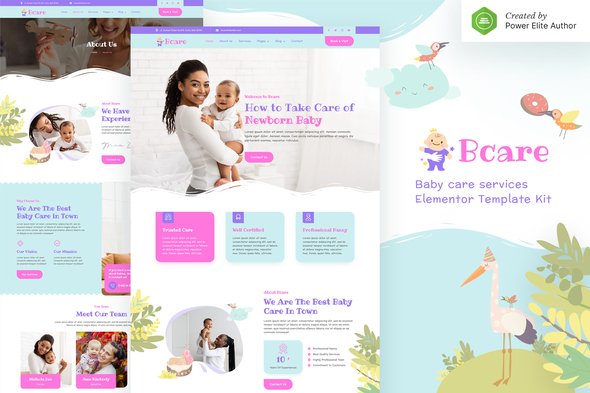
Baby Care Website Template Built for Childcare Professionals
Most childcare providers spend months and thousands of dollars on websites that still look generic. This kit flips that script — you get a polished, professional online presence in a single afternoon.
What You Get With This Baby Care Elementor Template Kit
These pages were built for one audience: parents deciding who to trust with their kids. Every design choice signals safety and competence — warm colors, clear typography, and layouts that answer the questions parents actually ask.
- Home page with hero section, service highlights, and testimonial carousel
- About Us page to introduce your team and philosophy
- Services page with detailed offerings and pricing tables
- Gallery page to showcase your facility and activities
- Team profiles page for staff introductions
- FAQ page pre-populated with common parent questions
- Contact page with form integration and maps support
- Header and Footer variations
Built for the Childcare Industry
Generic templates make parents scroll past. This one speaks their language. Soft, nurturing colors. Friendly but authoritative fonts. Sections that address what matters: your credentials, safety protocols, daily schedule, and how to reach you.
Works with the free Elementor plugin and Elementor Pro. No extra purchases. No coding. Point, click, done.
Who Should Buy This Template Kit
You don’t need to be a tech expert. This kit works if you’re running:
- A home-based daycare or childcare center
- A commercial childcare facility or preschool
- A babysitting or nanny service
- A pediatric therapy or early intervention practice
- Any child-focused wellness or parenting service
Freelance designers: this saves you hours on every client project. The commercial license covers both your sites and client work.
How to Get Started
Download. Install the Template Kit plugin in WordPress. Import your chosen pages. Swap in your logo, adjust your colors, add your own text. Publish. That’s it — no code, no design degree required.
The result is fully responsive. Parents browsing on phones see the same polished site as desktop users. For childcare, this matters — most first inquiries come from mobile searches.
Why This Beats Custom Development
Custom childcare websites run $3,000–$10,000+ and take 4–8 weeks minimum. This kit delivers the same professional result at a fraction of the cost. One payment. Commercial license. No restrictions on how you use it.
Updates come free forever. WordPress evolves, Elementor updates — your site stays compatible. There’s also lifetime support if you ever get stuck.
Ready to Launch Your Baby Care Website?
Parents are searching for childcare services right now. This kit lets you show up with a site that looks like you spent weeks on it — when you really spent an evening. Buy today, build tonight, start taking inquiries tomorrow.
Only logged in customers who have purchased this product may leave a review.
How to use Kit:
Install and activate the “Template Kit – Import” plugin from Plugins > Add New in WordPress.
Do not unzip.
Go to Template Kit – Import > Upload Template Kit Zip File button.
Before importing a template, ensure the Install Requirements button is clicked to activate required plugins.
For best results, do not import more than one template at a time.
RELATED PRODUCTS

DIVI – Original License | One Time Payment – Exclusive Deal

Elementor Pro 4.2.3 + Elementorism Landing Pages WordPress Plugin

907 5.3.6 – Responsive Multi-Purpose WordPress Theme

Element Pack Pro 9.1.0 – Addon For Elementor






 Mobile Apps
 php script
 How to
Reviews
There are no reviews yet