
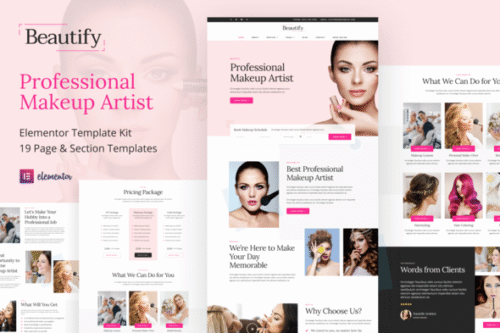
Beautify – Makeup Artist & Hair Stylist Elementor Template Kit
- Updated on April 30, 2026
- 100% Original Product & Well Documented
- Unlimited Domain Usage

*Important Note:
The image should not be Part of the template kit. You need to use your own reliable Source.


Original price was: ₹999.00.₹299.00Current price is: ₹299.00.
Launch a beauty website that looks like you paid a designer. Beautify gives makeup artists and hair stylists a complete Elementor template kit — no code, no weeks of back-and-forth with developers.
- Secured & Scanned by Virus total & McAfee.
- Access to Free updates for Lifetime
- All products are Under GPL License (Unlimited Domain Usage)
- We Not Provide any Support For this Product

Lifetime Membership
Access 6700+ Premium WordPress Themes & Plugins, Elementor Templates, Mobile Apps, PHP scripts with Lifetime Updates.
Join Premium MembershipRecently Viewed
Build a Professional Online Presence for Your Beauty Business
Let’s be honest — you didn’t get into makeup or hair to learn WordPress. Yet here you are, wrestling with website builders when you could be glamming clients. Beautify solves that. It’s a complete website template built specifically for beauty pros, designed to launch in an afternoon instead of three months.
What Beautify Is
Beautify is a pre-made Elementor template kit for makeup artists, hair stylists, and salon owners. Inside, you’ll find: homepage layouts, portfolio sections, service listings, pricing tables, team pages, testimonials, and contact forms. The typography is clean. The color palette is soft and sophisticated — it works with any brand aesthetic. Every layout is fully responsive, so your site looks sharp on phones, tablets, and desktops alike.
The beauty of Elementor? You edit visually. Change fonts, swap colors, add your own photos — everything happens in a drag-and-drop interface. No code. No developer invoices.
Key Features of Beautify
This kit was built around what beauty professionals actually need on their sites.
- 8+ pages and section templates ready to use immediately
- Portfolio layouts that showcase before-and-after work beautifully
- Service pages with built-in pricing tables and booking form integration
- Responsive design that looks perfect on every screen size
- Full customization via Elementor — swap colors, fonts, images anytime
- Clean code that loads fast and helps your site rank on Google
- One-click import to get your site live quickly
Who It’s For
Beautify fits makeup artists building their personal brand from scratch, salon owners refreshing their web presence, hair stylists ready to move beyond Instagram DMs, and skincare specialists who want a site that books clients without the marketing degree.
Never touched WordPress? That’s fine. The setup is straightforward even for complete beginners. And if you’re a web designer or agency, the commercial license lets you deploy this for your own clients — no extra fees.
How To Use It
After purchase, download the template files. Install the free Envato Elements plugin in your WordPress dashboard, import Beautify, swap in your own content, and hit publish. Most people go from download to live site in 2-3 hours.
Works with the free Elementor plugin. Pro unlocks extra features like popups and theme builder controls, but you don’t need it for a complete site.
Why Buy Beautify
A custom-built website typically costs $3,000-10,000 and takes 8-12 weeks minimum. Beautify delivers a professional result at a fraction of that. You get the full design system, lifetime updates, and a commercial license for client projects. Since it’s built on Elementor — the world’s most-used WordPress page builder — you’ll never be stuck without help or resources.
Stop paying for generic website builders that look generic. Stop saving up for a developer who won’t start for three months. Beautify gets you online this week.
Ready to Get Started?
Your portfolio deserves more than a link-in-bio page. Get instant access to Beautify and launch a website that actually represents your work — no coding skills required.
Only logged in customers who have purchased this product may leave a review.
How to use Kit:
Install and activate the “Template Kit – Import” plugin from Plugins > Add New in WordPress.
Do not unzip.
Go to Template Kit – Import > Upload Template Kit Zip File button.
Before importing a template, ensure the Install Requirements button is clicked to activate required plugins.
For best results, do not import more than one template at a time.
RELATED PRODUCTS

DIVI – Original License | One Time Payment – Exclusive Deal

Elementor Pro 4.2.3 + Elementorism Landing Pages WordPress Plugin

907 5.3.6 – Responsive Multi-Purpose WordPress Theme

Element Pack Pro 9.1.0 – Addon For Elementor






 Mobile Apps
 php script
 How to
Reviews
There are no reviews yet