
Bit Integrations Pro 2.6.5 – Integration Plugin for WordPress
- Updated on December 25, 2025
- 100% Original Product & Well Documented
- Unlimited Domain Usage



Original price was: ₹4,500.00.₹299.00Current price is: ₹299.00.
Connect WordPress plugins to 200+ apps without monthly fees. Buy Bit Integrations Pro to automate your workflow and sync data directly. Download the premium version now.
- Secured & Scanned by Virus total & McAfee.
- Lifetime Free Updates
- GPL License (Unlimited Domain Usage)
- Pre Activated, You Don’t Need Any license Key
- 100% Satisfaction Guarantee (Refund Policy)

Lifetime Membership
Access 6700+ Premium WordPress Themes & Plugins, Elementor Templates, Mobile Apps, PHP scripts with Lifetime Updates.
Join Premium MembershipRecently Viewed
Connect Your WordPress Stack with Bit Integrations Pro
Bit Integrations Pro is a professional automation tool for WordPress users who need to move data between plugins and external software. This plugin functions as a local alternative to cloud-based services like Zapier or Pabbly. It resides on your WordPress dashboard, allowing you to create triggers and actions without paying monthly subscription fees for middleware. When you buy Bit Integrations Pro, you gain access to over 200 integrations. The plugin handles data transfer between form builders, e-commerce platforms, learning management systems, and customer relationship management (CRM) tools. It is a premium solution for agencies managing multiple client sites who want to keep operational costs low while maintaining high automation standards.
Core Functionality and Technical Capabilities
The plugin works by identifying a trigger—such as a form submission or a new order—and performing an action in another application. You map the fields from your source to your destination using a simple interface. There is no coding required, but the plugin provides enough flexibility for developers to handle complex data structures. The data stays on your server during the process, which provides a security advantage over third-party platforms that store your data in the cloud.
- Conditional Logic: Set specific rules for when an integration should run. For example, only send data to your CRM if a user selects a specific department in a dropdown menu.
- Field Mapping: Manually pair form fields with your destination app fields to ensure data arrives in the correct format.
- Webhook Support: Use incoming and outgoing webhooks to connect with any application that supports API communication, even if it is not natively listed.
- Background Processing: The plugin handles tasks in the background to prevent site slowdowns during data transmission.
- Log Management: Track every integration run with detailed logs to troubleshoot errors or verify successful data transfers.
Common Use Cases for WordPress Sites
Lead Generation and CRM Syncing
If you use Elementor Pro, Contact Form 7, or WPForms, you can send lead data directly to HubSpot, Zoho CRM, or Salesforce. This removes the need to export CSV files or manually enter contact details. Agencies use this professional tool to ensure client leads are followed up immediately. You can also send different leads to different lists based on the information the user provides in the form.
WooCommerce Automation
Link your WooCommerce store to Google Sheets for order tracking or add customers to a specific Mailchimp list based on the product they purchased. You can also trigger messages in Slack or Telegram whenever a new order arrives, keeping your team updated in real-time. This premium functionality ensures that your fulfillment and marketing teams have the data they need without manual entry.
LMS and Membership Management
For sites using LearnDash or Tutor LMS, Bit Integrations Pro can automate enrollment processes. When a student completes a course, you can trigger an action to issue a badge in another plugin or send their data to an external reporting tool. This keeps your educational platform organized without manual intervention. You can also sync member data with external community platforms like Circle or Discord.
Who Should Use This Plugin?
This tool is for WordPress developers, agency owners, and store managers who want to automate repetitive tasks. It is not for users who only have one simple contact form and no other external tools. If you find yourself manually moving data from WordPress to an email list, a spreadsheet, or a CRM, this download will save you hours of work every week. It is built for those who prefer to keep their automation stack within their own hosting environment to maintain speed and data privacy.
Cost-Effective Professional Automation
By choosing this premium plugin, you avoid the per-task pricing models of external automation platforms. Since the processing happens on your server, you have full control over your data. This is a professional choice for those who value efficiency and cost-effectiveness in their tech stack. Most third-party services charge more as your site grows, but Bit Integrations Pro allows you to scale your automations without increasing your monthly bills.
Simple Setup and Configuration
Setting up an integration takes less than five minutes. First, select your trigger plugin from the list. Second, choose your action application and authorize the connection via API key or OAuth. Third, map your fields and save the integration. The plugin handles the rest. You can download the Pro version to access advanced features like multi-step integrations and priority support triggers. The interface is clean and avoids technical jargon, making it accessible for site owners while remaining powerful enough for developers.
Bit Integrations Pro supports a wide range of popular apps including Google Drive, Trello, Twilio, and various email marketing services. Whether you are building a simple landing page or a complex e-commerce site, this tool provides the connectivity needed to keep your business running. It replaces multiple single-purpose plugins with one unified interface for all your automation needs.
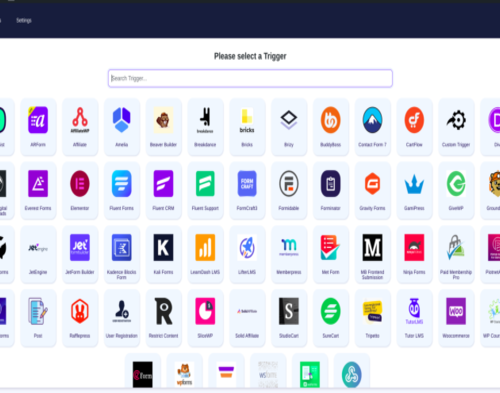 Bit Integrations Pro 2.6.5 – Integration Plugin for WordPress










 Mobile Apps
 php script
 How to

Reviews
There are no reviews yet