
Cafert – Cafe and Restaurant Elementor Template Kit
- Updated on May 2, 2026
- 100% Original Product & Well Documented
- Unlimited Domain Usage
*Important Note:
The image should not be Part of the template kit. You need to use your own reliable Source.


Original price was: ₹999.00.₹299.00Current price is: ₹299.00.
Professional cafe and restaurant website template built for Elementor. Includes menu layouts, reservation forms, and gallery sections — get your site live today.
- Secured & Scanned by Virus total & McAfee.
- Access to Free updates for Lifetime
- All products are Under GPL License (Unlimited Domain Usage)
- We Not Provide any Support For this Product

Lifetime Membership
Access 6700+ Premium WordPress Themes & Plugins, Elementor Templates, Mobile Apps, PHP scripts with Lifetime Updates.
Join Premium MembershipRecently Viewed
Cafert – Elementor Template Kit for Cafes & Restaurants
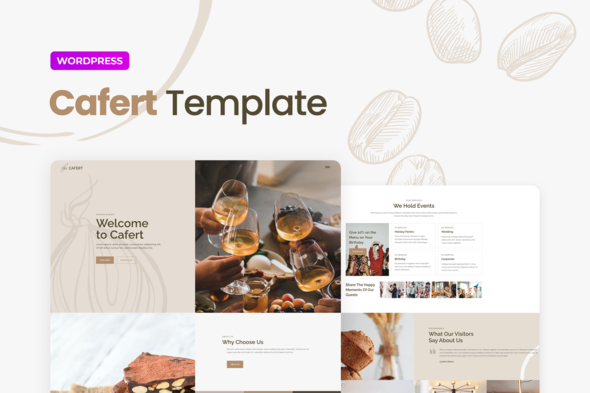
You need a website that actually works for your restaurant, not one that looks like every other template. Cafert gives you a complete Elementor Template Kit designed specifically for cafes, coffee shops, bistros, and food businesses — ready to download and customize in minutes. No coding required, just drag, drop, and publish.
What It Is
Cafert is a pre-built Elementor Template Kit built for the food service industry. It includes everything you need: a stunning homepage, about page, menu layouts with pricing tables, reservation booking section, team profiles, gallery grid, and contact forms. Each section is designed to showcase your dishes, atmosphere, and brand personality — because first impressions matter in the restaurant business.
Key Features
This template kit comes packed with restaurant-specific elements that other generic templates miss:
- Pre-designed menu page layouts with food categories, dish descriptions, and price display options
- Reservation booking section with date picker and guest count fields
- Full-width hero sections to display your best food photography
- Gallery template with masonry and grid layouts for ambiance shots
- Testimonial blocks to build trust with new visitors
- Contact form integrated with location and hours of operation
All templates are fully responsive. Your site looks equally sharp on mobile phones, tablets, and desktop screens — essential when potential diners are searching on the go.
Who It’s For
This kit works best for:
- Independent cafes and coffee shops wanting a professional online presence
- Restaurants and bistros needing an affordable website solution
- Food truck operators building a brand website
- WordPress beginners who want results without hiring a developer
- Web designers looking for ready-to-use restaurant templates for client projects
How To Use It
Using Cafert is straightforward. Install the free Elementor plugin on your WordPress site, upload the template kit, and import the pages you need. Each template is organized by page function — homepage, menu, about, contact — so you can build your complete site in under an hour. Swap in your own images, update your menu items, adjust colors to match your brand, and you’re done. The kit includes global styles, so changes you make once apply across all pages automatically.
Why Buy This
Building a restaurant website from scratch costs hundreds in developer fees and takes weeks of back-and-forth revisions. Cafert gives you a professional result immediately — at a fraction of that cost. You get instant download, a commercial license that covers client work or commercial projects, lifetime updates, and one-time payment pricing. No subscriptions, no recurring fees.
The templates are beginner-friendly, which means you can make updates yourself whenever your menu changes or you add seasonal specials. No need to touch code or wait on developers for simple edits.
Ready to Get Started?
Stop paying for expensive custom builds when you can get a premium restaurant website template that looks professionally designed. Download Cafert today and have your cafe or restaurant website live this week. One purchase, unlimited possibilities.
Only logged in customers who have purchased this product may leave a review.
How to use Kit:
Install and activate the “Template Kit – Import” plugin from Plugins > Add New in WordPress.
Do not unzip.
Go to Template Kit – Import > Upload Template Kit Zip File button.
Before importing a template, ensure the Install Requirements button is clicked to activate required plugins.
For best results, do not import more than one template at a time.
RELATED PRODUCTS

DIVI – Original License | One Time Payment – Exclusive Deal

Elementor Pro 4.2.3 + Elementorism Landing Pages WordPress Plugin

907 5.3.6 – Responsive Multi-Purpose WordPress Theme

Element Pack Pro 9.1.0 – Addon For Elementor






 Mobile Apps
 php script
 How to
Reviews
There are no reviews yet