
Cakecrumbs – Bakery Elementor Template kit
- Updated on May 2, 2026
- 100% Original Product & Well Documented
- Unlimited Domain Usage
*Important Note:
The image should not be Part of the template kit. You need to use your own reliable Source.


Original price was: ₹999.00.₹299.00Current price is: ₹299.00.
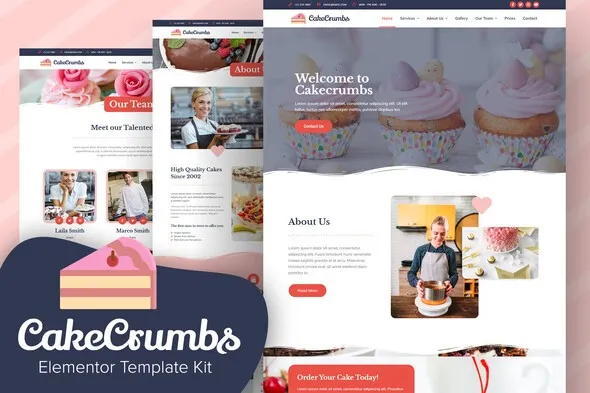
Cakecrumbs gives your bakery a gorgeous, professional website in minutes — no coding required. Get this Elementor Template Kit with commercial license, lifetime updates, and instant download. Grab it now!
- Secured & Scanned by Virus total & McAfee.
- Access to Free updates for Lifetime
- All products are Under GPL License (Unlimited Domain Usage)
- We Not Provide any Support For this Product

Lifetime Membership
Access 6700+ Premium WordPress Themes & Plugins, Elementor Templates, Mobile Apps, PHP scripts with Lifetime Updates.
Join Premium MembershipRecently Viewed
Create a Stunning Bakery Website in Minutes with Cakecrumbs
Building a professional online presence for your bakery shouldn’t take weeks of work or cost a fortune in web design fees. Cakecrumbs is a ready-to-use Bakery Elementor Template Kit that lets you launch a beautiful, functional bakery website without touching a single line of code. Whether you’re a cake shop owner, pastry chef, or artisan baker, this template gives you everything you need to start selling online today.
The design captures the warmth and charm customers expect from a neighborhood bakery — soft colors, elegant typography, and layouts that showcase your creations beautifully. Every element works perfectly on mobile devices, so customers can browse your menu and place orders from their phones. You get complete control over colors, fonts, and content through Elementor’s drag-and-drop interface.
What You Get with Cakecrumbs
- Professionally designed homepage, menu pages, and contact sections
- Fully responsive layouts that look great on any screen size
- Customizable headers, footers, and inner pages
- Compatible with Elementor and the free WordPress theme
- All graphics and placeholders ready for your bakery branding
Who Is This Template For?
This Bakery Elementor Template Kit works best for small bakery owners who want a polished website without hiring a developer. Freelance web designers can use it as a starting point for client projects — the commercial license covers all commercial use. Even WordPress beginners find the setup straightforward since no coding knowledge is required. If you’re tired of generic templates that don’t fit your brand, Cakecrumbs gives you a professional foundation to build on.
How to Get Started
After purchase, you download the template kit instantly and import it directly into WordPress with Elementor installed. Swap in your bakery name, add photos of your cakes and pastries, adjust colors to match your branding, and publish. The entire process takes most users under two hours from download to live website. Support documentation guides you through each step if you need help.
Why Choose Cakecrumbs Over Other Options?
Unlike monthly subscriptions or template marketplaces that keep charging you forever, Cakecrumbs comes with a one-time payment. You get lifetime free updates as we improve the template, plus our team answers questions whenever you need help. The commercial license means you can even reskin it for client projects without additional fees. No hidden costs, no recurring charges, no surprises.
This template works with the free Elementor plugin, so you don’t need to purchase premium page builders. The lightweight code keeps your bakery website fast-loading — important for keeping impatient visitors from bouncing to competitors. Every design element is optimized for conversion, helping turn site visitors into paying customers.
Ready to Get Started?
Stop spending money on web developers for simple bakery websites. Buy Cakecrumbs today and have a professional, conversion-ready bakery website running by tomorrow. Instant download means you can start building your site right now — no waiting, no delays. Get the template that bakery owners trust for their online presence.
Only logged in customers who have purchased this product may leave a review.
How to use Kit:
Install and activate the “Template Kit – Import” plugin from Plugins > Add New in WordPress.
Do not unzip.
Go to Template Kit – Import > Upload Template Kit Zip File button.
Before importing a template, ensure the Install Requirements button is clicked to activate required plugins.
For best results, do not import more than one template at a time.
RELATED PRODUCTS

DIVI – Original License | One Time Payment – Exclusive Deal

Elementor Pro 4.2.3 + Elementorism Landing Pages WordPress Plugin

907 5.3.6 – Responsive Multi-Purpose WordPress Theme

Element Pack Pro 9.1.0 – Addon For Elementor






 Mobile Apps
 php script
 How to
Reviews
There are no reviews yet