
Centrix – Artificial Intelligence & Technology Services Elementor Template Kit
- Updated on May 3, 2026
- 100% Original Product & Well Documented
- Unlimited Domain Usage
*Important Note:
The image should not be Part of the template kit. You need to use your own reliable Source.


Original price was: ₹999.00.₹299.00Current price is: ₹299.00.
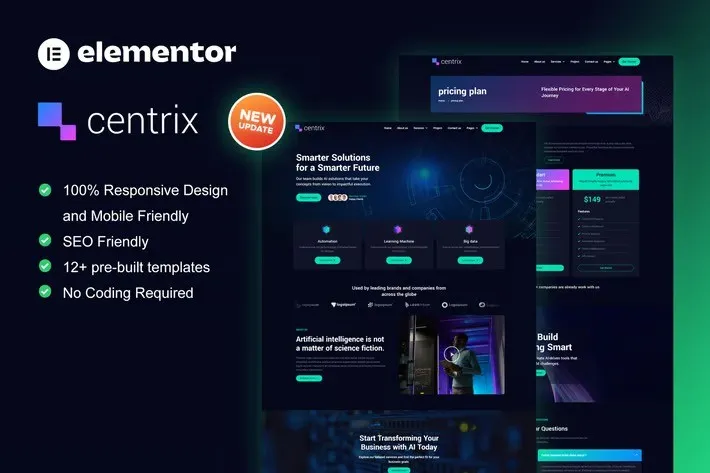
Build your AI or tech website in a few hours, not weeks. Centrix gives you 10+ pages, drag-and-drop editing, and a dark design that actually looks premium — no code required.
- Secured & Scanned by Virus total & McAfee.
- Access to Free updates for Lifetime
- All products are Under GPL License (Unlimited Domain Usage)
- We Not Provide any Support For this Product

Lifetime Membership
Access 6700+ Premium WordPress Themes & Plugins, Elementor Templates, Mobile Apps, PHP scripts with Lifetime Updates.
Join Premium MembershipRecently Viewed
Centrix AI Technology Elementor Template Kit
Let’s be honest — building a tech website from scratch eats up time you don’t have. Centrix skips that headache. It’s an Elementor Template Kit designed for AI agencies, software shops, and tech service companies. The result: a professional, polished site you can have live in an afternoon.
What You Get With Centrix
10+ pre-built pages that cover the full customer journey. Homepage layouts put your AI capabilities front and center. Separate pages for About Us, Services, Case Studies, and Team profiles establish credibility. Contact forms, pricing tables, and FAQ sections handle the questions that eat up your inbox. Blog templates let you publish industry insights without moving to a new platform.
- 10+ complete page layouts for AI and tech websites
- Dark-mode default design with neon accent options
- Fully responsive — looks sharp on mobile, tablet, and desktop
- Compatible with free Elementor and Elementor Pro
- Global widgets for easy header and footer updates
Key Features Built for Tech Companies
The design hits the aesthetic your clients expect. Dark background with subtle glows signals innovation. Animated counters show off your numbers. Service cards flip to reveal details on hover. Portfolio grids let visitors filter through past work. Testimonial sliders add social proof where it matters. Everything loads fast and plays nice with search engines.
- Animated hero sections with gradient overlays
- Service comparison tables with pricing tiers
- Integrated contact forms with anti-spam protection
- SVG icon library included — no external dependencies
- One-click demo import — get the full site in under 5 minutes
Who It’s Built For
Freelance AI consultants use it to land enterprise clients. Agencies deploy it as a quick-launch option for tech startups. Dev teams showcase product features and integrations. IT companies display certifications and client logos. If you’re not technical, Elementor’s visual editor handles updates without touching code.
How to Get Started
Install the free Elementor plugin on WordPress. Upload the Centrix kit file. Click to import the pages you need. Swap in your own text and images. Publish. No PHP. No FTP. No developer.
Why Buy This Template Kit
Custom web development for a tech site runs $3,000 to $15,000 — and that’s before you factor in 4-8 weeks of back-and-forth. Centrix delivers the same professional look for a fraction of that. Instant download. Commercial license covers client work. Lifetime updates as WordPress and Elementor evolve. Premium support if you get stuck. One payment. No subscriptions. No surprises.
Ready to Get Started?
Your competitors already have professional sites. Don’t lose business to a generic or outdated online presence. Download Centrix now and launch your AI or technology services website today.
Only logged in customers who have purchased this product may leave a review.
How to use Kit:
Install and activate the “Template Kit – Import” plugin from Plugins > Add New in WordPress.
Do not unzip.
Go to Template Kit – Import > Upload Template Kit Zip File button.
Before importing a template, ensure the Install Requirements button is clicked to activate required plugins.
For best results, do not import more than one template at a time.
RELATED PRODUCTS

DIVI – Original License | One Time Payment – Exclusive Deal

Elementor Pro 4.2.3 + Elementorism Landing Pages WordPress Plugin

907 5.3.6 – Responsive Multi-Purpose WordPress Theme

Element Pack Pro 9.1.0 – Addon For Elementor






 Mobile Apps
 php script
 How to
Reviews
There are no reviews yet