
Chattera – Saas & Chat Service Company Elementor Kit
- Updated on May 4, 2026
- 100% Original Product & Well Documented
- Unlimited Domain Usage
*Important Note:
The image should not be Part of the template kit. You need to use your own reliable Source.


Original price was: ₹999.00.₹299.00Current price is: ₹299.00.
12+ Elementor templates built for SaaS and chat service sites. Pick what you need, drop in your branding, publish. Instant download with commercial license included.
- Secured & Scanned by Virus total & McAfee.
- Access to Free updates for Lifetime
- All products are Under GPL License (Unlimited Domain Usage)
- We Not Provide any Support For this Product

Lifetime Membership
Access 6700+ Premium WordPress Themes & Plugins, Elementor Templates, Mobile Apps, PHP scripts with Lifetime Updates.
Join Premium MembershipRecently Viewed
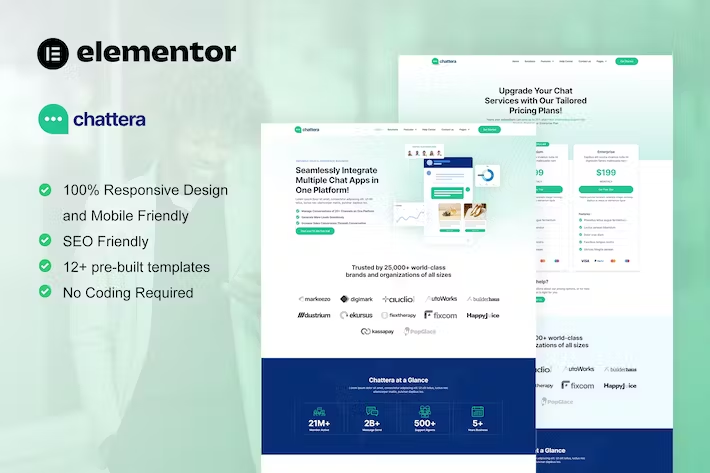
SaaS Elementor Template Kit for Your Chat Service Website
Your website should close deals, not collect dust. Chattera gives you 12+ pre-built templates with a clean SaaS look — hero sections that grab attention, pricing tables that answer objections, service pages that actually convert. No design degree required. No staring at a blank screen wondering where to start. Just download, open in Elementor, and swap in your content.
What Is Chattera?
Chattera is an Elementor Template Kit built for one job: getting your SaaS or chat service website live without the design headache. Twelve-plus fully designed pages come included — home, about, services, pricing, team, FAQ, contact, and blog. The aesthetic is modern without being trendy: crisp fonts, breathing room between sections, and colors that say “we’re legitimate” without screaming about it. Whether you’re launching fresh or giving an existing site a facelift, this kit handles the heavy lifting.
Key Features
Everything you need, nothing you don’t. Each template ships organized and labeled — find what you need fast, import it, make it yours.
- 12+ templates: Home, About, Services, Pricing, Team, FAQ, Contact, and Blog pages
- Clean typography, professional color palette, SaaS-specific layouts
- Responsive across devices — mobile, tablet, desktop all covered
- Sections built for action: lead capture, feature highlights, client testimonials
- Works with Elementor and Elementor Pro — no plugin conflicts
- Figma source file included for deeper custom work
Who It’s For
Three types of people get the most out of Chattera. SaaS founders and tech startups who need a site up yesterday — no budget for a design agency, no time to DIY from zero. Chat service companies that want to show off features, pricing, and customer wins in a way that doesn’t look like a 2015 startup page. Freelance designers and agencies who need a polished starting point so they can bill for customization instead of scaffolding. If any of that sounds familiar, Chattera removes the worst part: beginning with nothing.
How To Use It
Ten minutes, start to finish. Buy and download — the files land in your inbox immediately. Open WordPress, go to Templates > Import Kit in Elementor, and select the pages you want. Swap the placeholder text and images with your own. Publish. That’s it. No code. No developer on speed dial. No complex setup documentation to wade through.
Why Buy This Template Kit
A custom-designed site typically runs $2,000 to $10,000 if you’re hiring out. Even doing it yourself takes weeks you probably don’t have. Chattera gets you a professional, conversion-ready design for a one-time price. Commercial license covers your own business or client work. Lifetime updates mean you won’t get left behind when WordPress or Elementor push new versions. And if you hit a snag, support is available.
Short version: Chattera gives you a website that builds credibility and turns visitors into leads — without draining your budget, your timeline, or your patience.
Ready to Get Started?
Instant access. Lifetime updates. Commercial license included. Buy Chattera and have a real website running before the weekend.
Only logged in customers who have purchased this product may leave a review.
How to use Kit:
Install and activate the “Template Kit – Import” plugin from Plugins > Add New in WordPress.
Do not unzip.
Go to Template Kit – Import > Upload Template Kit Zip File button.
Before importing a template, ensure the Install Requirements button is clicked to activate required plugins.
For best results, do not import more than one template at a time.
RELATED PRODUCTS

DIVI – Original License | One Time Payment – Exclusive Deal

Elementor Pro 4.2.3 + Elementorism Landing Pages WordPress Plugin

907 5.3.6 – Responsive Multi-Purpose WordPress Theme

Element Pack Pro 9.1.0 – Addon For Elementor






 Mobile Apps
 php script
 How to
Reviews
There are no reviews yet