
Coestra – Political Party & Candidate Elementor Template Kit
- Updated on April 29, 2026
- 100% Original Product & Well Documented
- Unlimited Domain Usage
*Important Note:
The image should not be Part of the template kit. You need to use your own reliable Source.


Original price was: ₹999.00.₹299.00Current price is: ₹299.00.
Launch a campaign website in one afternoon. Coestra gives political parties and candidates pre-built pages for bios, policies, events, donations, and volunteer signup — all in Elementor. No developer needed.
- Secured & Scanned by Virus total & McAfee.
- Access to Free updates for Lifetime
- All products are Under GPL License (Unlimited Domain Usage)
- We Not Provide any Support For this Product

Lifetime Membership
Access 6700+ Premium WordPress Themes & Plugins, Elementor Templates, Mobile Apps, PHP scripts with Lifetime Updates.
Join Premium MembershipRecently Viewed
Political Campaign Website Template Built for Results
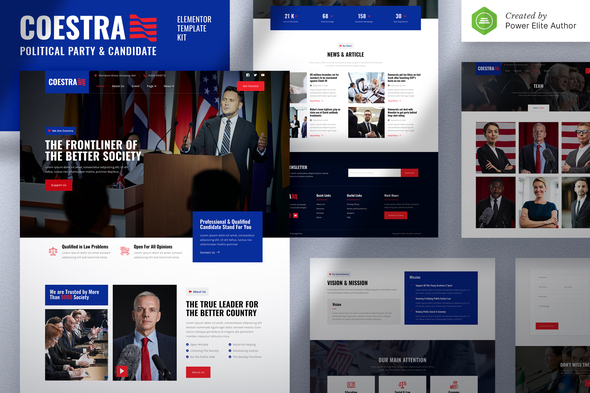
Election season waits for no one. Coestra is a premium Elementor template kit built specifically for political campaigns that need a polished, election-ready website without the development timeline.
This isn’t a generic template with a political coat of paint. Every section exists because campaigns actually need it — from candidate bio pages that build credibility to donation flows that turn supporters into funders.
What’s Inside the Coestra Template Kit
Coestra comes loaded with everything you need to build a complete political campaign website in Elementor:
- Pre-built homepage with hero section, candidate introduction, and call-to-action buttons
- Candidate biography and profile page templates
- Policy positions and issue pages
- Event and rally listing layouts
- Volunteer signup and contact forms
- Donation page templates optimized for conversions
- News, blog, and press release section layouts
- Team member and staff introduction pages
All templates use political aesthetics — authoritative without being stuffy, professional without being boring. Swap colors and fonts to match your campaign branding. No code required.
Who This Template Kit Is For
Coestra works best for:
- Local, state, and national political candidates running for office
- Political parties building member and voter-facing websites
- Campaign managers who need to launch multiple candidate sites quickly
- Political consultants outfitting client campaigns with professional web presence
- Political action committees and advocacy groups
Whether you’re a seasoned campaign operative or a first-time candidate editing your own site, the drag-and-drop builder makes customization easy. WordPress experience helps, but if you can use a word processor, you can use this kit.
How to Get Your Campaign Website Live
Install Elementor on your WordPress site, upload the template kit, and start editing. Import the sections you need, add your candidate photos and messaging, connect your donation processor, and publish. Most campaigns have a functional site running within a single afternoon.
All templates are responsive by default. Your site looks good on phones — essential when younger voters are browsing on mobile devices. No extra mobile work needed.
Why Choose Coestra Over Other Options
Hire a web developer for a custom political site and you’re looking at weeks and thousands of dollars. Grab a free WordPress theme and you’ll spend hours removing bundled junk and trying to make it fit a campaign.
Coestra gives you a complete political campaign template at a fraction of that cost, with everything ready to go. One payment covers lifetime updates — if WordPress or Elementor adds features, you get them free. Support is available if you hit snags during setup.
The commercial license lets you use this kit for unlimited client projects or multiple campaigns. Build your site, then offer it to fellow candidates in your party as a side revenue stream.
Ready to Build Your Campaign Website?
Your website is often the first impression voters get of your campaign. Make it count with a design that positions you as serious and election-ready. Download Coestra now and have your political campaign website live before your opponents even pick a color scheme.
Only logged in customers who have purchased this product may leave a review.
How to use Kit:
Install and activate the “Template Kit – Import” plugin from Plugins > Add New in WordPress.
Do not unzip.
Go to Template Kit – Import > Upload Template Kit Zip File button.
Before importing a template, ensure the Install Requirements button is clicked to activate required plugins.
For best results, do not import more than one template at a time.
RELATED PRODUCTS

DIVI – Original License | One Time Payment – Exclusive Deal

Elementor Pro 4.2.3 + Elementorism Landing Pages WordPress Plugin

907 5.3.6 – Responsive Multi-Purpose WordPress Theme

Element Pack Pro 9.1.0 – Addon For Elementor






 Mobile Apps
 php script
 How to
Reviews
There are no reviews yet