
CookBlog – Food & Personal Blog Elementor Template Kit
- Updated on May 1, 2026
- 100% Original Product & Well Documented
- Unlimited Domain Usage
*Important Note:
The image should not be Part of the template kit. You need to use your own reliable Source.


Original price was: ₹999.00.₹299.00Current price is: ₹299.00.
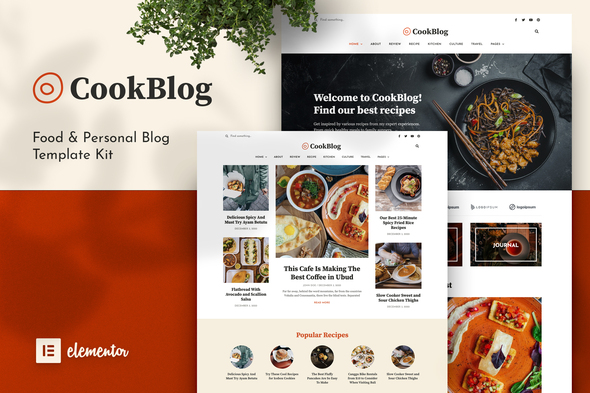
CookBlog gives food bloggers everything needed to launch a professional recipe site — without hiring a designer. Pre-built layouts, recipe cards, and SEO structure, all ready to import into Elementor. One payment, lifetime access.
- Secured & Scanned by Virus total & McAfee.
- Access to Free updates for Lifetime
- All products are Under GPL License (Unlimited Domain Usage)
- We Not Provide any Support For this Product

Lifetime Membership
Access 6700+ Premium WordPress Themes & Plugins, Elementor Templates, Mobile Apps, PHP scripts with Lifetime Updates.
Join Premium MembershipRecently Viewed
Build a Stunning Food Blog with the CookBlog Elementor Template Kit
Your recipes deserve more than a clunky theme built for everything except food. CookBlog is an Elementor Template Kit built specifically for food bloggers, recipe creators, and culinary storytellers who want a professional site without the professional price tag.
No coding. No design skills required. Import, edit, publish.
What Is the CookBlog Template Kit?
It’s a collection of page layouts and section designs tailored for food content. Each template works with Elementor — the WordPress page builder millions already use — so you can build and edit everything visually. Mobile-responsive, fast-loading, and organized so you can find what you need without hunting through endless options.
Whether you’re posting grandma’s lasagna recipe or documenting street food in Tokyo, CookBlog gives your content the presentation it deserves.
What’s Included
15+ pages ready to go:
- Homepage, about, contact, and archive layouts
- Recipe card templates with ingredients lists, prep time, cook time, and step-by-step instructions
- Food-specific sections for seasonal collections and featured recipes
- Responsive design that holds up on phones, tablets, and desktops
- SEO structure that helps search engines understand your content
- Typography and color options you can tweak to match your brand
Recipe cards display nutritional info and serving sizes in a clean, scannable format. Your readers will actually be able to find what they need while their hands are covered in flour.
Who Is This For?
CookBlog works for:
- Food bloggers sharing recipes, restaurant reviews, and travel eating
- Recipe developers who need organized, easy-to-follow pages
- Personal bloggers mixing food with lifestyle content
- WordPress beginners who want professional results without learning code
- Food influencers building a brand that actually looks the part
If you’re tired of generic WordPress themes that were clearly designed for businesses and awkwardly repurposed for recipes, this is the alternative.
Getting Started
Install the free Elementor plugin on your WordPress site, upload the kit, and start editing. Swap the placeholder images for your food photos. Change the colors. Hit publish. Most people have their site live the same afternoon.
Everything imports directly into Elementor’s visual editor. Drag, click, type. No code. No confusion.
Why CookBlog Instead of Other Options?
Custom design work runs $500 to $3,000+. Generic themes force you into food-shaped pegs in business-shaped holes. CookBlog gives you templates actually built for recipe sites — at a one-time price that won’t break your food blogger budget.
Commercial licensing is included if you’re building sites for clients. Updates come free forever. And if you get stuck, support is there.
The design adapts to any food niche: baking, meal prep, vegan cooking, comfort food, restaurant reviews. It grows with your blog as your audience does.
Ready to Launch?
Download CookBlog, import it into WordPress, and start sharing your recipes with a design that actually showcases your food. No more wrestling with themes that don’t fit what you’re doing.
Only logged in customers who have purchased this product may leave a review.
How to use Kit:
Install and activate the “Template Kit – Import” plugin from Plugins > Add New in WordPress.
Do not unzip.
Go to Template Kit – Import > Upload Template Kit Zip File button.
Before importing a template, ensure the Install Requirements button is clicked to activate required plugins.
For best results, do not import more than one template at a time.
RELATED PRODUCTS

DIVI – Original License | One Time Payment – Exclusive Deal

Elementor Pro 4.2.3 + Elementorism Landing Pages WordPress Plugin

907 5.3.6 – Responsive Multi-Purpose WordPress Theme

Element Pack Pro 9.1.0 – Addon For Elementor






 Mobile Apps
 php script
 How to
Reviews
There are no reviews yet