
Danze – Dance Studio School Elementor Template Kit
- Updated on May 1, 2026
- 100% Original Product & Well Documented
- Unlimited Domain Usage
*Important Note:
The image should not be Part of the template kit. You need to use your own reliable Source.


Original price was: ₹999.00.₹299.00Current price is: ₹299.00.
From zero to live in a weekend. Danze gives you 8 pages, class schedules, instructor profiles, and event calendars — all drag-and-drop in Elementor. One payment, lifetime access, no developer needed.
- Secured & Scanned by Virus total & McAfee.
- Access to Free updates for Lifetime
- All products are Under GPL License (Unlimited Domain Usage)
- We Not Provide any Support For this Product

Lifetime Membership
Access 6700+ Premium WordPress Themes & Plugins, Elementor Templates, Mobile Apps, PHP scripts with Lifetime Updates.
Join Premium MembershipRecently Viewed
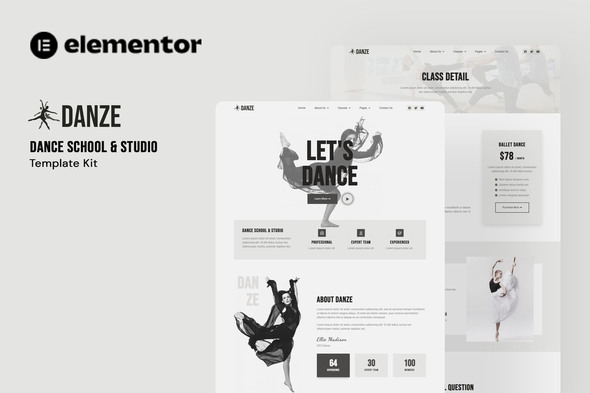
Danze Elementor Template Kit for Dance Studio Websites
Building a dance studio website shouldn’t drain your budget or eat up months of your time. Danze gives you a complete, ready-to-go website that works with the free Elementor page builder — zero coding required. This kit handles the heavy lifting: your dance classes, instructor introductions, booking inquiries, and everything in between. Download today and have something live tomorrow.
What You Get with Danze
Eight pre-built pages, each one designed for how parents and students actually browse. The homepage leads with your best classes. The schedule page lets people filter by dance style and age group. Every page adjusts automatically to phones, tablets, and desktop screens — because half your visitors are scrolling on their lunch break, comparing dance schools.
Key Features Included
- Homepage with hero section, featured classes, instructor spotlights, and testimonials
- About Us page for sharing your studio’s story and mission
- Class Schedule page with organized dance categories
- Instructor Profile page template with photos and bios
- Events page for performances, showcases, and special workshops
- Gallery section to display photos and videos from classes and recitals
- Pricing page with clear class tier options
- Contact page with location, hours, and inquiry form
The design keeps things elegant without being stuffy — it works equally well for classical ballet schools, high-energy hip-hop studios, contemporary companies, and fitness studios adding dance cardio. Every element snaps into place with drag-and-drop, so you can move sections around, swap colors, or swap photos without touching a single line of code.
Who Is This Template Kit For?
Danze was built for dance studio owners who are tired of overpaying for simple websites. Ballet schools use it to show off their technique and traditions. Hip-hop and street dance instructors love the modern, energetic vibe. Contemporary dance companies showcase their artistry. Yoga and fitness studios offering dance classes find the layout fits right in. Freelancers: the included commercial license means you can use Danze on client projects without any extra fees.
How to Use This Template Kit
No steep learning curve here. Install the template kit through Elementor, pick the pages you need, swap the placeholder photos and text for your own, and publish. Since Danze runs on the free Elementor plugin, you won’t need to upgrade to Pro. The built-in responsive preview shows exactly how each page looks on phones versus tablets before you go live.
Why Danze Is the Smart Choice
Most dance studio websites cost $500 to $3,000 when you hire someone. Danze gets you the same polished result for a fraction of that. Pay once, access forever — no monthly fees eating into your studio income. Updates come free as WordPress and Elementor improve over time. If you hit a snag during setup, there’s direct support available.
The commercial license adds even more value. Building sites for other studios or instructors? One purchase covers your client work too. Everything runs on your own hosting — install, customize, launch.
Ready to Get Started?
Ditch the monthly website builder fees. Stop waiting weeks for a developer to get back to you. Download Danze now and have a complete dance studio website live today. Instant delivery includes template files, setup documentation, and support to get you running without the headache.
Only logged in customers who have purchased this product may leave a review.
How to use Kit:
Install and activate the “Template Kit – Import” plugin from Plugins > Add New in WordPress.
Do not unzip.
Go to Template Kit – Import > Upload Template Kit Zip File button.
Before importing a template, ensure the Install Requirements button is clicked to activate required plugins.
For best results, do not import more than one template at a time.
RELATED PRODUCTS

DIVI – Original License | One Time Payment – Exclusive Deal

Elementor Pro 4.2.3 + Elementorism Landing Pages WordPress Plugin

907 5.3.6 – Responsive Multi-Purpose WordPress Theme

Element Pack Pro 9.1.0 – Addon For Elementor






 Mobile Apps
 php script
 How to
Reviews
There are no reviews yet