
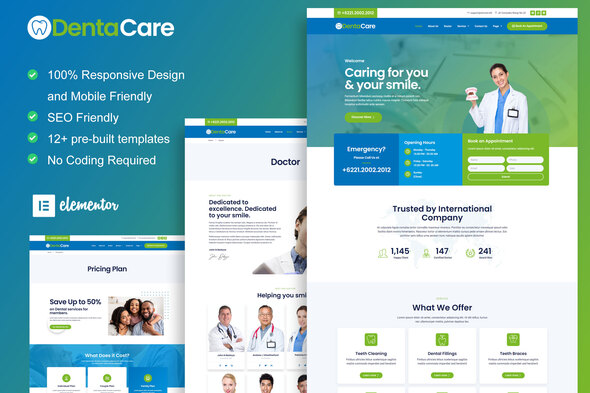
DentaCare – Dentist & Medical Elementor Template Kit
- Updated on May 2, 2026
- 100% Original Product & Well Documented
- Unlimited Domain Usage
*Important Note:
The image should not be Part of the template kit. You need to use your own reliable Source.


Original price was: ₹999.00.₹299.00Current price is: ₹299.00.
Build a professional dental clinic website in minutes with DentaCare. 15+ pre-built pages, drag-and-drop editing, commercial license included — get it now.
- Secured & Scanned by Virus total & McAfee.
- Access to Free updates for Lifetime
- All products are Under GPL License (Unlimited Domain Usage)
- We Not Provide any Support For this Product

Lifetime Membership
Access 6700+ Premium WordPress Themes & Plugins, Elementor Templates, Mobile Apps, PHP scripts with Lifetime Updates.
Join Premium MembershipRecently Viewed
DentaCare Elementor Template Kit — Build Your Dental Website in Hours, Not Weeks
Your dental practice deserves a website that converts visitors into patients. DentaCare gives you a complete, professional online presence without hiring a developer or spending months on design. This Elementor Template Kit ships with everything you need to launch a stunning dental clinic website today.
What You Get with DentaCare
This isn’t a basic landing page. DentaCare includes 15+ inner pages covering every section a modern dental practice needs. Service pages showcase treatments, team profiles highlight your staff, and testimonial sections build trust. The design feels clinical yet welcoming — clean whites, calming blues, and professional typography that signals expertise.
- 15+ pre-built inner pages ready to customize
- 10+ header and footer layout options
- Appointment booking section built-in
- Service showcase for treatments and procedures
- Testimonial and review sections
- Contact forms with map integration
No Coding Required
Elementor’s drag-and-drop builder means you edit everything visually. Change colors, swap images, adjust spacing — all without touching a single line of code. If you can point and click, you can build your website. The kit works with the free Elementor plugin, so you don’t need Elementor Pro to get started.
Built for Dental Practices and Medical Professionals
Generic website builders don’t understand healthcare. DentaCare does. Every section is designed for dentist appointments, medical services, clinic hours, and patient trust. Whether you run a general dentistry practice, a specialty clinic, or a multi-location medical center, this template kit scales to your needs.
- General dentistry and cosmetic dental practices
- Orthodontists, oral surgeons, and pediatric dentists
- Medical clinics, health centers, and private practices
- Veterinary clinics and other professional healthcare services
Commercial License Included
Use DentaCare for your own practice or client projects. The commercial license covers unlimited personal and commercial projects. No recurring fees, no usage restrictions — buy once and use it forever on as many sites as you want.
Lifetime Updates and Support
Web standards change. Elementor updates. Your dental website needs to stay current. DentaCare comes with lifetime free updates, so you’ll always have the latest version. If you hit a snag, one-time support connects you with the team behind the design.
Why Buy This Template Kit?
Building a professional website from scratch costs thousands and takes months. Hiring a developer means waiting for revisions and paying for every change. DentaCare puts you in control — download instantly, customize in hours, and launch your dental website this week. At this price point, it pays for itself with the first patient who books through your new site instead of your competitor’s.
Ready to Get Started?
Download DentaCare now and have your dental website live within days. One-time payment, lifetime access, commercial license included. Your patients are searching for a dentist like you — make sure they find your practice first.
Only logged in customers who have purchased this product may leave a review.
How to use Kit:
Install and activate the “Template Kit – Import” plugin from Plugins > Add New in WordPress.
Do not unzip.
Go to Template Kit – Import > Upload Template Kit Zip File button.
Before importing a template, ensure the Install Requirements button is clicked to activate required plugins.
For best results, do not import more than one template at a time.
RELATED PRODUCTS

DIVI – Original License | One Time Payment – Exclusive Deal

Elementor Pro 4.2.3 + Elementorism Landing Pages WordPress Plugin

907 5.3.6 – Responsive Multi-Purpose WordPress Theme

Element Pack Pro 9.1.0 – Addon For Elementor






 Mobile Apps
 php script
 How to

Reviews
There are no reviews yet