
Dexen – Printing & Copy Center Elementor Template Kit
- Updated on April 28, 2026
- 100% Original Product & Well Documented
- Unlimited Domain Usage
*Important Note:
The image should not be Part of the template kit. You need to use your own reliable Source.


Original price was: ₹999.00.₹299.00Current price is: ₹299.00.
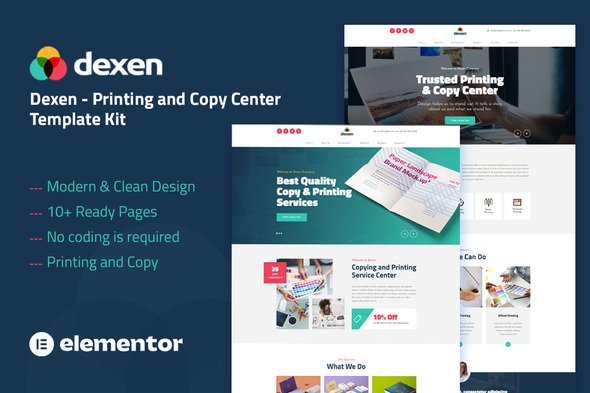
A professional website template built specifically for printing shops and copy centers. Present your services, showcase your work, and convert visitors into customers — all without touching a single line of code. Get instant access now.
- Secured & Scanned by Virus total & McAfee.
- Access to Free updates for Lifetime
- All products are Under GPL License (Unlimited Domain Usage)
- We Not Provide any Support For this Product

Lifetime Membership
Access 6700+ Premium WordPress Themes & Plugins, Elementor Templates, Mobile Apps, PHP scripts with Lifetime Updates.
Join Premium MembershipRecently Viewed
Build a Professional Printing Website in Minutes
Dexen is a ready-to-use Elementor template kit designed specifically for printing businesses, copy centers, and print shops. No more wrestling with generic layouts that don’t fit your industry. This template gives you a complete website structure with pages designed for the printing trade — from service listings to portfolio galleries and contact forms that actually convert.
Every section, every module, every layout decision was made with print businesses in mind. You get 8 pre-built pages that cover everything a modern printing website needs: homepage, about, services, gallery, team, FAQ, and contact. Just import, customize, and launch.
What You Get with Dexen
- 8 complete page templates optimized for printing and copy services
- Drag-and-drop editing through Elementor — no coding required
- Responsive design that looks sharp on mobile, tablet, and desktop
- Commercial license included — use for client projects or your own business
- Instant download after purchase
Perfect For Printing Businesses
Dexen works whether you’re running a local copy shop on the corner or a full-service commercial printing company. The template handles service showcases (business cards, flyers, banners, large format prints), before-and-after galleries, pricing displays, and lead capture forms. It’s the fastest path from blank page to a website that actually books jobs.
Freelance web designers will appreciate the commercial license — build client sites faster without licensing headaches. Elementor users already know how powerful this page builder is, and Dexen unlocks that power for print industry projects immediately.
How to Use This Template Kit
Getting started takes less than an hour. Download the kit after purchase, install the template in your WordPress Elementor setup, and import the pages you need. Swap in your logo, update your service list, add your portfolio images, and you’re live. That’s it. No developers, no long timelines, no surprise costs.
The template uses only free Elementor widgets, so you’re not locked into premium plugins. This keeps your site lightweight and fast-loading — important for both user experience and Google rankings.
Why Dexen Is the Smart Choice
Building a website from scratch wastes time and money. Adapting a generic template to fit a printing business means wrestling with layouts that don’t match your workflow. Dexen eliminates that frustration by giving you an industry-specific foundation from day one.
This template kit costs a fraction of hiring a designer, and you get lifetime updates and support. One simple payment, and you own a professional website template that grows with your business. It’s the most affordable way to get a print shop website that actually looks like it was built by a professional.
Ready to Get Started?
Download Dexen now and have your printing website live today. The template kit is ready to use, beginner-friendly, and built to help your print business look professional online. No recurring fees, no complicated setup — just a solid foundation for your digital presence.
Only logged in customers who have purchased this product may leave a review.
How to use Kit:
Install and activate the “Template Kit – Import” plugin from Plugins > Add New in WordPress.
Do not unzip.
Go to Template Kit – Import > Upload Template Kit Zip File button.
Before importing a template, ensure the Install Requirements button is clicked to activate required plugins.
For best results, do not import more than one template at a time.
RELATED PRODUCTS

DIVI – Original License | One Time Payment – Exclusive Deal

Elementor Pro 4.2.3 + Elementorism Landing Pages WordPress Plugin

907 5.3.6 – Responsive Multi-Purpose WordPress Theme

Element Pack Pro 9.1.0 – Addon For Elementor






 Mobile Apps
 php script
 How to
Reviews
There are no reviews yet