
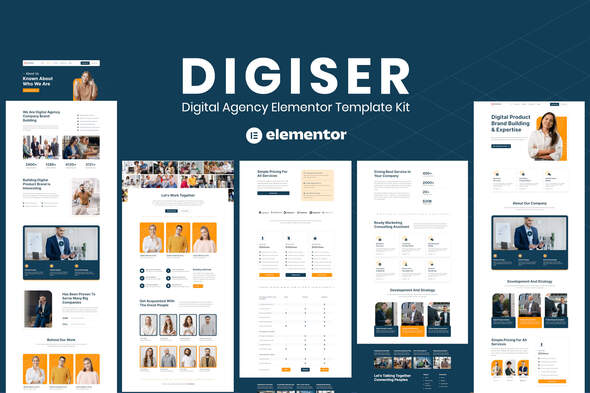
Digiser – Digital Agency Elementor Template Kit
- Updated on May 1, 2026
- 100% Original Product & Well Documented
- Unlimited Domain Usage
*Important Note:
The image should not be Part of the template kit. You need to use your own reliable Source.


Original price was: ₹999.00.₹299.00Current price is: ₹299.00.
Digiser gives your digital agency a sleek, professional website in minutes — no coding required. Get 10+ pre-built sections, commercial license included, and launch your site this week.
- Secured & Scanned by Virus total & McAfee.
- Access to Free updates for Lifetime
- All products are Under GPL License (Unlimited Domain Usage)
- We Not Provide any Support For this Product

Lifetime Membership
Access 6700+ Premium WordPress Themes & Plugins, Elementor Templates, Mobile Apps, PHP scripts with Lifetime Updates.
Join Premium MembershipRecently Viewed
Build Your Digital Agency Website in Minutes
Stop spending weeks on website setup when you could be landing clients instead. Digiser is a ready-to-use Elementor Template Kit built specifically for digital agencies, creative studios, and corporate businesses that need a professional online presence — fast.
Every section you need is already designed: hero banners, service showcases, portfolio grids, team profiles, client testimonials, pricing tables, and contact forms. Import, customize with Elementor’s drag-and-drop editor, publish. That’s it. No coding. No design degree. No headaches.
What You Get With Digiser
This template kit includes everything a modern digital agency website needs to turn visitors into clients:
- Homepage with animated hero section and service highlights
- Services page with icon-based feature grids
- Portfolio/project showcase with filtering options
- Team member profiles with social links
- Client testimonials and trust badges
- Pricing plans section
- Contact form and footer with CTA
- Fully responsive — looks great on mobile, tablet, and desktop
Who Is Digiser For?
This template kit works best for:
- Digital marketing agencies looking to scale their online presence
- Web design and development studios showcasing past projects
- Creative freelancers building a portfolio site
- Corporate businesses wanting a modern, clean web presence
- Startups that need to launch quickly without sacrificing quality
Whether you’re a solo freelancer or a 20-person agency, Digiser scales to fit your needs. The clean, minimal design adapts to your brand colors and typography in minutes.
How to Get Started
Setting up Digiser takes under an hour. First, make sure you have the free Elementor plugin installed on your WordPress site. Then, import the template kit directly from your WordPress dashboard. Browse the pre-built pages, click to insert, and customize text, images, and colors using Elementor’s visual editor. No FTP access. No code snippets. No developer needed.
When you’re done, you’ll have a complete, professional website — one that signals to potential clients you’re serious, organized, and worth hiring.
Why Choose Digiser Over Starting From Scratch?
Building from scratch means dozens of design decisions: spacing, typography scale, color contrast, button styles, grid layouts. Digiser handles all of that. The design is already cohesive, mobile-optimized, and conversion-focused.
Plus, you get:
- Commercial license included — use for client projects without paying extra fees
- One-time payment — no subscriptions, no surprises
- Lifetime updates — new sections and improvements come at no extra cost
- Lifetime support — help when you need it, not a ticket queue
Compare that to hiring a developer ($2,000+), buying a generic theme that needs heavy customization ($100-300), or spending your own time building from scratch (weeks of lost billable hours).
Ready to Launch?
Your competitors already have professional websites. Your potential clients are forming opinions about you right now based on what they find online. Digiser gives you a top-tier digital agency website — ready to use today, affordable for any budget, and yours to keep forever.
Download Digiser and have your new website live before the week is out. Questions during setup? Our support team is standing by.
Only logged in customers who have purchased this product may leave a review.
How to use Kit:
Install and activate the “Template Kit – Import” plugin from Plugins > Add New in WordPress.
Do not unzip.
Go to Template Kit – Import > Upload Template Kit Zip File button.
Before importing a template, ensure the Install Requirements button is clicked to activate required plugins.
For best results, do not import more than one template at a time.
RELATED PRODUCTS

DIVI – Original License | One Time Payment – Exclusive Deal

Elementor Pro 4.2.3 + Elementorism Landing Pages WordPress Plugin

907 5.3.6 – Responsive Multi-Purpose WordPress Theme

Element Pack Pro 9.1.0 – Addon For Elementor






 Mobile Apps
 php script
 How to
Reviews
There are no reviews yet