
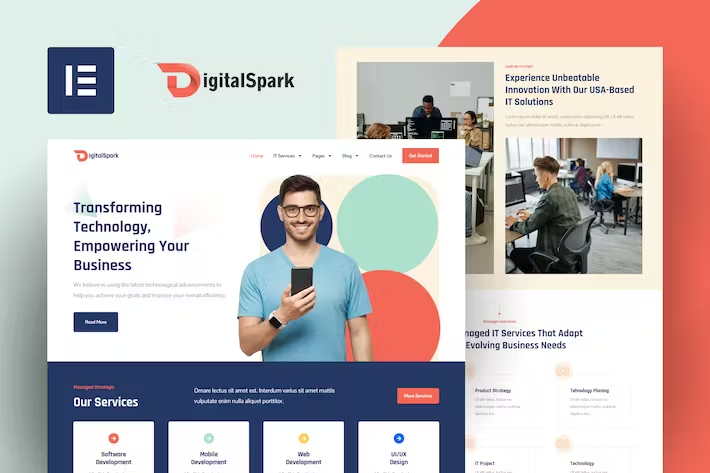
DigitalSpark – IT Services Elementor Template Kit
- Updated on May 4, 2026
- 100% Original Product & Well Documented
- Unlimited Domain Usage
*Important Note:
The image should not be Part of the template kit. You need to use your own reliable Source.


Original price was: ₹999.00.₹299.00Current price is: ₹299.00.
10+ pages built for IT companies. Clean design that works with Elementor’s free version. One payment, lifetime updates, unlimited client projects.
- Secured & Scanned by Virus total & McAfee.
- Access to Free updates for Lifetime
- All products are Under GPL License (Unlimited Domain Usage)
- We Not Provide any Support For this Product

Lifetime Membership
Access 6700+ Premium WordPress Themes & Plugins, Elementor Templates, Mobile Apps, PHP scripts with Lifetime Updates.
Join Premium MembershipRecently Viewed
DigitalSpark Elementor Template Kit for IT Services and SaaS
You need a real website, not another half-finished mockup sitting in a folder. DigitalSpark gives IT companies and SaaS businesses a complete, professional site — ready to edit in minutes with Elementor.
What You Get
This isn’t just a homepage and a contact form. It’s 10+ pages of actual content structure: headers, footers, inner pages, the works.
- Homepage, About, Services, Portfolio, Blog, and Contact
- Pricing tables, FAQ sections, and team showcase pages
- Service detail pages and case study layouts
- Testimonials and CTA sections throughout
- Fully responsive — looks solid on phones and tablets
- Clean code that loads fast (Google notices these things)
Who It’s Built For
Works well if you fit any of these:
- IT consulting firms and managed service providers
- SaaS companies getting ready to launch
- Software agencies building client projects
- Tech startups establishing credibility online
- Freelancers who build websites for clients
The drag-and-drop editor means you can hand this off to a junior designer or do it yourself — no developer required.
How It Works
Three steps: install the free Elementor plugin, import the kit, and swap in your own text and images. Change the colors to match your brand. Hit publish. The whole thing takes an afternoon, not weeks.
No Elementor Pro subscription needed. Everything in this kit works with the free version.
Why This Template Kit
Most template kits give you a beautiful homepage and forget the rest. Your visitors still land on empty placeholder pages asking “what now?”
DigitalSpark covers the full journey: service pages that explain what you actually do, case study layouts for proof, testimonials for trust, and CTAs that guide people toward contacting you. A homepage alone doesn’t close clients.
The design keeps things clean: plenty of whitespace, readable typography, and a professional color scheme. Nothing flashy — just the kind of site that makes a B2B buyer trust you enough to send an inquiry.
Commercial License Included
Use this on unlimited projects. Your clients, your side projects, your freelance work — no licensing headaches. Pay once, build as much as you want.
Updates come free. When WordPress or Elementor changes something, your templates get updated too. No surprise fees down the road.
Get Started
Download DigitalSpark, import it into Elementor, and have a real website published today.
Only logged in customers who have purchased this product may leave a review.
How to use Kit:
Install and activate the “Template Kit – Import” plugin from Plugins > Add New in WordPress.
Do not unzip.
Go to Template Kit – Import > Upload Template Kit Zip File button.
Before importing a template, ensure the Install Requirements button is clicked to activate required plugins.
For best results, do not import more than one template at a time.
RELATED PRODUCTS

DIVI – Original License | One Time Payment – Exclusive Deal

Elementor Pro 4.2.3 + Elementorism Landing Pages WordPress Plugin

907 5.3.6 – Responsive Multi-Purpose WordPress Theme

Element Pack Pro 9.1.0 – Addon For Elementor






 Mobile Apps
 php script
 How to

Reviews
There are no reviews yet