
Dinery | Restaurant Elementor Template Kit
- Updated on May 2, 2026
- 100% Original Product & Well Documented
- Unlimited Domain Usage
*Important Note:
The image should not be Part of the template kit. You need to use your own reliable Source.


Original price was: ₹999.00.₹299.00Current price is: ₹299.00.
Launch a restaurant website today — no coding, no week-long project. This Elementor kit includes 6 pages, a menu template, reservation system, and gallery. Set it up in an afternoon, not a month.
- Secured & Scanned by Virus total & McAfee.
- Access to Free updates for Lifetime
- All products are Under GPL License (Unlimited Domain Usage)
- We Not Provide any Support For this Product

Lifetime Membership
Access 6700+ Premium WordPress Themes & Plugins, Elementor Templates, Mobile Apps, PHP scripts with Lifetime Updates.
Join Premium MembershipRecently Viewed
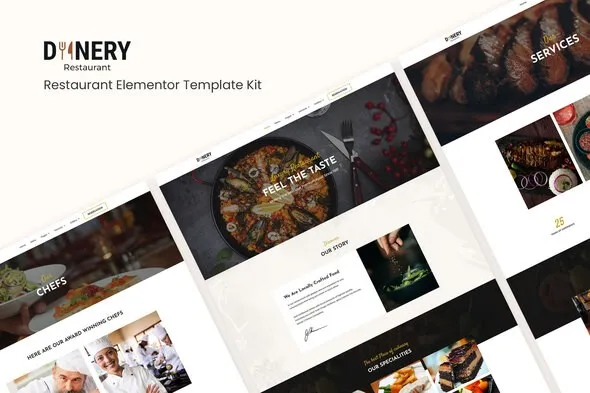
Dinery: Restaurant Website Template for Elementor
Most restaurant owners know they need a website. Few have time to build one. Between inventory orders, staff schedules, and keeping the lunch rush moving, you probably can’t afford to spend three weeks learning WordPress.
Dinery changes that. It’s a complete restaurant site — six pages, polished design, functional reservation form — ready to import into Elementor in minutes. You’ll spend an afternoon setting it up instead of a month.
What You Get With Dinery
Everything a food business website needs, pre-built and ready to customize:
- Homepage with hero image, signature dishes, and customer reviews
- Menu page with category tabs, item listings, and space for your prices
- Reservation section customers can use right away
- Gallery page with lightbox for food photography
- About page for your story
- Contact page with map placeholder, hours, and phone number
Built for Elementor — Free Version Works
No Elementor Pro needed. This kit runs on the free plugin, so you won’t have to budget for a subscription just to get your site live. The drag-and-drop builder handles everything — change text, swap photos, update colors. If you’ve used a word processor, you can edit this template.
Delete the demo sushi restaurant, add your burger joint. Change blue to your brand’s green. Move the menu above the gallery. The structure is yours to rearrange.
Who Dinery Is For
This works well for:
- New restaurants and cafes launching their first website
- Established spots refreshing an online presence that looks stuck in 2012
- Bakeries and pastry shops showing off their work
- Bars and pubs wanting a digital menu and booking system
- Food trucks building a web presence without social media dependency
- Catering services displaying menus and event options
How Fast Can You Launch?
Two hours is realistic for a basic launch. Install WordPress. Install Elementor. Upload the kit. Import the pages. Swap the placeholder content with your own. It’s beginner-friendly without looking beginner-made.
If questions come up, support is included — not just at purchase, but whenever you need it.
Why Pay for This Instead of a Free Template?
Free templates have a way of revealing their limits. Watermarks you can’t remove. Sections that can’t be edited without paid plugins. Designs that look like every other free template download. Dinery comes with a commercial license, so you can use it for client work too.
One payment. Lifetime updates. When WordPress or Elementor changes, your template gets updated too.
No subscriptions eating into what you make at the door.
Your Restaurant Deserves a Real Website
Customers Google restaurants before they visit. If your site loads slowly, looks outdated, or doesn’t exist, they’ll choose the competitor who bothered. Dinery gives you a site that represents your food and atmosphere accurately — without the developer invoice.
Only logged in customers who have purchased this product may leave a review.
How to use Kit:
Install and activate the “Template Kit – Import” plugin from Plugins > Add New in WordPress.
Do not unzip.
Go to Template Kit – Import > Upload Template Kit Zip File button.
Before importing a template, ensure the Install Requirements button is clicked to activate required plugins.
For best results, do not import more than one template at a time.
RELATED PRODUCTS

DIVI – Original License | One Time Payment – Exclusive Deal

Elementor Pro 4.2.3 + Elementorism Landing Pages WordPress Plugin

907 5.3.6 – Responsive Multi-Purpose WordPress Theme

Element Pack Pro 9.1.0 – Addon For Elementor






 Mobile Apps
 php script
 How to
Reviews
There are no reviews yet