
Disle – Digital Agency Elementor Template Kit
- Updated on May 4, 2026
- 100% Original Product & Well Documented
- Unlimited Domain Usage
*Important Note:
The image should not be Part of the template kit. You need to use your own reliable Source.


Original price was: ₹999.00.₹299.00Current price is: ₹299.00.
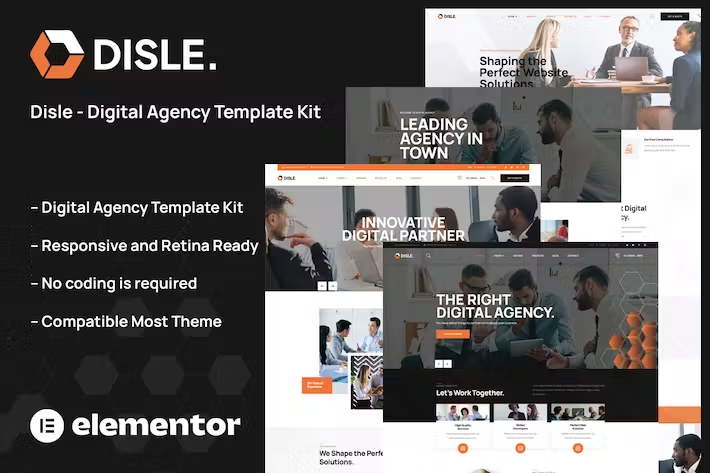
Disle is an Elementor template kit built for digital agencies. Launch a polished agency site in hours — includes commercial license, lifetime updates, and instant download.
- Secured & Scanned by Virus total & McAfee.
- Access to Free updates for Lifetime
- All products are Under GPL License (Unlimited Domain Usage)
- We Not Provide any Support For this Product

Lifetime Membership
Access 6700+ Premium WordPress Themes & Plugins, Elementor Templates, Mobile Apps, PHP scripts with Lifetime Updates.
Join Premium MembershipRecently Viewed
Disle – Digital Agency Elementor Template Kit for WordPress
Looking for a digital agency website template that doesn’t look like a template? Disle was built for that. It gives you a complete, professional agency site without the developer price tag or weeks of back-and-forth revisions.
You get: homepage sections, service pages, portfolio layouts, team showcases, pricing tables, and contact forms. All drag-and-drop ready in Elementor. No coding. No design degree needed. Download, install, publish.
What Is Disle?
It’s a pre-built Elementor Template Kit built specifically for digital agencies. Clean layouts, modern typography, a neutral color palette you can swap out in minutes. Each section drops straight into WordPress — hero areas, service grids, portfolio galleries, testimonial sliders, you name it.
Not a designer? Doesn’t matter. If you can move blocks around in Elementor, you can build this site.
What’s Included
Disle comes loaded with 25+ section layouts covering every part of a modern agency website:
- Customizable homepage with hero section, services grid, portfolio showcase, client testimonials, and call-to-action banner
- Dedicated service pages with space for descriptions, pricing, and visual elements
- Portfolio and case study templates with before/after sliders and result metrics
- Team member blocks with photo, bio, and social links
- Pricing tables and FAQ sections for client-facing pages
- Pre-styled contact forms and inquiry sections
- Fully responsive — looks sharp on phones, tablets, and desktops
- Global color and typography settings — change your brand colors in seconds, not hours
Who Is This For?
Freelance designers. Small agencies. Marketing teams. Anyone selling digital services who needs a site that closes deals.
Beginner-friendly for first-timers, but structured enough for developers who want to dig into the code. Building your own site? Disle saves you weeks. Charging clients for the build? You’re covered — commercial license included.
How to Use It
Simple: install the free Elementor plugin on your WordPress site, import the kit, and start customizing. Every text, image, and color lives right in the page editor. Swap your logo in, drop in your portfolio screenshots, update your services, hit publish.
Most users build their complete site in one afternoon. No code. No ongoing subscriptions.
Why Disle Over Others?
One purchase. Instant download. Commercial license covers client work. Free lifetime updates whenever we add new sections or improve existing ones.
Most template marketplaces charge yearly fees. Disle uses a one-time payment model. Pay once, keep it forever, update as needed.
Start Building Today
A better agency site takes less than a day. Download Disle now and have a professional website live before your next client call.
Only logged in customers who have purchased this product may leave a review.
How to use Kit:
Install and activate the “Template Kit – Import” plugin from Plugins > Add New in WordPress.
Do not unzip.
Go to Template Kit – Import > Upload Template Kit Zip File button.
Before importing a template, ensure the Install Requirements button is clicked to activate required plugins.
For best results, do not import more than one template at a time.
RELATED PRODUCTS

DIVI – Original License | One Time Payment – Exclusive Deal

Elementor Pro 4.2.3 + Elementorism Landing Pages WordPress Plugin

907 5.3.6 – Responsive Multi-Purpose WordPress Theme

Element Pack Pro 9.1.0 – Addon For Elementor






 Mobile Apps
 php script
 How to

Reviews
There are no reviews yet