
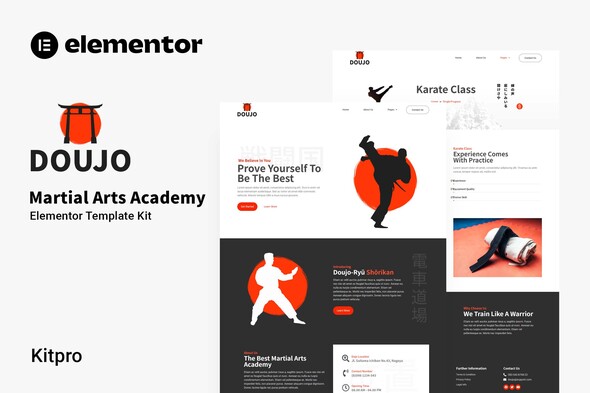
Doujo – Martial Arts Academy Elementor Template Kit
- Updated on May 2, 2026
- 100% Original Product & Well Documented
- Unlimited Domain Usage
*Important Note:
The image should not be Part of the template kit. You need to use your own reliable Source.


Original price was: ₹999.00.₹299.00Current price is: ₹299.00.
Build a professional martial arts academy website in minutes. Doujo gives you 10+ pre-designed pages with instructor profiles, class schedules, and enrollment forms — ready to customize and launch with Elementor. Get instant access now.
- Secured & Scanned by Virus total & McAfee.
- Access to Free updates for Lifetime
- All products are Under GPL License (Unlimited Domain Usage)
- We Not Provide any Support For this Product

Lifetime Membership
Access 6700+ Premium WordPress Themes & Plugins, Elementor Templates, Mobile Apps, PHP scripts with Lifetime Updates.
Join Premium MembershipRecently Viewed
Build Your Martial Arts Academy Website with Doujo
Doujo is a ready-to-use Elementor Template Kit designed specifically for martial arts schools, dojos, and combat sports academies. Whether you run a karate studio, Brazilian jiu-jitsu gym, or kickboxing school, this kit gives you every page you need to launch a professional website without hiring a developer. Every template is built with Elementor’s drag-and-drop builder, so you can customize colors, fonts, and images without touching code. The kit includes homepage layouts, about pages, program listings, instructor profiles, class schedules, pricing tables, and contact forms — everything your academy needs to convert visitors into enrolled students.
What You Get with Doujo
- 10+ pre-built pages covering every section a martial arts website needs
- Instructor profile templates with photo placeholders and bio sections
- Class schedule grids and program comparison tables
- Student enrollment forms and contact CTA sections
- Mobile-responsive layouts that look great on any device
- Fully customizable color palette and typography settings
Who Should Buy This Template Kit
Doujo is built for dojo owners launching new websites, martial arts instructors expanding their online presence, and academy managers refreshing outdated sites. If you’re opening a martial arts school, rebranding your programs, or simply need a website faster than waiting for custom development, this kit delivers. You don’t need design experience — the layouts are polished enough for immediate use, or you can tweak them in Elementor to match your school’s branding.
How to Use Doujo
After purchase, you download the kit files and import them directly into Elementor. The template library populates with all pages included in the kit. From there, replace placeholder text with your dojo’s information, swap images with photos of your facility and instructors, and publish. No coding required. If you already have a WordPress site running, simply install the free Elementor plugin and you’re ready to import.
Why Choose Doujo Over Custom Development
Custom website development for a martial arts academy typically costs $2,000–$5,000 and takes weeks of back-and-forth revisions. Doujo delivers a professional result immediately — you control the timeline, not a developer. The one-time purchase includes a commercial license, so you can use it for client projects if you build websites for other academies. Updates to the template files are free for life, keeping your site compatible with future Elementor versions.
Ready to Launch Your Martial Arts Website?
Get Doujo today and have your academy online within hours. Instant download delivers the complete kit immediately after purchase. The commercial license covers your site forever with no recurring fees. If you have questions during setup, our support team responds within one business day.
Only logged in customers who have purchased this product may leave a review.
How to use Kit:
Install and activate the “Template Kit – Import” plugin from Plugins > Add New in WordPress.
Do not unzip.
Go to Template Kit – Import > Upload Template Kit Zip File button.
Before importing a template, ensure the Install Requirements button is clicked to activate required plugins.
For best results, do not import more than one template at a time.
RELATED PRODUCTS

DIVI – Original License | One Time Payment – Exclusive Deal

Elementor Pro 4.2.3 + Elementorism Landing Pages WordPress Plugin

907 5.3.6 – Responsive Multi-Purpose WordPress Theme

Element Pack Pro 9.1.0 – Addon For Elementor






 Mobile Apps
 php script
 How to

Reviews
There are no reviews yet