
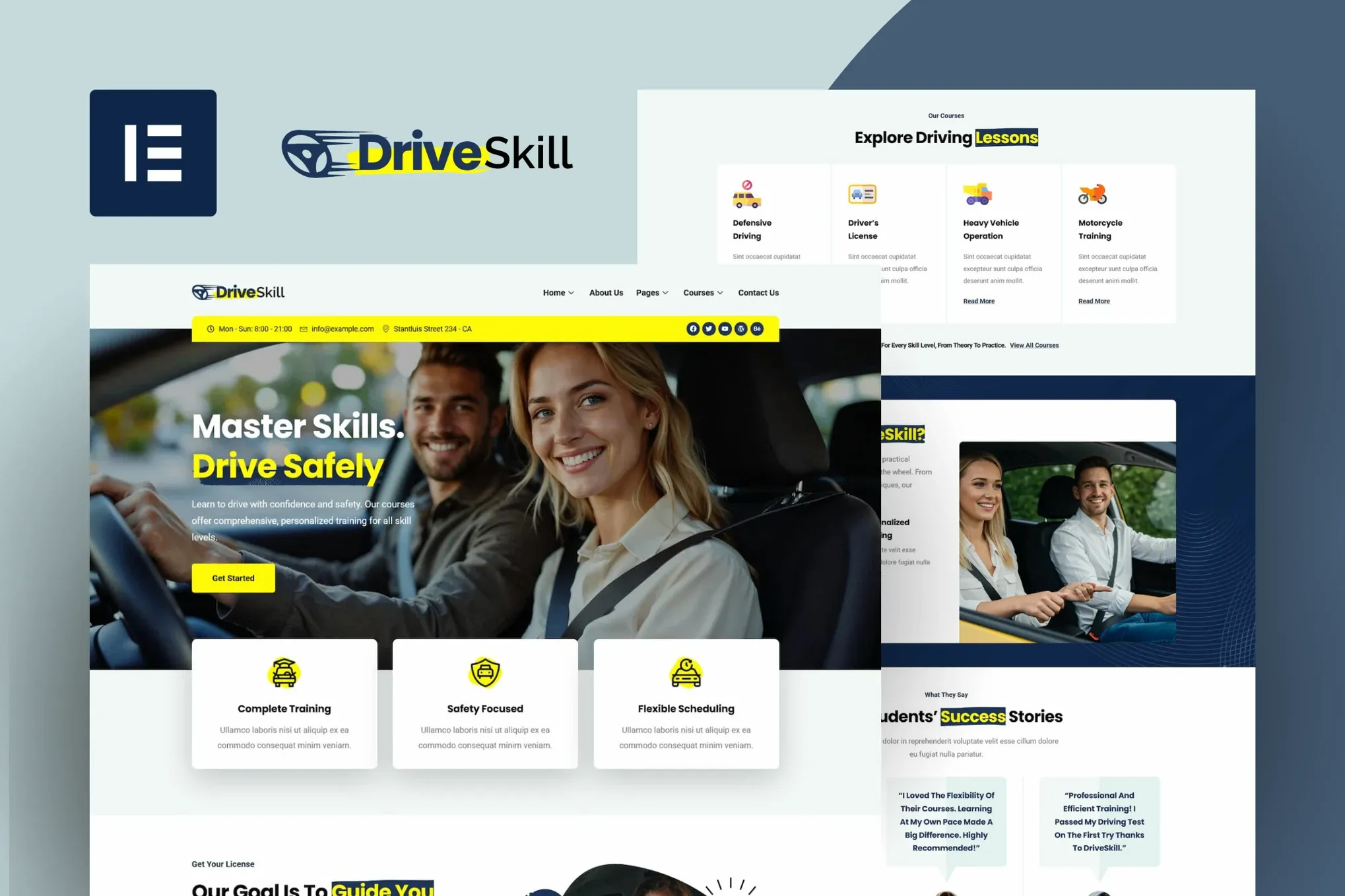
DriveSkill – Driving School Elementor Template Kit
- Updated on May 4, 2026
- 100% Original Product & Well Documented
- Unlimited Domain Usage
*Important Note:
The image should not be Part of the template kit. You need to use your own reliable Source.


Original price was: ₹999.00.₹299.00Current price is: ₹299.00.
Launch your driving school website today — zero coding skills needed. This complete Elementor kit gives you 8+ pages, instructor profiles, course listings, booking forms, and a modern design that actually converts visitors into students. Commercial license included. Instant download.
- Secured & Scanned by Virus total & McAfee.
- Access to Free updates for Lifetime
- All products are Under GPL License (Unlimited Domain Usage)
- We Not Provide any Support For this Product

Lifetime Membership
Access 6700+ Premium WordPress Themes & Plugins, Elementor Templates, Mobile Apps, PHP scripts with Lifetime Updates.
Join Premium MembershipRecently Viewed
Driving School Elementor Template Kit for Professional Websites
Most driving instructors spend weeks waiting on a developer — and thousands of dollars — just to get a basic website online. DriveSkill changes that. You get a fully finished, professional website you can launch in a single afternoon.
This kit exists for one reason: to help driving schools, auto academies, and independent instructors get online fast without sacrificing quality. Every page is designed to show off your courses, introduce your instructors, and — most importantly — turn browsers into enrolled students.
It works with Elementor and the free Hello Elementor theme. No code. No technical headaches. If you’ve used a drag-and-drop editor before, you’ll feel right at home.
What You Get With This Template Kit
Everything a driving school website needs, ready to customize:
- 8+ pre-built pages: Home, About, Courses, Pricing, Team, Gallery, FAQ, and Contact
- Instructor profile sections so new students know who’s teaching them
- Course listing layouts with pricing tables and session durations
- Booking and inquiry forms already connected and working
- Design that looks sharp on any device — phone, tablet, or desktop
- Editable headers, footers, and navigation you can tweak in minutes
Who Is This Template Kit For?
New instructors launching their own brand. Existing schools that need an upgrade. Auto academies looking professional. Driving programs that want to stop losing students to competitors with slicker websites.
Here’s the thing: whether you’re booking through referrals or running Facebook ads, people Google you before they call. A clean, modern site builds trust instantly. It answers their questions before they even ask. That means more calls, more bookings, and a fuller schedule.
How To Use DriveSkill
Three steps:
1. Install Hello Elementor on your WordPress site (it’s free)
2. Install Elementor (also free)
3. Import the DriveSkill kit with one click
Then swap in your school name, photos, pricing, and contact info. Change the colors if you want. Hit publish. Done.
You’ll get lifetime updates at no extra cost. When we improve the template, the new version is yours.
Why Buy This Template Kit?
Custom developer websites for driving schools start at $2,000. Most run $3,000–$5,000. With DriveSkill, you get the same professional result for a one-time price that’s a fraction of that — and you own it forever. No monthly fees. No subscriptions.
The commercial license also lets you use this for client projects. Build sites for other driving schools and keep all the profit.
Stuck during setup? Lifetime support is included. We’ll help you figure it out.
Ready to Get Started?
Download DriveSkill now. The complete kit lands in your inbox immediately after purchase. Your new website can be live today.
Only logged in customers who have purchased this product may leave a review.
How to use Kit:
Install and activate the “Template Kit – Import” plugin from Plugins > Add New in WordPress.
Do not unzip.
Go to Template Kit – Import > Upload Template Kit Zip File button.
Before importing a template, ensure the Install Requirements button is clicked to activate required plugins.
For best results, do not import more than one template at a time.
RELATED PRODUCTS

DIVI – Original License | One Time Payment – Exclusive Deal

Elementor Pro 4.2.3 + Elementorism Landing Pages WordPress Plugin

907 5.3.6 – Responsive Multi-Purpose WordPress Theme

Element Pack Pro 9.1.0 – Addon For Elementor






 Mobile Apps
 php script
 How to
Reviews
There are no reviews yet