
Dunmedic – Medical & Healthcare Elementor Template Kit
- Updated on April 29, 2026
- 100% Original Product & Well Documented
- Unlimited Domain Usage
*Important Note:
The image should not be Part of the template kit. You need to use your own reliable Source.


Original price was: ₹999.00.₹299.00Current price is: ₹299.00.
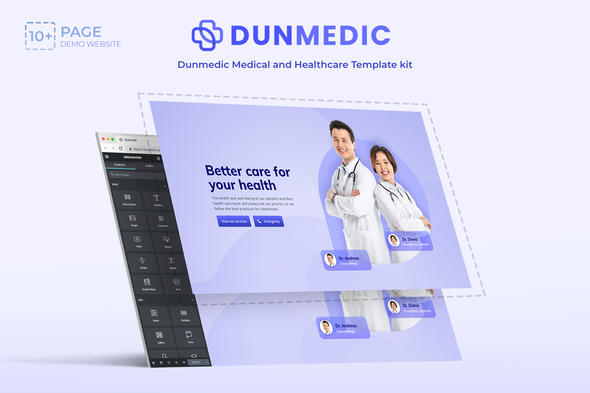
Dunmedic gives you 15+ ready-made medical pages — home, services, doctors, booking forms — that you can edit with drag-and-drop. No coding. Download and publish today.
- Secured & Scanned by Virus total & McAfee.
- Access to Free updates for Lifetime
- All products are Under GPL License (Unlimited Domain Usage)
- We Not Provide any Support For this Product

Lifetime Membership
Access 6700+ Premium WordPress Themes & Plugins, Elementor Templates, Mobile Apps, PHP scripts with Lifetime Updates.
Join Premium MembershipRecently Viewed
Medical Elementor Template: Build a Professional Healthcare Website in Minutes
Most medical websites take 6-8 weeks to build and cost $5,000+. Dunmedic cuts that down to an afternoon. This template kit comes with everything you need to launch a polished, professional healthcare site — no developer required.
Built specifically for medical practices, clinics, and healthcare providers. Every layout has been designed with patient trust in mind: clean typography, calming colors, and clear calls-to-action that actually convert.
What Is the Dunmedic Healthcare Template Kit?
Dunmedic is a pre-built collection of Elementor templates for medical and healthcare websites. It includes complete page layouts for:
- Home, About, and Contact pages
- Medical services and specialty pages
- Doctor profiles and team introductions
- Appointment booking and inquiry forms
- Patient testimonials and reviews sections
- Blog and health tips pages
- Footer and header variations
All layouts are fully responsive. Your site looks sharp on mobile, tablet, and desktop. Elementor’s drag-and-drop editor means you can customize anything — colors, fonts, images, text — without touching a single line of code.
Key Features of This Healthcare Website Template
Dunmedic includes practical elements that healthcare sites actually use:
- Appointment booking forms with patient intake fields
- Service listing layouts with pricing and procedure details
- Medical icon sets and healthcare-specific graphics
- Before-and-after gallery templates for cosmetic or dental practices
- Testimonial sliders for patient reviews
- Contact and location blocks with maps integration
- Telemedicine and virtual consultation booking sections
The kit works with the free Elementor plugin. Some advanced widgets perform better with Elementor Pro, but everything essential works with the free version.
Who Is This Template Kit For?
Dunmedic works best for:
- Doctors and physicians launching private practice websites
- Dental offices and orthodontic clinics
- Medical spas and cosmetic surgery centers
- Clinics with multiple specialists and service pages
- Healthcare startups building patient-facing platforms
- Web designers working with medical clients who need fast turnaround
How to Use the Dunmedic Template Kit
Setup takes about 20 minutes. Install the free Elementor plugin on your WordPress site, upload the Dunmedic kit, and choose which pages you want. Replace the placeholder text with your practice information, adjust colors and fonts, and hit publish.
Documentation and video guides are included. Lifetime support comes with your purchase — reach out if you get stuck during setup.
Why Buy the Dunmedic Healthcare Template Kit?
Here’s what you get with Dunmedic versus hiring a developer:
- Healthcare-specific design: Every element is built for medical sites — not adapted from a generic template
- One-time payment: No subscriptions, no recurring fees. Pay once, use forever
- Commercial license included: Use it for your own practice or client projects
- No coding required: Elementor’s visual editor handles everything
- Launch in hours: Not weeks. You’ll be live before lunch
Ready to Get Started?
Download your template kit instantly. Pick your pages, customize them to match your practice, and publish. That’s it — no back-and-forth with developers, no waiting for revisions.
Only logged in customers who have purchased this product may leave a review.
How to use Kit:
Install and activate the “Template Kit – Import” plugin from Plugins > Add New in WordPress.
Do not unzip.
Go to Template Kit – Import > Upload Template Kit Zip File button.
Before importing a template, ensure the Install Requirements button is clicked to activate required plugins.
For best results, do not import more than one template at a time.
RELATED PRODUCTS

DIVI – Original License | One Time Payment – Exclusive Deal

Elementor Pro 4.2.3 + Elementorism Landing Pages WordPress Plugin

907 5.3.6 – Responsive Multi-Purpose WordPress Theme

Element Pack Pro 9.1.0 – Addon For Elementor






 Mobile Apps
 php script
 How to

Reviews
There are no reviews yet