
FireGuard – Firefighter & Fire Department Elementor Template Kit
- Updated on May 2, 2026
- 100% Original Product & Well Documented
- Unlimited Domain Usage
*Important Note:
The image should not be Part of the template kit. You need to use your own reliable Source.


Original price was: ₹999.00.₹299.00Current price is: ₹299.00.
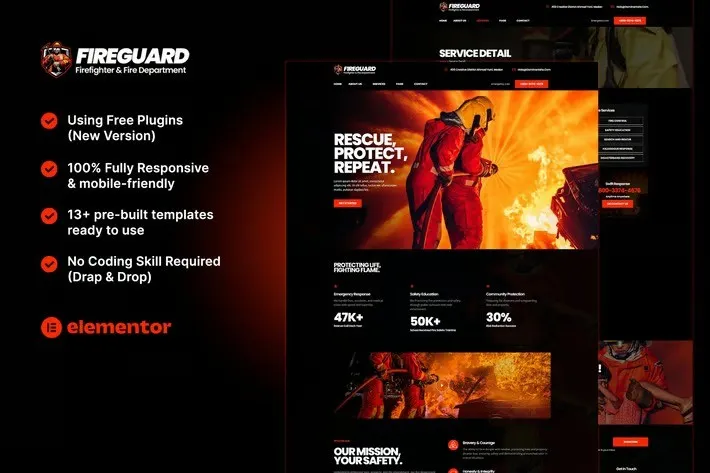
Your fire department needs a website that works — one residents can actually navigate, that communicates authority, and that took you five minutes to set up. FireGuard gives you 10+ pre-built pages, a commercial license, and zero recurring fees. Launch this week.
- Secured & Scanned by Virus total & McAfee.
- Access to Free updates for Lifetime
- All products are Under GPL License (Unlimited Domain Usage)
- We Not Provide any Support For this Product

Lifetime Membership
Access 6700+ Premium WordPress Themes & Plugins, Elementor Templates, Mobile Apps, PHP scripts with Lifetime Updates.
Join Premium MembershipRecently Viewed
FireGuard Elementor Template Kit — Professional Firefighter Website Design
Most fire department websites fall into two categories: outdated relics that haven’t been touched since 2015, or expensive custom builds that took three months and cost more than new turnout gear.
FireGuard is neither. It’s a WordPress template that installs directly into Elementor — giving your department a professional, credible website without the developer wait times or the monthly subscription fees.
The design speaks to who you are. Deep reds, charcoal grays, clean whites. Station locations, emergency contacts, volunteer info, community events — everything residents actually look for, organized in a way that makes sense.
What FireGuard Includes
Ten pages, ready to customize:
- Homepage — Bold hero section, emergency call-to-action, department overview
- About Us — Station history, mission, leadership profiles
- Services — Fire prevention, emergency response, community education
- Volunteer Application — Downloadable forms, application workflow
- Donation Portal — Support campaign integration
- News & Events — Community updates, calendar integration
- Media Gallery — Photos, documentation, public records
- Contact — Station locations, emergency numbers, inquiry forms
The typography is legible. No fancy scripts that fall apart on mobile. Your grandmother should be able to find the non-emergency line without squinting.
Who Is This For?
- Municipal fire departments refreshing their online presence
- Volunteer departments without dedicated web staff
- Fire safety instructors and consultants
- Fire investigation firms
- Firefighter associations and unions
Whether you’re a volunteer chief handling the website between calls or a city admin tired of hearing complaints about the department’s crashed GeoCities-era page, FireGuard gets you out of the technical weeds.
Getting Started
Under an hour if you’ve touched WordPress before:
- Install the free Elementor plugin on your WordPress site
- Upload and import the FireGuard template kit
- Replace placeholder text with your actual information
- Swap demo photos for your station and crew
- Publish
Drag-and-drop editing. Reorganize sections, add pages, change colors — no code. Works on phones, tablets, and desktops.
The Numbers
- One-time payment — No subscriptions. No hidden fees.
- Commercial license — Use it on client projects, multiple stations, or your own department.
- Lifetime updates — Download once, get future versions free.
- Lifetime support — Email questions, not a ticket queue.
- Instant download — Start building the same day you buy.
No piecing together plugins. No guessing what pages you missed. The design handles resident lookup, volunteer recruitment, and community outreach — so you’re not starting from scratch.
Ready to Launch?
Download FireGuard and have your department’s website live before the week is out. Professional design, essential pages, room to grow — all in one affordable package.
Only logged in customers who have purchased this product may leave a review.
How to use Kit:
Install and activate the “Template Kit – Import” plugin from Plugins > Add New in WordPress.
Do not unzip.
Go to Template Kit – Import > Upload Template Kit Zip File button.
Before importing a template, ensure the Install Requirements button is clicked to activate required plugins.
For best results, do not import more than one template at a time.
RELATED PRODUCTS

DIVI – Original License | One Time Payment – Exclusive Deal

Elementor Pro 4.2.3 + Elementorism Landing Pages WordPress Plugin

907 5.3.6 – Responsive Multi-Purpose WordPress Theme

Element Pack Pro 9.1.0 – Addon For Elementor






 Mobile Apps
 php script
 How to
Reviews
There are no reviews yet