
Fodma – Restaurant & Cafe Elementor Template Kit
- Updated on May 2, 2026
- 100% Original Product & Well Documented
- Unlimited Domain Usage
*Important Note:
The image should not be Part of the template kit. You need to use your own reliable Source.


Original price was: ₹999.00.₹299.00Current price is: ₹299.00.
Build a professional restaurant website without touching code. Fodma gives you 8 ready-to-use pages—home, menu, gallery, contact—that work with any WordPress theme. Commercial license included. Download and launch today.
- Secured & Scanned by Virus total & McAfee.
- Access to Free updates for Lifetime
- All products are Under GPL License (Unlimited Domain Usage)
- We Not Provide any Support For this Product

Lifetime Membership
Access 6700+ Premium WordPress Themes & Plugins, Elementor Templates, Mobile Apps, PHP scripts with Lifetime Updates.
Join Premium MembershipRecently Viewed
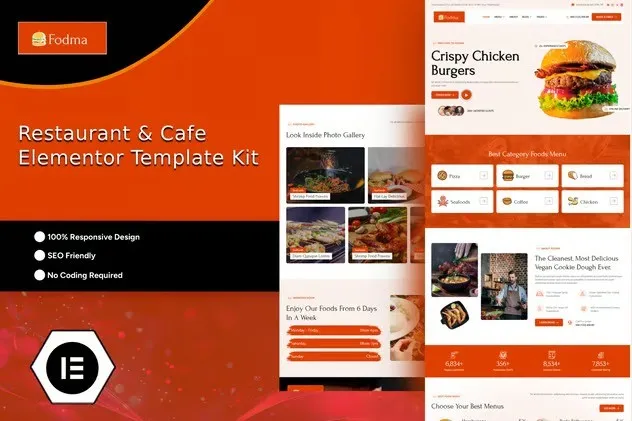
Fodma Restaurant & Cafe Elementor Template Kit
You need a website that looks as good as your food. Fodma delivers exactly that—a restaurant template kit built for cafes, bistros, food trucks, and fine dining establishments. No coding required. No expensive developers. Just clean, conversion-focused pages you can customize in minutes using the Elementor drag-and-drop editor.
What Fodma Is
Fodma is a purpose-built Elementor Template Kit designed specifically for the restaurant industry. It includes 8 pre-designed pages covering every section your website needs—from a mouthwatering homepage to a reservation system, full menu display, and gallery that showcases your dishes. The kit works with the free Elementor plugin and integrates smoothly with popular WordPress themes. You get professional design without the professional price tag.
Key Features
This restaurant template kit comes packed with components that restaurant owners actually need:
- Homepage with hero section, featured dishes, and customer testimonials
- Full menu page with categories, pricing, and dish descriptions
- Reservation form section for table bookings
- Photo gallery optimized for food imagery
- Contact page with location, hours, and map integration
- About section to tell your restaurant’s story
- Responsive design that looks perfect on mobile devices
- Fully customizable colors, fonts, and images
Who It’s For
Fodma works best for restaurant and cafe owners who want to establish a professional online presence without learning web development. It’s ideal for new restaurants launching their first website, existing eateries refreshing their digital image, food truck operators building brand awareness, and cafe owners showcasing their atmosphere and menu. If you know how to click and drag in WordPress, you can use Fodma.
How To Use It
Getting started takes less than 15 minutes. Install the free Elementor plugin on your WordPress site, upload the Fodma template kit, and import the pages you want. Swap in your restaurant name, upload your food photos, adjust the menu items and prices, and publish. That’s it. The template kit handles the layout and design—you just add your content. No shortcodes to remember, no custom CSS to write, no templates to break.
Why Buy This Template Kit
Hiring a web designer for a custom restaurant website costs $2,000 or more. Fodma gives you the same professional result at a fraction of the price. Every template is built with conversion in mind—strategic placement of your menu, clear calls-to-action for reservations, and gallery layouts that make food look irresistible. You get instant download, a commercial license that covers client work or commercial projects, and lifetime updates at no extra cost.
Stop struggling with generic WordPress themes that weren’t built for restaurants. Fodma understands the food industry and delivers a website that matches your establishment’s quality.
Ready to Get Started?
Download Fodma now and have your restaurant website live this week. One-time payment. Lifetime access. Commercial license included.
Only logged in customers who have purchased this product may leave a review.
How to use Kit:
Install and activate the “Template Kit – Import” plugin from Plugins > Add New in WordPress.
Do not unzip.
Go to Template Kit – Import > Upload Template Kit Zip File button.
Before importing a template, ensure the Install Requirements button is clicked to activate required plugins.
For best results, do not import more than one template at a time.
RELATED PRODUCTS

DIVI – Original License | One Time Payment – Exclusive Deal

Elementor Pro 4.2.3 + Elementorism Landing Pages WordPress Plugin

907 5.3.6 – Responsive Multi-Purpose WordPress Theme

Element Pack Pro 9.1.0 – Addon For Elementor






 Mobile Apps
 php script
 How to
Reviews
There are no reviews yet