
Gadam – Fire Department Elementor Template Kit
- Updated on May 4, 2026
- 100% Original Product & Well Documented
- Unlimited Domain Usage
*Important Note:
The image should not be Part of the template kit. You need to use your own reliable Source.


Original price was: ₹999.00.₹299.00Current price is: ₹299.00.
Your fire department deserves a professional website — without the developer invoice. This Elementor Template Kit gets you live in hours, not weeks. Instant download included.
- Secured & Scanned by Virus total & McAfee.
- Access to Free updates for Lifetime
- All products are Under GPL License (Unlimited Domain Usage)
- We Not Provide any Support For this Product

Lifetime Membership
Access 6700+ Premium WordPress Themes & Plugins, Elementor Templates, Mobile Apps, PHP scripts with Lifetime Updates.
Join Premium MembershipRecently Viewed
Fire Department Website Template Kit for Elementor
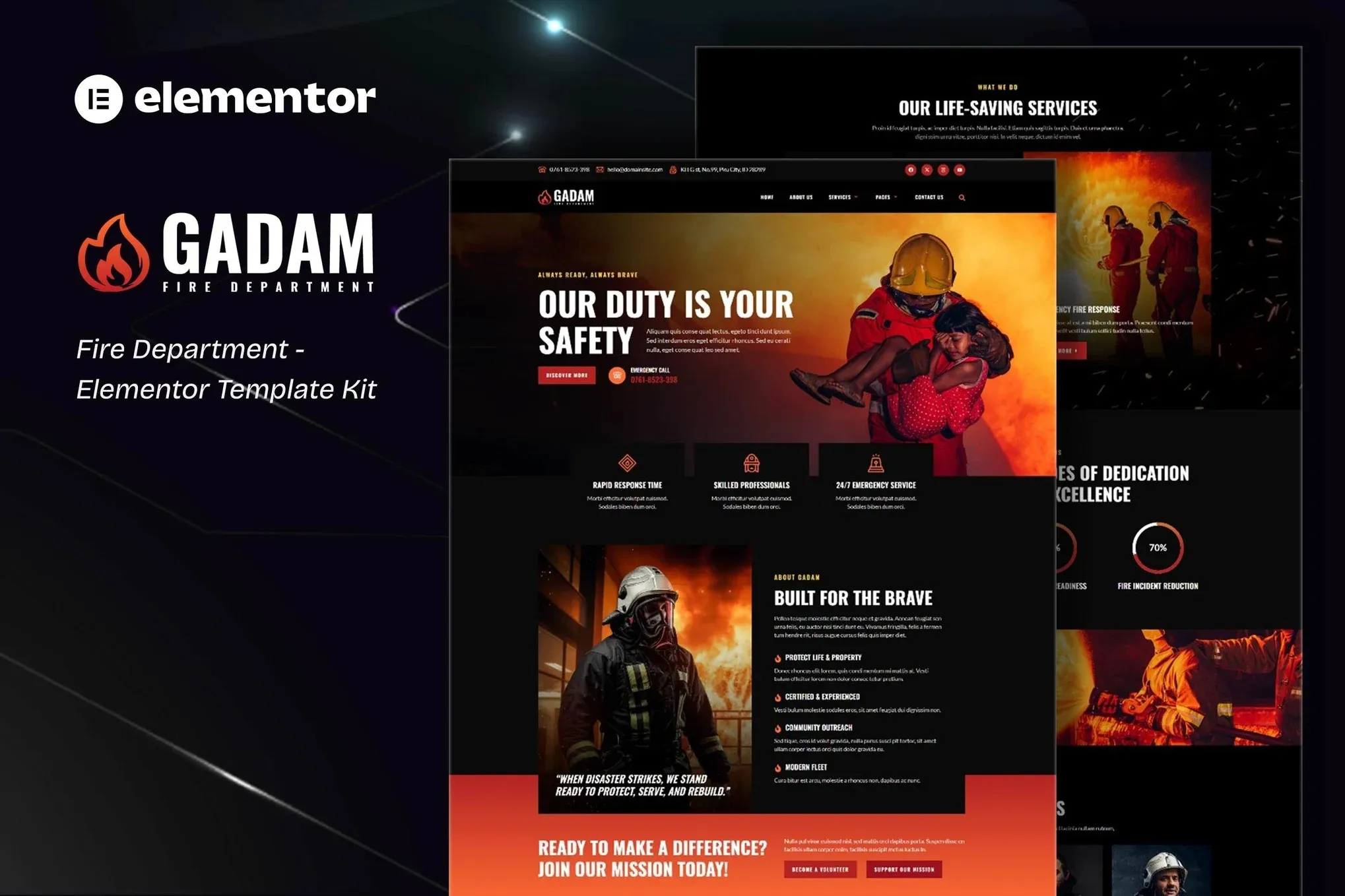
When your community needs critical safety information, your website has to deliver — immediately. Gadam is a professionally designed template kit built specifically for fire departments, fire stations, and rescue services. No coding. No design degree. Just open Elementor, import the kit, and publish a site that actually represents the work your crew does every day.
The kit includes ready-to-go pages for home, about, services, volunteer info, news, and contact. Every section prioritizes clarity — big text, high-contrast layouts, mobile-first structure. Residents on any device can grab emergency info, check schedules, and get updates without squinting or pinching. Volunteer-run company or full municipal department? Either way, this scales to your needs.
What You Get With Gadam
Stop wrestling with generic templates that weren’t built for your industry. Gadam was designed around the specific content fire departments need to communicate — and how residents actually search for it.
- Homepage with hero section, service highlights, and a prominent emergency contact block
- Services page showcasing apparatus, rescue operations, and community programs
- Volunteer and recruitment page with application-ready forms
- News and incident report section for community updates
- Contact page with station address, phone number, and integrated map placeholder
- Fully responsive design that looks sharp on phones, tablets, and desktops
Who Is This Template Kit For?
Fire departments, firehouses, volunteer fire companies, and municipal rescue services that want a professional online presence without the agency price tag. If your current site is outdated, hard to update, or doesn’t exist at all, this kit gives you a solid foundation in minutes. You don’t need to be a WordPress expert. If you can drag and drop, you can use Gadam.
How to Use This Kit
Here’s how it works: set up a fresh WordPress site, install the free Elementor plugin, upload the Gadam template kit file, and import the pages you want. Swap in your department name, colors, and photos. Hit publish. Most users are live within two hours of purchase. No subscriptions. No recurring fees. One flat payment, commercial license included, lifetime access to future updates.
Why Fire Departments Choose Gadam
Your website is often the first place someone goes when they need to report an emergency, locate a station, or learn about fire safety programs. It has to look credible, load fast, and work for everyone. Gadam handles all three. The design carries authority without feeling cold — warm enough to feel community-focused, structured enough to convey professionalism. And because it’s an Elementor kit, you stay in full control of your content. No third-party lock-in. No surprise platform changes that break your layout overnight.
This isn’t just a fire department website template. It’s the foundation for building trust with your community before you ever arrive on scene.
Ready to Build Your Fire Department Website?
Skip the developer waiting list. Skip the expensive agency scope creep. Download Gadam now and have a professional fire department website live today. Commercial license included. Instant access. Lifetime support if you need it.
Only logged in customers who have purchased this product may leave a review.
How to use Kit:
Install and activate the “Template Kit – Import” plugin from Plugins > Add New in WordPress.
Do not unzip.
Go to Template Kit – Import > Upload Template Kit Zip File button.
Before importing a template, ensure the Install Requirements button is clicked to activate required plugins.
For best results, do not import more than one template at a time.
RELATED PRODUCTS

DIVI – Original License | One Time Payment – Exclusive Deal

Elementor Pro 4.2.3 + Elementorism Landing Pages WordPress Plugin

907 5.3.6 – Responsive Multi-Purpose WordPress Theme

Element Pack Pro 9.1.0 – Addon For Elementor






 Mobile Apps
 php script
 How to
Reviews
There are no reviews yet