
Gomedic – Medical Elementor Template Kit
- Updated on May 2, 2026
- 100% Original Product & Well Documented
- Unlimited Domain Usage
*Important Note:
The image should not be Part of the template kit. You need to use your own reliable Source.


Original price was: ₹999.00.₹299.00Current price is: ₹299.00.
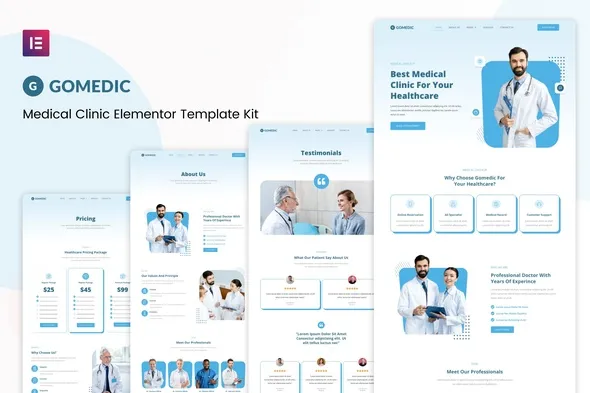
Build a professional medical website over a weekend. Gomedic gives you 15+ pre-built pages, appointment booking forms, and doctor profile layouts — just drag, drop, and publish with Elementor.
- Secured & Scanned by Virus total & McAfee.
- Access to Free updates for Lifetime
- All products are Under GPL License (Unlimited Domain Usage)
- We Not Provide any Support For this Product

Lifetime Membership
Access 6700+ Premium WordPress Themes & Plugins, Elementor Templates, Mobile Apps, PHP scripts with Lifetime Updates.
Join Premium MembershipRecently Viewed
Build a Professional Medical Website with Gomedic Elementor Template Kit
You know you need a website. But finding time to build one while running a practice feels impossible. Gomedic solves that. It’s a Medical Elementor Template Kit made for healthcare providers who want a site that actually looks like they hired a designer — without the designer invoice.
The kit includes appointment booking layouts, doctor profile pages, service showcases, testimonials, and contact forms. Everything’s built with that clean, trustworthy look patients expect from medical offices. You import it, tweak your colors and logo, add your info, and go live.
What You Get in the Gomedic Template Kit
These aren’t generic business templates retrofitted for healthcare. Every page was designed with medical practices in mind:
- 15+ pre-built pages: home, services, about, team, appointments, testimonials, and contact
- Appointment booking sections with time slots and patient intake forms
- Doctor profile templates with spots for credentials, specializations, and photos
- Service listing pages with room for pricing and descriptions
- Mobile-responsive layouts — works great on phones, tablets, and desktops
- Testimonial sections to help new patients feel confident choosing you
Who Is Gomedic Built For?
This kit works for anyone who needs a real medical website without paying custom development rates:
- Private doctors and specialists launching their own practice sites
- Clinics, urgent care centers, and medical groups refreshing their online presence
- Healthcare startups building landing pages
- Freelance designers taking on medical client projects
- WordPress developers who need a healthcare starting point
- Dental offices, physiotherapy clinics, mental health practices, and wellness centers
How to Get Your Medical Website Live
No coding required. If you can drag and drop in WordPress, you can use Gomedic. Install Elementor (the free version works), import the kit, swap in your branding, add your content, and publish. Most people have something live the same day.
Each section works on its own or as part of the full site. Only need the appointment page? Grab just that. Want the whole practice site? Everything connects.
Why Skip Custom Development
Custom healthcare websites usually run $3,000–$10,000 and take 6–12 weeks to build. Gomedic gets you the same professional result for a one-time price. You get instant access, a commercial license for unlimited projects, free updates, and support if you get stuck.
No subscriptions. No recurring fees. Pay once, own it forever — use it for your own practice or client work.
Ready to Build Your Medical Website?
Patients are searching for practices like yours every day. Gomedic gives you the foundation to turn those visitors into appointments. Download it and have your site live before your competitors beat you to it.
Only logged in customers who have purchased this product may leave a review.
How to use Kit:
Install and activate the “Template Kit – Import” plugin from Plugins > Add New in WordPress.
Do not unzip.
Go to Template Kit – Import > Upload Template Kit Zip File button.
Before importing a template, ensure the Install Requirements button is clicked to activate required plugins.
For best results, do not import more than one template at a time.
RELATED PRODUCTS

DIVI – Original License | One Time Payment – Exclusive Deal

Elementor Pro 4.2.3 + Elementorism Landing Pages WordPress Plugin

907 5.3.6 – Responsive Multi-Purpose WordPress Theme

Element Pack Pro 9.1.0 – Addon For Elementor






 Mobile Apps
 php script
 How to
Reviews
There are no reviews yet