
Goso – Contractor & Heavy Equipment Elementor Template Kit
- Updated on May 3, 2026
- 100% Original Product & Well Documented
- Unlimited Domain Usage
*Important Note:
The image should not be Part of the template kit. You need to use your own reliable Source.


Original price was: ₹999.00.₹299.00Current price is: ₹299.00.
Stop waiting on developers. Goso gives contractors and heavy equipment businesses a polished, ready-to-customize website in Elementor — no coding needed. Go live in hours, not weeks.
- Secured & Scanned by Virus total & McAfee.
- Access to Free updates for Lifetime
- All products are Under GPL License (Unlimited Domain Usage)
- We Not Provide any Support For this Product

Lifetime Membership
Access 6700+ Premium WordPress Themes & Plugins, Elementor Templates, Mobile Apps, PHP scripts with Lifetime Updates.
Join Premium MembershipRecently Viewed
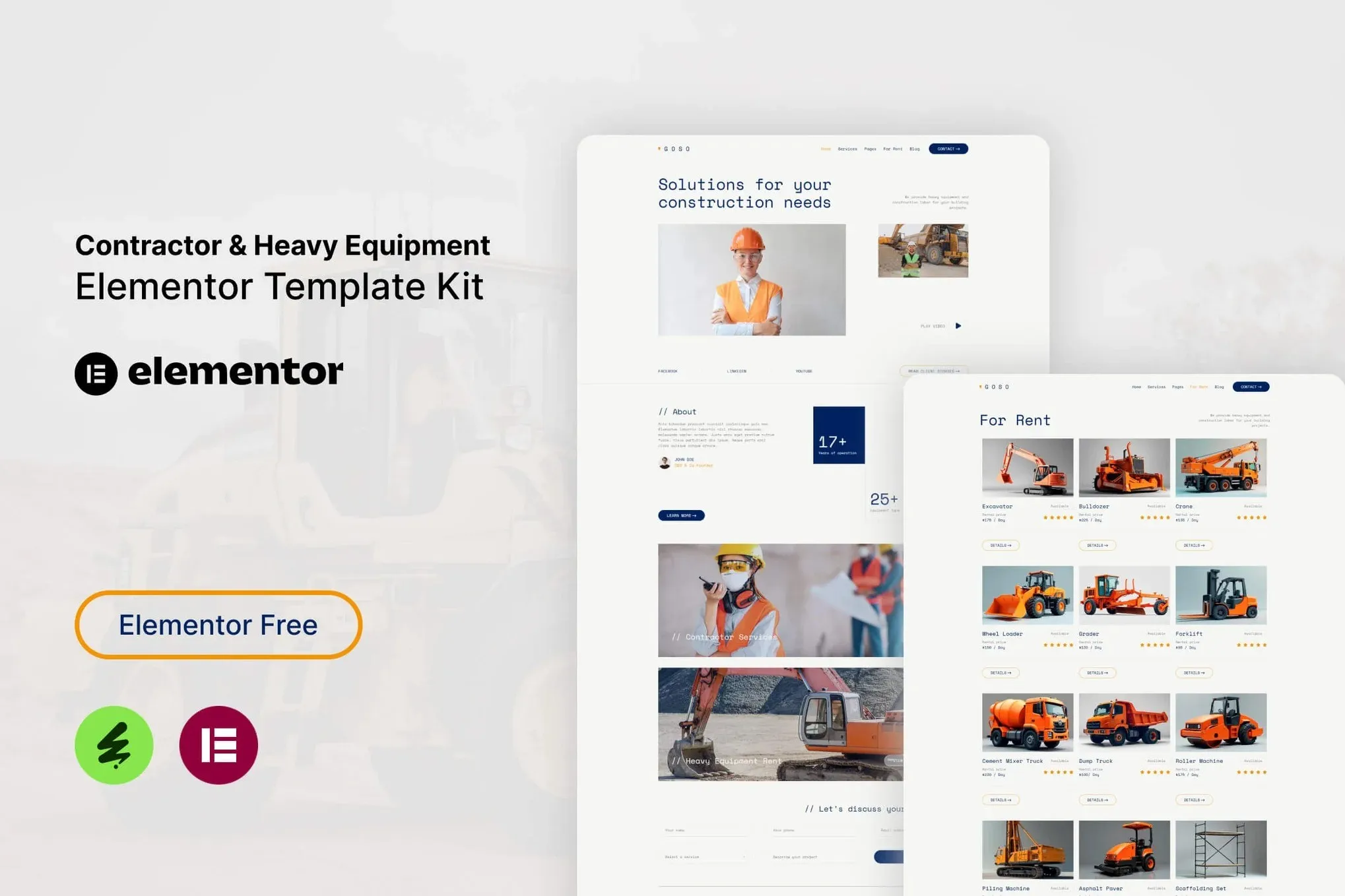
Contractor & Heavy Equipment Website Template for Elementor
Building a website for your construction company or heavy equipment business shouldn’t take months or drain your budget. Goso delivers a complete, industry-specific website solution you can set up in Elementor — no developers needed, no design skills required. This template kit gives contractors, excavation services, and equipment rental companies a credible online presence that actually converts visitors into clients.
What You Get with Goso
Goso isn’t just another generic template repackaged for construction. It’s specifically designed around how contractor businesses operate online. The kit includes pre-built pages for services, equipment listings, project showcases, team profiles, and contact forms. Every section is laid out to highlight your work, display your fleet, and make it dead simple for potential clients to reach out.
The template uses a bold, industrial design language with strong typography and high-contrast sections that perform well across all devices. Whether a client is browsing on their desktop at the office or scrolling through your portfolio on a job site phone, Goso adapts to any screen size without breaking a sweat.
Key Features Built for Trade Businesses
- 15+ pre-designed pages covering services, equipment, projects, testimonials, and contact
- Heavy equipment-focused section designs with equipment cards, fleet showcases, and service breakdowns
- Project portfolio layouts with before/after sliders and gallery grids
- Ready-to-use contact forms, quote request forms, and appointment schedulers
- Fully responsive design that looks sharp on smartphones, tablets, and desktops
- Works with both Elementor Free and Elementor Pro features
Who Goso Is Designed For
This template kit works best for construction contractors, excavation companies, equipment rental businesses, trucking services, and industrial service providers. If you’re a tradesperson or business owner who wants a professional website without the custom development costs, Goso gives you a head start. Freelance web designers also use kits like this to deliver fast, quality results for contractor clients without building from scratch.
How to Get Your Site Live
Once you purchase and download Goso, you import the kit directly into Elementor. The template library populates with all pages and sections, ready to customize with your branding, services, and photos. Swap in your logo, update your contact info, add your equipment inventory — and you’re ready to publish. No code, no complicated setup, no waiting on developers.
Why Goso Beats Starting From Scratch
Custom construction websites can run $3,000 to $10,000+ when working with agencies. Goso gives you the same professional appearance at a fraction of the cost. You get instant access, a commercial license that covers client work or your own business, and a design framework already optimized for contractor services. The template structure guides your content creation while keeping your site organized and easy to navigate.
Ready to Get Started?
Stop paying for slow, overpriced web development. Get Goso today, import it into your WordPress site, and have a professional contractor website live this week. One purchase, lifetime access, commercial license included. Build your online presence right the first time.
Only logged in customers who have purchased this product may leave a review.
How to use Kit:
Install and activate the “Template Kit – Import” plugin from Plugins > Add New in WordPress.
Do not unzip.
Go to Template Kit – Import > Upload Template Kit Zip File button.
Before importing a template, ensure the Install Requirements button is clicked to activate required plugins.
For best results, do not import more than one template at a time.
RELATED PRODUCTS

DIVI – Original License | One Time Payment – Exclusive Deal

Elementor Pro 4.2.3 + Elementorism Landing Pages WordPress Plugin

907 5.3.6 – Responsive Multi-Purpose WordPress Theme

Element Pack Pro 9.1.0 – Addon For Elementor






 Mobile Apps
 php script
 How to
Reviews
There are no reviews yet